
How to buy a GPU in 2026
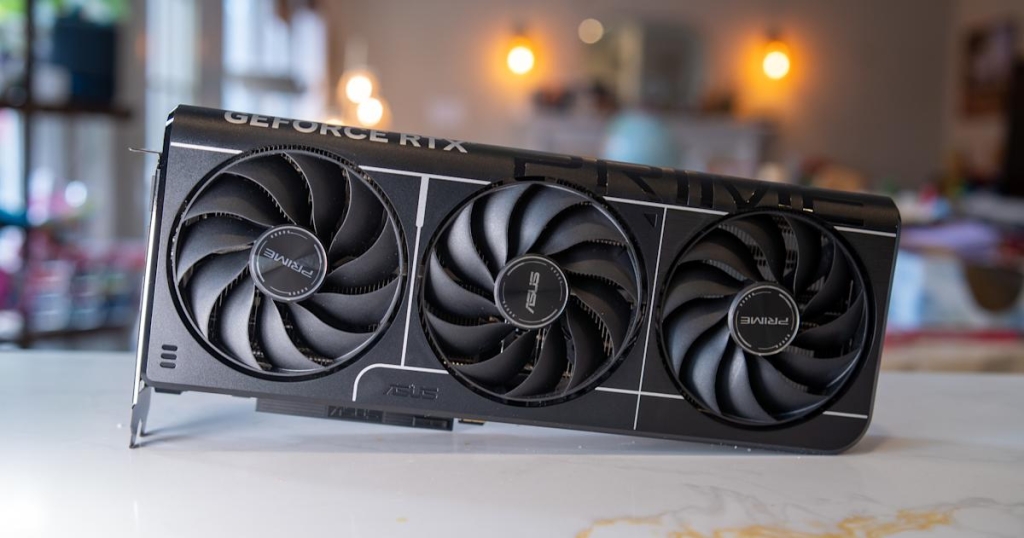
The Ultimate GPU Buying Guide: Navigating the Chaotic World of Graphics Cards in 2026
In the ever-evolving landscape of PC gaming, the graphics card remains the crown jewel of any serious gaming rig. Whether you’re building from scratch or upgrading your current setup, choosing the right GPU can make the difference between smooth, immersive gameplay and a frustrating experience plagued by stuttering and low frame rates. With the current market turmoil caused by AI-driven memory shortages and inflated prices, finding the perfect graphics card has never been more challenging—or more important.
The Gaming Experience: It All Starts Here
Before diving into specifications and brand wars, ask yourself one fundamental question: what kind of games do you actually play?
If your gaming diet consists primarily of competitive shooters like Valorant, Overwatch, or the latest Marvel Rivals, you’re in luck. These games were engineered to run efficiently on older hardware, meaning even entry-level GPUs like the GeForce RTX 5060 can deliver buttery-smooth performance at 120+ frames per second in 1080p. The importance of this cannot be overstated—competitive gamers know that higher frame rates translate directly to better reaction times and improved gameplay.
However, if you’re more interested in the latest single-player blockbusters with all the visual bells and whistles—ray tracing, advanced particle effects, and cutting-edge rendering techniques—you’ll need considerably more horsepower. The relationship between resolution and GPU demand is exponential, not linear. A 1440p (QHD) monitor contains 78% more pixels than a standard 1080p display, while 4K packs more than double the pixel count of QHD. This means running modern games at 4K, especially above 60 frames per second, pushes even the most powerful GPUs to their limits.
The solution for many gamers has become upscaling technologies like NVIDIA’s Deep Learning Super Sampling (DLSS) and AMD’s FidelityFX Super Resolution (FSR), which use AI and clever algorithms to render games at lower resolutions and intelligently upscale them to your monitor’s native resolution.
Pro Tip: Never pair an expensive 4K monitor with a budget GPU. That’s a recipe for disappointment. If you’re shopping for both components simultaneously, check out our comprehensive guide to the best gaming monitors to ensure your display matches your GPU’s capabilities.
For most gamers, a midrange card that can handle 1440p gaming at 144 frames per second or higher represents the sweet spot. This configuration will let you enjoy everything from competitive shooters to graphically intensive single-player adventures without compromise.
The Three Titans: NVIDIA vs AMD vs Intel
The GPU market is dominated by three major players: NVIDIA, AMD, and Intel. Each designs the GPUs, but manufacturing is handled by add-in board (AIB) partners like ASUS, XFX, Gigabyte, and others. This creates a complex ecosystem where manufacturer-recommended prices often bear little resemblance to actual street prices.
Take NVIDIA’s RTX 5070, for example. The company lists it with a starting price of $549 on its website, but finding one at that price is nearly impossible. On major retailers like Newegg, the cheapest new models start around $630—a significant markup that can throw off even the most carefully planned budgets.
Historically, NVIDIA dominated the high-end market, offering the best combination of raw performance, ray tracing capabilities, and features like DLSS. However, the RTX 50 series release in 2025 has disrupted this status quo. Outside of the flagship RTX 5080 and 5090 (where NVIDIA still reigns supreme), AMD and Intel have emerged as compelling alternatives, particularly in the entry-level and midrange segments where value matters most.
Ray Tracing: The Future of Gaming Graphics
For decades, game developers relied on rasterization techniques to simulate how light behaves in the real world. While these methods produced impressive results, they were ultimately approximations with visible limitations. Real-time ray tracing promised to change everything by simulating the physical behavior of light, creating more realistic reflections, shadows, and global illumination.
When NVIDIA introduced real-time ray tracing with its RTX 20 series in 2018, it marked a watershed moment for gaming graphics. In certain titles, the difference is transformative—ray-traced reflections in games like Cyberpunk 2077 or Control create visual experiences that were previously impossible.
The catch? Ray tracing is computationally expensive, often causing significant frame rate drops without upscaling. Before 2025, you could largely ignore ray tracing performance if you chose an AMD GPU, as most games treated it as an optional feature. The RX 7800 XT, for instance, might have lagged behind the RTX 4070 in ray tracing performance, but it often offered better value through lower prices, more VRAM, and superior rasterization performance.
That calculus has changed dramatically. Games like Doom: The Dark Ages have integrated ray tracing as a core part of their rendering pipeline, and this trend is accelerating. While AMD’s latest cards have made significant strides in ray tracing performance, NVIDIA still maintains an edge. If ray tracing is important to your gaming experience, NVIDIA GPUs remain the safer choice.
Understanding Refresh Rates and Frame Rates
If you’re new to PC gaming, the relationship between refresh rates and frame rates can be confusing. Here’s the essential breakdown: a monitor’s refresh rate determines how many times per second it can update the image on screen. A 240Hz monitor can refresh the image 240 times per second, while a 120Hz monitor updates 120 times per second.
However, your GPU needs to be capable of rendering frames at a rate that matches or exceeds your monitor’s refresh rate. If you have a 120Hz monitor, you want a GPU that can consistently deliver 120 frames per second in your games. Most video cards won’t achieve this in every title, but it’s a good target when shopping for a new GPU.
The difference is tangible. Moving elements appear smoother on higher refresh rate displays, reducing motion blur and making fast-paced action easier to follow. This is particularly crucial in competitive gaming, where every millisecond counts.
Frame Generation: The Performance Multiplier
NVIDIA’s frame generation technology, introduced with the RTX 40 series and expanded with multi-frame generation in the 50 series, represents one of the most significant performance innovations in recent years. By generating additional frames between traditionally rendered ones, these technologies can dramatically increase perceived frame rates.
Here’s how it works: for every frame your GPU renders normally, frame generation can create one or more additional frames. NVIDIA’s implementation is considered superior to AMD’s and Intel’s due to better frame pacing, which prevents the visual stuttering that can occur when generated frames don’t align properly with monitor refreshes.
However, frame generation isn’t a magic bullet. It introduces system latency, making games feel less responsive—a critical consideration for competitive gamers. Additionally, high-end GPUs benefit more from frame generation than entry-level cards because they can naturally render more frames to begin with. Think of frame generation as a way to maximize the potential of a high refresh rate display rather than a substitute for raw GPU power.
Upscaling and Latency: The Performance Sweet Spot
Upscaling technologies like DLSS, FSR, and Intel’s XeSS have become essential tools in the modern gamer’s arsenal. As games become more graphically demanding, particularly with ray tracing enabled, even powerful GPUs struggle to maintain playable frame rates at higher resolutions.
These technologies work by rendering games at lower resolutions and then intelligently upscaling them to your monitor’s native resolution. NVIDIA pioneered this approach with DLSS, using machine learning to recreate images at higher resolutions while addressing many of the visual artifacts associated with traditional upscaling methods.
The results can be impressive. In many games, enabling DLSS or FSR can provide performance gains of 40-70% with minimal loss in image quality. Since DLSS 4.5’s release, NVIDIA has further refined its technology, offering what many consider the best image quality among upscaling solutions.
For AMD GPU owners, FSR 4 represents a significant leap forward from previous versions, though it still trails DLSS in terms of both image quality and game support. Intel’s XeSS sits somewhere between the two, offering competitive performance in supported titles.
NVIDIA’s Reflex technology deserves special mention for competitive gamers. By reducing system latency, Reflex can make games feel more responsive, potentially improving your performance in shooters and other fast-paced titles.
Driver Support: The Unsung Hero
One of NVIDIA’s historical advantages has been its reliable driver support. Well-optimized drivers mean fewer crashes, better performance, and more stable gaming experiences. While NVIDIA’s drivers were problematic at the start of 2025, the company has since addressed most issues, restoring confidence in its software ecosystem.
VRAM: The Memory Race
When comparing GPUs, especially within the same performance tier, pay close attention to VRAM (Video RAM) capacity. Modern games are increasingly memory-hungry, and insufficient VRAM can create severe performance bottlenecks.
As a general rule, more VRAM is better, especially if you’re gaming at higher resolutions or plan to keep your GPU for several years. The difference between an 8GB and 16GB version of the same GPU can be substantial. For example, the RTX 5060 Ti is available in both 8GB and 16GB configurations. While the 8GB model starts at $379, spending an extra $50 for the 16GB version provides significantly better future-proofing and performance in memory-intensive games.
However, VRAM capacity isn’t everything. Memory bandwidth—how quickly the GPU can access its memory—also matters. A GPU with less VRAM but faster memory speeds can sometimes outperform one with more VRAM but slower speeds. This is why it’s essential to read reviews that test real-world gaming performance rather than relying solely on specifications.
Physical Considerations: Size and Power
Modern GPUs are massive. Most new cards require at least two PCI slots and can be quite long, depending on their cooling solutions. Before purchasing, measure your case’s GPU clearance and compare it to the card’s dimensions. Don’t forget to account for front-mounted radiators if you have liquid cooling.
Power requirements are equally important. NVIDIA recommends a 750-watt power supply for the RTX 5070 Ti, so if you’re running a 650-watt unit, you’ll need to factor in a PSU upgrade. Using an underpowered PSU can cause system instability, crashes, or even hardware damage.
The Used GPU Market: Proceed with Caution
Buying a used GPU can be tempting, especially with current market prices, but it comes with risks. If you can find a good deal on a recent RTX 40 series card, it might be worth considering, as the performance gains in the RTX 50 series don’t justify the premium prices many retailers are charging.
However, finding genuinely good deals on used GPUs is challenging. Most sellers know the value of their hardware and will price accordingly. You’re more likely to find better deals on older AMD and Intel cards, but investing in newer models from these companies often provides better long-term value due to significant generational improvements.
As a general rule, avoid anything older than the RTX 40 series or RX 6000 series unless you’re on an extremely tight budget or primarily play older games. The performance difference and lack of modern features make older cards poor investments for most gamers.
Timing Your Purchase: When to Buy
The current GPU market is turbulent, to put it mildly. The AI boom, particularly OpenAI’s massive infrastructure investments, has created memory shortages that have driven prices up across the board. SSDs, RAM, and GPUs have all seen significant price increases in recent months.
If you already own a relatively recent GPU, you’re probably better off holding onto it until the market stabilizes. However, if your current card isn’t meeting your needs, you face a difficult choice: overpay now or risk paying even more later.
To help navigate this uncertainty, we maintain a regularly updated guide listing GPU models available close to their MSRP. This resource is updated at least monthly, so check back often if you’re waiting for better deals.
Our Top GPU Recommendations for 2026
Entry-Level (1080p Gaming)
For gamers focused on competitive shooters and basic 1080p gaming, these cards offer excellent value:
-
AMD Radeon RX 9060 XT 8GB: Surprisingly available for around $300, this card offers excellent 1080p performance with DLSS 4 support despite having only 8GB of VRAM.
-
AMD Radeon RX 7600: While a last-generation card, the RX 7600 remains more than capable for 1080p gaming and can often be found at attractive prices.
Midrange (1440p Gaming)
For the best balance of performance and value, these midrange cards excel at 1440p gaming:
-
NVIDIA RTX 5060 Ti: Delivers excellent 1080p and 1440p performance and can still be found under $500. Our full review confirms its status as one of the best values in the current market.
-
AMD Radeon RX 9060 XT 16GB: A step up from the 8GB model, offering excellent performance across modern games at a lower price point than comparable NVIDIA cards.
-
AMD Radeon RX 9070: AMD’s surprise hit, offering performance similar to more expensive NVIDIA cards with more VRAM. While not available at its $550 launch price, it can still be found for around $650.
High-End (4K Gaming)
For gamers demanding the absolute best performance at 4K resolution:
-
NVIDIA RTX 5070 Ti: The best overall NVIDIA card for 4K gaming at 120Hz or higher, though finding it at MSRP is extremely difficult. Our comprehensive review details why it’s worth the premium when available.
-
AMD Radeon RX 9070 XT: With RTX 5070 Ti shortages, this becomes the best GPU you can buy without paying an exorbitant premium.
-
NVIDIA RTX 5080: For those who need maximum performance and 24GB of VRAM, though expect to pay around $1,500—a 50% increase over its $999 launch price.
Tags: GPU buying guide, graphics card recommendations, 2026 gaming hardware, NVIDIA vs AMD vs Intel, ray tracing performance, DLSS vs FSR, VRAM requirements, GPU pricing trends, competitive gaming hardware, 1080p gaming, 1440p gaming, 4K gaming, frame generation technology, upscaling technologies, GPU driver support, used GPU market, memory shortages, AI impact on hardware
Viral Sentences:
“The GPU market in 2026 is absolute chaos—here’s how to navigate it without losing your mind (or your savings)”
“NVIDIA’s RTX 50 series missed the mark, but these AMD cards are absolute steals right now”
“Why paying $1,500 for an RTX 5080 might actually make sense (but probably doesn’t)”
“The secret reason your games are stuttering: it’s not your GPU, it’s your VRAM”
“How OpenAI’s AI ambitions are making your gaming PC more expensive by the day”
“The $300 GPU that outperforms cards twice its price—AMD’s sleeper hit revealed”
“Frame generation isn’t magic, but it’s the closest thing PC gaming has to a performance cheat code”
“4K gaming without breaking the bank: the GPU strategy that actually works in 2026”
“Why buying a used GPU in 2026 is riskier than ever (and what to buy instead)”
“The one GPU spec that matters more than everything else—and why manufacturers don’t want you to know”
,


Leave a Reply
Want to join the discussion?Feel free to contribute!