
Microsoft’s VS Code in Ubuntu’s Snap Format Eats Up Disk Space Like Bloatware Even After Removal
VS Code’s Snap Version: The Hidden Disk Space Vampire You Never Knew About
If you’ve been scratching your head wondering why your Linux machine’s storage seems to vanish into thin air—even with an empty trash bin—you might want to point the finger at a certain popular code editor. Visual Studio Code, specifically its Snap-packaged version, has been quietly hoarding gigabytes of deleted files in a secret trash folder that never gets cleared automatically.
This isn’t just a minor annoyance; it’s a full-blown storage leak that could leave your SSD gasping for space.
The Absurd Bug That’s Eating Your Disk Alive
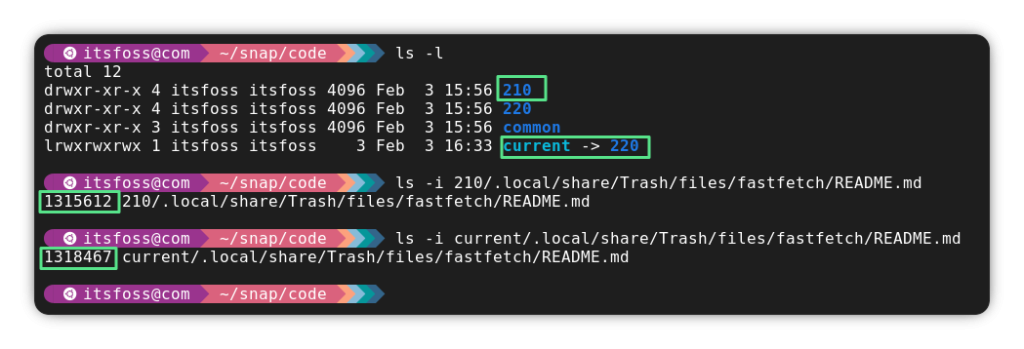
Here’s how it works: When you delete a file in VS Code using the Delete key, instead of sending it to your system’s regular trash folder (located at ~/.local/share/Trash), the Snap version squirrels it away into its own hidden trash directory at:
~/snap/code/current/.local/share/Trash
That’s right—your deleted code, configs, and temp files are being stashed in a Snap-specific folder buried deep in your home directory. And the worst part? GNOME’s automatic trash cleanup doesn’t touch this folder. So those files just sit there, silently accumulating like digital dust bunnies.
But wait—there’s more. Every time you update VS Code, the old version’s trash folder doesn’t get cleaned up either. It lingers in a separate directory, meaning you could have multiple generations of deleted files piling up, each one taking up precious space.
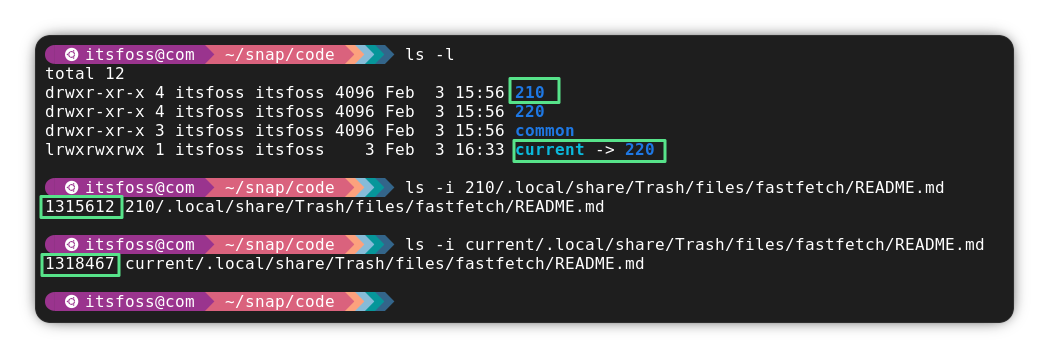
This isn’t just a theoretical problem. Users have reported hundreds of gigabytes of wasted space due to this bug. And despite being reported back in November 2024, the issue remains unresolved in current Snap versions of both VS Code and its open-source cousin, VSCodium.
What Can You Do About It?
If you’re tired of VS Code silently gobbling up your disk space, here are your options:
-
Switch to the DEB or RPM package – These traditional package formats don’t suffer from the Snap trash folder issue. You can download the official
.debor.rpmpackages directly from Microsoft’s website. -
Try the Flatpak version – An unofficial Flatpak build of VS Code is available on Flathub and handles file deletion more sensibly.
-
Use Code – OSS on Arch-based distros – If you’re running Manjaro or another Arch-based distribution, you can install the open-source
codepackage from the official repositories, which avoids the Snap problem entirely. -
Delete the Snap version – Removing the Snap package also wipes out all its associated junk files, giving you an instant storage boost.
The Bigger Picture
This bug highlights a growing concern with Snap packages: they can introduce unexpected behaviors that traditional packages don’t. While Snaps offer convenience and sandboxing, they sometimes come with hidden costs—like mysterious disk usage.
For developers who rely on VS Code daily, this issue could mean the difference between a smooth workflow and constant storage headaches. It’s a reminder that even the most trusted tools can have surprising flaws.
Stay Informed, Stay Efficient
If you’re a Linux user, keeping an eye on how your applications manage files is crucial. Tools like du, ncdu, or even a simple ls -la in your home directory can help you spot unusual storage patterns before they become a crisis.
And if you’re using VS Code on Snap, consider making the switch today—your SSD will thank you.
Tags: VS Code, Snap package, disk space, Linux, storage leak, bug, trash folder, Visual Studio Code, VSCodium, GNOME, Snapd, Flatpak, DEB package, RPM package, Code – OSS, Arch Linux, Manjaro, file deletion, hidden files, storage management, open source, Microsoft, developer tools, terminal, ncdu, du command, SSD, bloatware, sandboxing, packaging formats
Viral Sentences:
- “VS Code’s Snap version is secretly eating your disk space alive!”
- “Hundreds of gigabytes gone—thanks to a hidden trash folder you never knew existed.”
- “This isn’t just a bug—it’s a storage leak that could leave your SSD gasping for space.”
- “Deleted files? More like deleted storage. VS Code’s Snap bug is out of control.”
- “Switch to DEB or RPM today—your SSD will thank you.”
- “Snap packages: convenient, but at what hidden cost?”
- “VS Code’s Snap trash folder is the digital dust bunny you never saw coming.”
- “This bug has been around since November 2024—and it’s still not fixed.”
- “Are you a victim of VS Code’s Snap storage vampire? Find out now.”
- “The open-source community has a fix—just not in the Snap version.”
,


Leave a Reply
Want to join the discussion?Feel free to contribute!