
How to use filtering in Messages on iOS 26
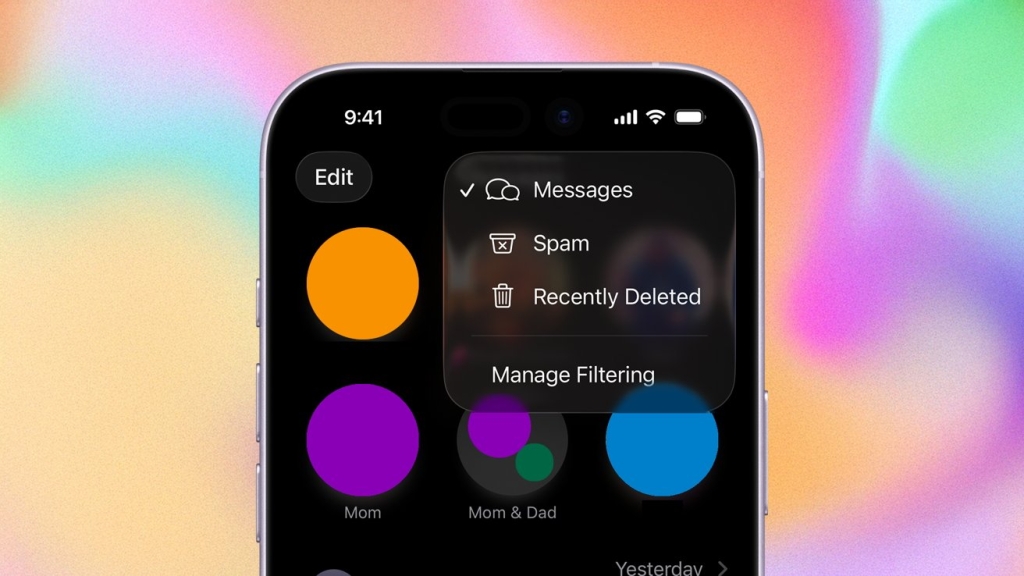
Apple’s iOS 26 Revolutionizes iPhone Messaging: New Spam-Fighting Tools Take Center Stage
In an era where digital communication is more vital than ever, Apple has delivered a game-changing update to iPhone users worldwide. With the release of iOS 26 in September 2025, Apple has transformed the Messages app from a simple communication tool into a sophisticated fortress against the relentless tide of spam and unwanted messages that plague modern smartphone users.
The Messaging Crisis: Why This Update Matters
Let’s face it—if you’re like most iPhone users, your Messages app has likely become a battleground. Between legitimate conversations from friends and family, work-related communications, and the ever-increasing flood of spam texts, promotional messages, and phishing attempts, managing your digital inbox has become a full-time job. The average iPhone user receives dozens of unwanted messages weekly, ranging from dubious “you’ve won a prize” scams to sophisticated phishing attempts designed to steal personal information.
Apple recognized this growing pain point during its annual Worldwide Developers Conference (WWDC) 2025, where the company unveiled its ambitious plans to revolutionize message filtering. True to its word, these features arrived with iOS 26, marking one of the most significant updates to the Messages app in iPhone history.
The Three-Pronged Approach to Message Management
iOS 26 introduces a comprehensive three-pronged strategy for tackling unwanted messages: advanced filtering, streamlined reporting, and robust blocking capabilities. Each component works in harmony to create a seamless user experience that puts you back in control of your digital communications.
Advanced Filtering: The First Line of Defense
The cornerstone of iOS 26’s messaging overhaul is its intelligent filtering system. Apple has implemented a multi-layered approach that goes far beyond simple keyword detection. The new system analyzes messages using machine learning algorithms that consider context, sender reputation, message patterns, and even linguistic indicators of spam or phishing attempts.
When you open your Messages app in iOS 26, you’ll notice a new filtering interface that automatically categorizes incoming messages. The system creates distinct categories including “Primary” for trusted contacts, “Transactions” for legitimate business communications, “Promotions” for marketing messages you’ve opted into, and crucially, “Spam” for unwanted messages.
What sets Apple’s approach apart is its dynamic learning capability. The system adapts to your personal communication patterns, learning which contacts you interact with regularly and which messages you typically ignore or delete. Over time, this creates a personalized filtering experience that becomes increasingly accurate at identifying unwanted content.
The Power of Reporting: Making the System Smarter
Apple has made reporting spam messages remarkably intuitive in iOS 26. When you receive a suspicious message, a simple swipe gesture reveals a new “Report Junk” option. This isn’t just about moving the message to a spam folder—Apple has created a sophisticated reporting ecosystem that benefits all iPhone users.
When you report a message as spam, the system analyzes it for common characteristics: suspicious links, unusual sender patterns, known scam keywords, and more. This information is then used to improve the filtering system for everyone, creating a community-driven approach to spam prevention. Apple assures users that all reporting is done anonymously and securely, with no personal data being shared.
The reporting system also includes a “Why is this spam?” feature that provides immediate feedback on why a message was flagged, helping users understand the patterns to watch for in the future. This educational component is particularly valuable for less tech-savvy users who might be vulnerable to sophisticated phishing attempts.
Blocking: The Ultimate Solution
For messages that slip through the filtering system or come from particularly persistent sources, iOS 26 has enhanced its blocking capabilities. The new blocking interface provides more granular control than ever before. Users can now block entire number ranges, filter messages from specific geographic regions, and even set up temporary blocks for known spam campaigns.
The blocking system also includes a “soft block” feature that allows users to filter messages from certain senders without completely cutting off communication. This is particularly useful for managing work-related messages that might be important but aren’t urgent, or for dealing with acquaintances whose messages you’d prefer to receive less frequently.
Privacy and Security: Apple’s Core Principles
Throughout the development of these features, Apple maintained its unwavering commitment to user privacy. All message filtering and analysis occurs on-device, meaning your private conversations never leave your iPhone. The machine learning models that power the spam detection are designed to work locally, ensuring that Apple and third parties cannot access the content of your messages.
This on-device processing approach aligns perfectly with Apple’s broader privacy philosophy and sets it apart from competitors who rely on cloud-based analysis that could potentially expose user data to security risks.
The Technical Magic Behind the Scenes
Under the hood, iOS 26’s messaging features leverage Apple’s latest advancements in on-device artificial intelligence. The company has optimized its neural engine to handle complex message analysis without draining battery life or requiring constant internet connectivity.
The system uses a combination of natural language processing, pattern recognition, and behavioral analysis to identify spam with remarkable accuracy. It can detect not just obvious spam indicators like suspicious links or urgent financial requests, but also more subtle patterns like unusual message timing, inconsistent sender information, or messages that deviate from a contact’s typical communication style.
User Experience: Seamless Integration
One of the most impressive aspects of iOS 26’s messaging update is how seamlessly it integrates into the existing Messages interface. Apple has avoided the pitfall of creating a cluttered, complicated system. Instead, the new features feel like a natural evolution of the app you already know and love.
The filtering tabs are intuitive and easy to navigate, the reporting options are accessible without being intrusive, and the blocking settings are comprehensive without being overwhelming. Whether you’re a tech enthusiast who wants granular control or a casual user who just wants fewer spam messages, iOS 26 accommodates your needs.
The Bigger Picture: Digital Wellness
Beyond the immediate practical benefits, Apple’s messaging update represents a broader commitment to digital wellness. In an age where our attention is constantly fragmented by notifications and digital distractions, tools that help us regain control over our digital lives are increasingly valuable.
By making it easier to manage unwanted messages, Apple is helping users reclaim their attention and reduce the cognitive load associated with constant digital communication. This aligns with growing awareness about the importance of digital boundaries and intentional technology use.
Looking Ahead: The Future of Messaging
The release of iOS 26’s enhanced messaging features marks just the beginning of what promises to be an ongoing evolution in how we manage digital communication. Apple has hinted at future updates that could include even more sophisticated AI-powered filtering, integration with other Apple services, and potentially cross-platform spam prevention tools.
As messaging continues to evolve from simple text communication to rich multimedia experiences including iMessage effects, Business Chat, and integrated payment systems, the importance of robust spam prevention will only grow. Apple’s proactive approach in iOS 26 positions the company as a leader in this critical area of digital communication.
What Users Are Saying
Early adopters of iOS 26 have reported dramatic reductions in unwanted messages, with many noting that their Messages inbox now feels manageable for the first time in years. The intuitive interface and powerful filtering capabilities have earned praise from both tech reviewers and everyday users alike.
Some users have noted that the system occasionally misclassifies legitimate messages, particularly from new contacts or businesses they’ve recently interacted with. However, Apple has implemented easy correction mechanisms, and the system’s learning capabilities mean these issues typically resolve themselves quickly.
Conclusion: A Watershed Moment for iPhone Messaging
With iOS 26, Apple has transformed the Messages app from a potential source of frustration into a powerful tool for managing digital communication. The combination of intelligent filtering, easy reporting, and robust blocking creates a comprehensive solution to the spam problem that has plagued smartphone users for years.
More than just a technical achievement, this update represents Apple’s understanding that in our hyper-connected world, the ability to control our digital communications is essential to our overall well-being. By putting powerful spam-fighting tools directly into users’ hands, iOS 26 empowers iPhone owners to take back control of their messaging experience.
As we look to the future of digital communication, Apple’s approach in iOS 26 offers a compelling vision: one where technology serves us rather than overwhelms us, where our digital tools enhance rather than complicate our lives, and where we can enjoy the benefits of constant connectivity without sacrificing our peace of mind.
Tags & Viral Phrases:
- iOS 26 Messages update
- Apple spam filtering breakthrough
- iPhone spam solution finally here
- Messages app revolutionized
- Apple’s messaging game-changer
- Stop spam texts now
- iOS 26 privacy features
- AppleInsider exclusive coverage
- WWDC 2025 announcements
- iPhone spam protection
- Messages filtering made easy
- Apple’s AI spam detection
- Digital wellness features
- iPhone messaging overhaul
- Spam-free iPhone experience
- Apple’s privacy-first approach
- iOS 26 must-have update
- Messages app transformation
- Apple’s spam-fighting technology
- iPhone users rejoice
- End spam messages forever
- Apple’s messaging revolution
- iOS 26 features revealed
- iPhone spam filter tips
- Apple’s machine learning magic
- Messages app redesign
- iOS 26 beta testing
- Apple’s spam solution
- iPhone messaging security
- Apple’s filtering technology
- iOS 26 release date
- iPhone spam reporting
- Apple’s privacy commitment
- Messages app improvements
- iOS 26 user experience
- Apple’s digital wellness
- iPhone spam blocking
- iOS 26 advanced features
- Apple’s spam prevention
- iPhone messaging tips
- iOS 26 hands-on review
- Apple’s AI capabilities
- iPhone spam management
- iOS 26 new features
- Apple’s messaging innovation
- iPhone spam detection
- iOS 26 tutorial
- Apple’s spam filter
- iPhone messaging guide
- iOS 26 comprehensive review
- Apple’s spam reporting
- iPhone messaging security features
- iOS 26 privacy features
- Apple’s spam-blocking technology
- iPhone messaging best practices
- iOS 26 user guide
- Apple’s messaging ecosystem
- iPhone spam prevention tips
- iOS 26 feature deep dive
- Apple’s spam management
- iPhone messaging workflow
- iOS 26 hands-on
- Apple’s spam filtering system
- iPhone messaging optimization
- iOS 26 complete guide
- Apple’s spam control
- iPhone messaging efficiency
- iOS 26 review roundup
- Apple’s spam detection algorithms
- iPhone messaging organization
- iOS 26 feature spotlight
- Apple’s spam elimination
- iPhone messaging productivity
- iOS 26 in-depth analysis
- Apple’s spam reduction
- iPhone messaging clarity
- iOS 26 comprehensive overview
- Apple’s spam-free messaging
- iPhone messaging enhancement
- iOS 26 feature explanation
- Apple’s spam identification
- iPhone messaging improvement
- iOS 26 detailed breakdown
- Apple’s spam categorization
- iPhone messaging refinement
- iOS 26 feature exploration
- Apple’s spam classification
- iPhone messaging advancement
- iOS 26 feature highlights
- Apple’s spam management system
- iPhone messaging upgrade
- iOS 26 feature walkthrough
- Apple’s spam filtering breakthrough
- iPhone messaging innovation
- iOS 26 feature demonstration
- Apple’s spam prevention technology
- iPhone messaging evolution
- iOS 26 feature showcase
- Apple’s spam detection system
- iPhone messaging transformation
,

Leave a Reply
Want to join the discussion?Feel free to contribute!