
The best Samsung tablets of 2026: Expert tested and reviewed
The Best Samsung Tablets of 2026: A Comprehensive Guide
Samsung’s tablet lineup offers a compelling alternative to Apple’s iPad, with devices ranging from budget-friendly options to premium powerhouses. Whether you’re a creative professional, a student, or simply looking for an entertainment device, there’s a Samsung tablet designed for your needs.
Why Choose Samsung Over iPad?
Samsung tablets run on Android, offering greater customization and flexibility compared to Apple’s ecosystem. They also feature expandable storage via microSD cards—something iPads simply can’t match. Plus, Samsung includes the S Pen with many of its tablets, providing a natural writing and drawing experience right out of the box.
Our Top Picks
Samsung Galaxy Tab S11 Ultra – Best Overall
The Galaxy Tab S11 Ultra stands as Samsung’s flagship tablet, delivering a premium experience that can genuinely replace your laptop. With its massive 14.6-inch Dynamic AMOLED 2X display, this tablet offers unparalleled screen real estate for multitasking, creative work, and media consumption.
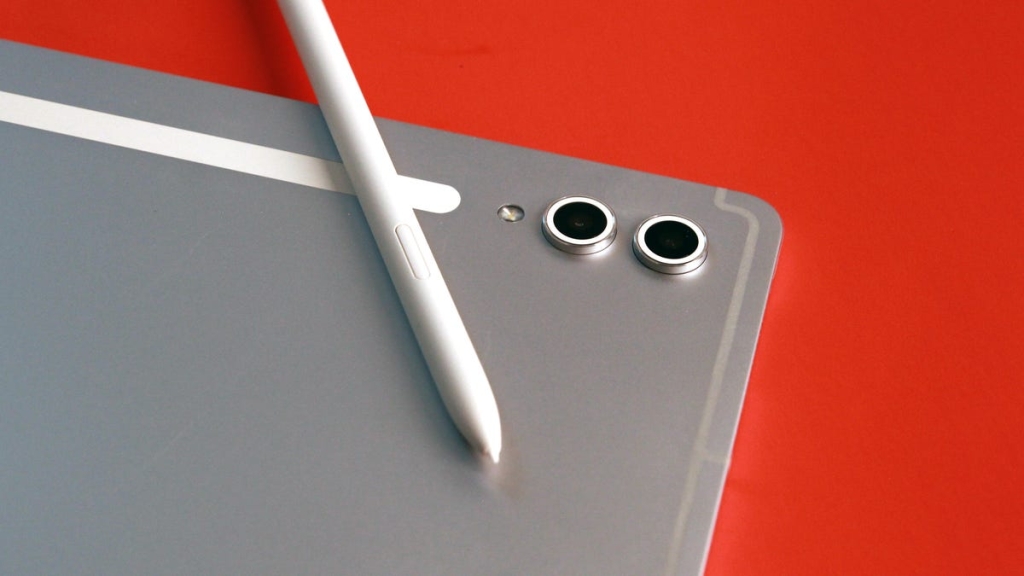
The redesigned S Pen features a hexagonal body that mimics a traditional pencil, making it more comfortable for extended use. The cone-shaped tip allows for natural shading and angled strokes that digital artists will appreciate.
Running on Android 16 with Galaxy AI capabilities, the Tab S11 Ultra comes with 12GB of RAM and 256GB of storage (expandable up to 2TB). The 11,600mAh battery ensures you can work or play all day without reaching for a charger.
Samsung Galaxy Tab S11 Plus – Best Value
If the Ultra’s price tag gives you pause, the Galaxy Tab S11 Plus offers nearly identical performance at a $400 discount. The 11-inch Dynamic AMOLED display still delivers stunning visuals, and you get the same Android 16 experience with Galaxy AI features.
The S Pen included with this model features Quick Tools and Sticky Notes integration, allowing you to pull up a floating toolbar for quick access to pen styles, colors, and settings—similar to the Apple Pencil Pro’s squeeze gesture.
Samsung Galaxy Tab S10 FE+ – Best Mid-Range
For those seeking a balance between performance and price, the Galaxy Tab S10 FE+ delivers impressive value. The 13.1-inch display is significantly larger than its predecessor, offering more space for multitasking, media streaming, and creative work.
Powered by the Exynos 1580 chip, this tablet is about 32% faster than the previous generation. While not a high-end processor, it handles everyday tasks with ease and is one of Samsung’s strategic compromises that make FE devices more affordable.
Samsung Galaxy Tab S6 Lite – Best Budget Option
The Galaxy Tab S6 Lite proves that you don’t need to spend a fortune for a capable tablet. Its 10.4-inch screen with 2000×1200 resolution is perfect for streaming, working, and light creative tasks.
The lightweight design makes it incredibly portable, and it comes with an S Pen included—a rarity in this price range. With support for up to 1TB of expandable storage via microSD card, you’ll never run out of space for your files and media.
Samsung Galaxy Tab Active5 Pro – Best Rugged Option
For users who need a tablet that can withstand harsh conditions, the Galaxy Tab Active5 Pro is built to perform. With an 11,100mAh battery (split across two batteries), this tablet can last through extended field work without needing a charge.
The tablet features several physical buttons for navigation, making it usable even with gloves on. Its IP68 rating provides water and dust resistance, while the bright display remains visible in direct sunlight.
Key Factors to Consider
Features
Not all Samsung tablets are created equal. Some excel at entertainment, others at productivity, and some can genuinely replace your laptop. Consider your primary use case before making a decision.
Price Points
Samsung offers tablets at various price points, from the budget-friendly Tab A series to premium S series devices. Determine your budget early to narrow down your options.
Battery Life
Whether you’re using your tablet for work or play, battery life matters. Look for tablets with substantial battery capacities, especially if you’ll be away from power outlets frequently.
Latest Samsung Tablet News
Samsung recently unveiled the Galaxy Tab A11+ in January 2026, positioning it as a family-friendly device suitable for gaming, streaming, and multitasking. The tablet features super-fast charging capabilities and is designed to serve multiple family members with different needs.
Testing Methodology
Our recommendations are based on extensive real-world testing, following a consistent methodology across all tablets:
Display Testing
We measure brightness levels in various lighting conditions and assess color accuracy. Touch responsiveness and extra features like stylus support are also evaluated.
Performance Testing
We measure reaction times to input, game performance, multitasking capabilities, app launch times, and temperature during intensive tasks.
Battery Life Testing
We test battery life across different scenarios including streaming, web browsing, productivity apps, and gaming.
Camera and Audio Testing
For cameras, we evaluate resolution, aperture, low-light performance, autofocus accuracy, dynamic range, color accuracy, image quality, sharpness, and video quality. Audio testing includes sound quality, clarity at different volumes, stereo separation, maximum volume levels, and distortion assessment.
Expert Tips
- Charging your tablet properly can significantly extend its lifespan. Avoid common charging mistakes that could damage your battery over time.
- Repurposing old tablets can give them new life. Consider turning an old Amazon Fire tablet into an Echo Show for smart home control.
Tags and Viral Phrases
- Samsung tablets vs iPad
- Best Android tablets 2026
- Galaxy Tab S11 Ultra review
- Samsung S Pen features
- Android tablet for productivity
- Expandable storage tablets
- Rugged tablets for outdoor work
- Tablet as laptop replacement
- Galaxy AI features
- Best tablet for digital artists
- Samsung tablet deals
- Tablet battery life comparison
- Android vs iOS tablets
- Best tablet for students
- Samsung tablet accessories
- Tablet multitasking capabilities
- Galaxy Tab FE series value
- Tablet for streaming and gaming
- Samsung DeX desktop experience
- Tablet with S Pen included
- Best mid-range Android tablet
- Tablet for field work
- Samsung tablet water resistance
- Tablet screen size comparison
- Android tablet customization
- Tablet for note-taking
- Samsung tablet processor performance
- Best tablet under $500
- Tablet for creative professionals
- Samsung tablet ecosystem
- Tablet with long battery life
- Android tablet software updates
- Tablet for entertainment purposes
- Samsung tablet display quality
- Tablet with microSD support
- Best rugged Android tablet
- Tablet for productivity on the go
- Samsung tablet price points
- Tablet for digital art and design
- Android tablet gaming performance
- Tablet with keyboard support
- Samsung tablet camera quality
- Tablet for business use
- Android tablet app ecosystem
- Tablet for reading and browsing
- Samsung tablet design and build
- Tablet with fast charging
- Android tablet for video editing
- Tablet with split-screen multitasking
- Samsung tablet comparison guide
,


Leave a Reply
Want to join the discussion?Feel free to contribute!