
PeaZip 10.9 Released With File Manager and Viewer Improvements
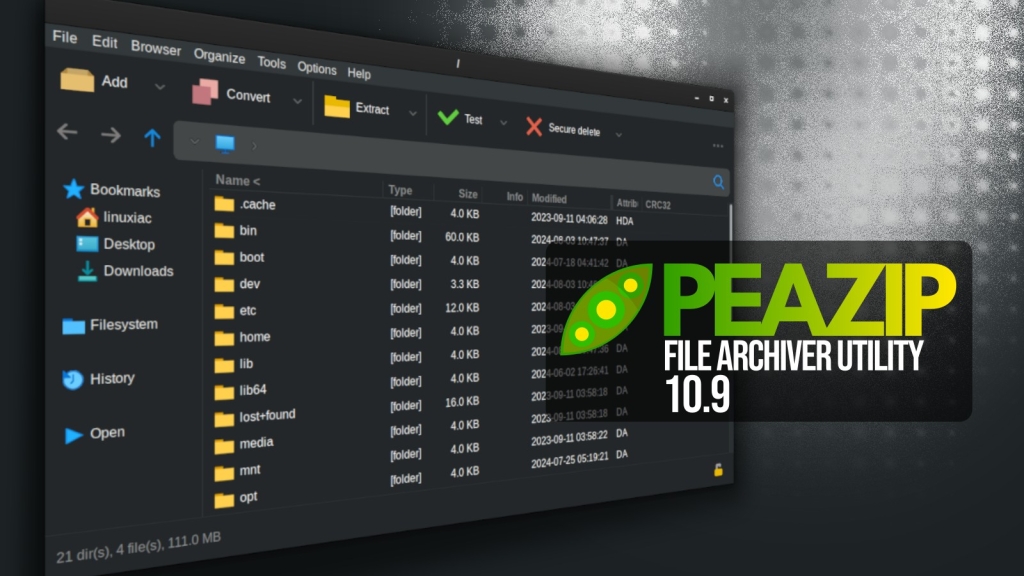
PeaZip 10.9: The Archiver That Just Got Smarter, Faster, and More Beautiful
If you’re a digital packrat, a software developer, or just someone who deals with compressed files on a regular basis, you’ve likely crossed paths with PeaZip. This open-source, cross-platform file archiver has been a quiet workhorse in the compression world for years, and its latest release—version 10.9—proves that sometimes, the best tools are the ones that keep getting better without making a fuss.
Just a month after the 10.8 release, the PeaZip team has dropped version 10.9, and it’s packed with meaningful upgrades that make file management smoother, faster, and more intuitive. Let’s dive into what makes this update worth your attention.
A Fresh Look and Feel
First impressions matter, and PeaZip 10.9 nails them. The Pea and Unpea graphical interfaces have been polished to perfection. Input and output fields are now clickable, allowing you to jump directly to the corresponding folders—no more tedious navigation. Readability has been boosted across the board, with clearer displays for file sizes, progress percentages, and compression ratios. It’s the kind of polish that makes you go, “Ah, that’s nice,” every time you use it.
The File Manager Gets a Major Glow-Up
The file manager is where most of the magic happens in PeaZip 10.9. The built-in image viewer now handles full-screen windowed mode more reliably across different widget sets, correctly detecting usable screen dimensions and showing scroll bars when needed. No more squinting or awkward scrolling—just smooth, seamless viewing.
Drag-and-drop functionality has also been reworked. Internal drag-and-drop between the file browser and tree view now always shows the context menu, letting you explicitly choose actions like copy or move. These options are now available even when drag-and-drop is initiated while browsing the filesystem. It’s a small change that makes a big difference in workflow efficiency.
Text and Hex Viewers: Now Smarter Than Ever
For those who dig into the nitty-gritty of file contents, PeaZip 10.9’s text viewer is a game-changer. It now detects BOM (Byte Order Mark) headers, supports word wrapping, and offers case-sensitive search via keyboard shortcuts. You can even select a custom font for better readability. Zoom controls have been added, and viewer settings are now persistent across sessions—so your preferences stick around.
The hex viewer has been aligned with these changes and uses the same monospaced font configuration, making it easier to analyze binary data without straining your eyes.
New Context Menus and Keyboard Shortcuts
PeaZip 10.9 introduces new alternative context menus for “Open with” and “Rename” actions, along with an expanded set of keyboard shortcuts. The space bar now acts as a general viewer shortcut, automatically opening text or image viewers depending on file type. Additional combinations allow direct access to text, hex viewing, checksum calculation, and archive tree expansion. It’s like PeaZip read your mind and added every shortcut you wished for.
Performance Boost: Faster, Leaner, Meaner
On the performance side, PeaZip 10.9 is a beast. Browsing very large archives has been optimized, with reported reductions of roughly 18 percent in RAM usage and noticeable improvements in responsiveness on archives containing hundreds of thousands of files. Handling of multi-volume archives has been improved, task progress reporting has been refined, and asynchronous deletion of temporary preview files has been introduced to keep the interface responsive during navigation.
Users can now delete an entire archive directly from the delete menu, customize the middle mouse button behavior in the file manager, and benefit from reduced unnecessary GUI flashing. Startup and shutdown sequences have been reorganized to ensure configuration data is reliably saved, even when background cleanup tasks are still running.
Better Integration and Bug Fixes
Automatic detection of external RAR binaries has been improved on non-Windows systems, and freedesktop integration documentation has been updated with Flatpak and similar environments in mind. The release also includes a long list of bug fixes addressing archive sorting issues, column size resets on Qt6, extension duplication, archive locking problems, and inconsistencies when running archive tests from context menus or scripts.
Where to Get PeaZip 10.9
For more information, refer to the release notes or visit the project’s GitHub page for downloads. For Linux users, the app is also available for installation as a Flatpak.
Tags & Viral Phrases
PeaZip 10.9, open-source file archiver, cross-platform compression, file management, drag-and-drop improvements, image viewer, text viewer, hex viewer, keyboard shortcuts, performance optimization, RAM usage, large archives, multi-volume archives, GUI polish, Flatpak, Linux, Windows, macOS, Pea and Unpea interfaces, file browser, tree view, context menus, “Open with,” rename actions, BOM headers, word wrapping, case-sensitive search, custom fonts, zoom controls, persistent settings, asynchronous deletion, external RAR binaries, freedesktop integration, bug fixes, archive sorting, Qt6, extension duplication, archive locking, script testing, digital packrat, software developer, compression tool, workflow efficiency, binary data analysis, configuration data, startup and shutdown sequences, background cleanup, release notes, GitHub downloads.
,

Leave a Reply
Want to join the discussion?Feel free to contribute!