
Something’s missing: Android Auto users report a jarring bug in Google Maps
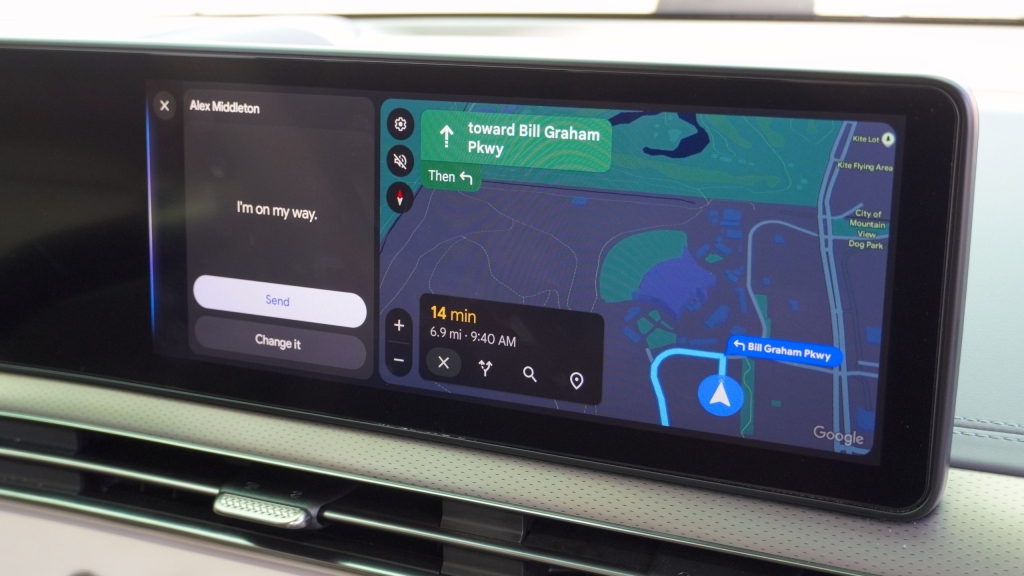
Google Maps’ Vanishing Car Icon: A Bizarre Bug Hits Android Auto Users
Android Auto users have encountered a peculiar and frustrating bug this week: their vehicle icon has mysteriously disappeared from Google Maps during navigation. What was once a reliable blue arrow guiding drivers along their route has suddenly gone AWOL, leaving users navigating blind—at least visually.
The Bug: What’s Happening?
Reports have flooded the Android Auto subreddit, with users describing how their car’s icon vanishes mid-navigation. According to the original report, the issue has been occurring in Google Maps v6.1.660404-release for the past few days. One user noted that the problem appears when the “media player is in full screen” and they switch to split-view mode.
The car’s icon isn’t just a cosmetic feature—it’s a crucial navigational tool that helps drivers see their exact location on the map. Without it, users are left guessing where they are on the road, even though the map continues to scroll along as they drive.
The Fix (For Now)
Interestingly, some users have found a temporary workaround. Switching to Google Maps’ default vehicle icon seems to resolve the issue. One user reported that after reverting from a “non-default icon” to the default, the problem disappeared entirely. Refreshing the app also appears to keep the issue at bay.
While this fix is a relief for affected users, it’s not a permanent solution. Google will likely need to address the root cause of the bug in a future update.
A History of Android Auto Woes
This isn’t the first time Android Auto has faced significant issues. Last year, users were plagued by a wireless connectivity bug that broke the feature for many drivers. The problem was traced back to updates v13.4 and v13.5, which were rolled out in February. Google acknowledged the issue and promised a fix, but the incident left many users frustrated.
More recently, the Pixel 10 series encountered its own set of Android Auto problems. Users reported a gray screen issue when connecting their devices to Android Auto. While Google released a fix, the response was mixed—some users found relief, while others continued to experience problems. This left a sour taste for those who had just upgraded to the latest Pixel devices, expecting a seamless experience.
Why This Matters
While a disappearing car icon might seem like a minor inconvenience compared to the Pixel 10’s gray screen issue, it highlights a broader problem: the reliability of Android Auto. For many users, Android Auto is an essential tool for navigation and entertainment while driving. When it doesn’t work as expected, it can be more than just an annoyance—it can be a safety concern.
The fact that users have had to resort to workarounds like switching icons underscores the need for Google to prioritize stability and bug fixes in its updates. After all, Android Auto is meant to make driving easier, not more complicated.
Looking Ahead
As of now, Google has not officially commented on the vanishing car icon bug. However, given the volume of reports, it’s likely that the company is aware of the issue and working on a fix. In the meantime, affected users can try switching to the default vehicle icon to restore their navigation experience.
For Android Auto to maintain its reputation as a reliable driving companion, Google must address these recurring issues and ensure that future updates are thoroughly tested before release. After all, drivers deserve a seamless experience—not a game of whack-a-mole with bugs.
Tags & Viral Phrases:
- “Vanishing car icon”
- “Google Maps bug”
- “Android Auto glitch”
- “Pixel 10 Android Auto issues”
- “Wireless connectivity problems”
- “Gray screen nightmare”
- “Default icon fix”
- “Driving blind”
- “Google Maps navigation fail”
- “Tech bug of the week”
- “Android Auto reliability”
- “Google Maps disappearing act”
- “Pixel 10 launch woes”
- “Split-view bug”
- “Car icon gone rogue”
,

Leave a Reply
Want to join the discussion?Feel free to contribute!