
My favorite Pixel 10 Pro XL feature proves how good on-device AI really is
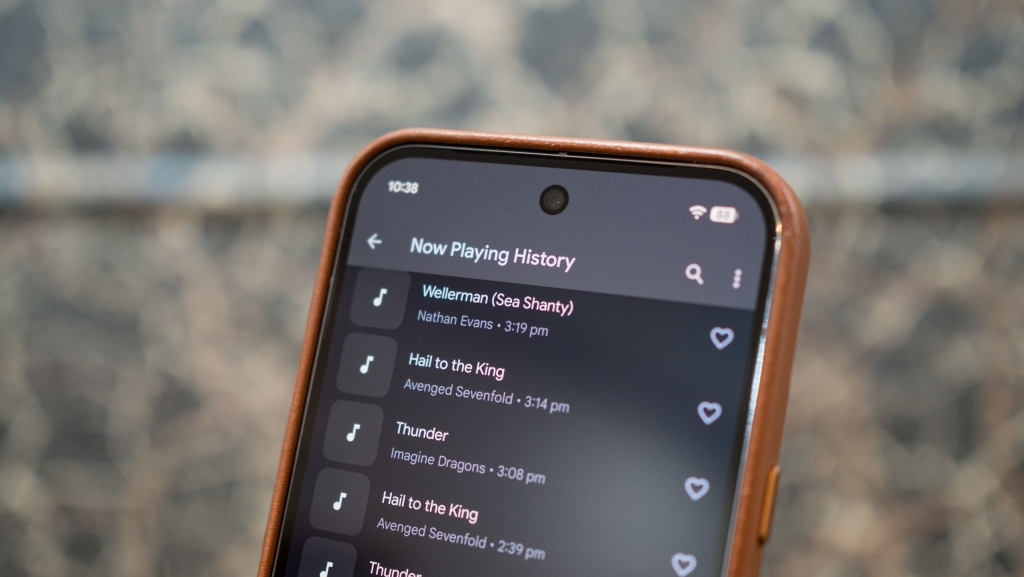
Google’s Now Playing: The Pixel’s Secret Weapon That’s Been Ahead of the Curve Since 2017
If you’re wondering why I’ve been raving about the Pixel 10 Pro XL as my daily driver, let me tell you—it’s not the hardware that’s stealing the show. Sure, the camera is fantastic, the display is stunning, and the battery life is solid, but what truly sets this phone apart is its software. Google has a knack for delivering features that you simply can’t find on any other device, and one of the most underrated gems is Now Playing.
Now Playing is one of those features that feels like magic. It automatically identifies music playing in the background, and it does so with such precision that it’s almost eerie. But what makes it even more impressive is that it works entirely on-device. No internet connection? No problem. No cloud servers? Doesn’t matter. This feature is a testament to Google’s ability to innovate without compromising privacy or performance.
How Does Now Playing Work?
Now Playing isn’t new—it debuted back in 2017 with the Pixel 2 and 2 XL. But over the years, Google has refined it to perfection. The feature relies on a local music database stored directly on your Pixel. When it detects ambient sounds, it analyzes the audio and matches it to the songs in its database, displaying the song title and artist on your lock screen or as a silent notification.
The best part? It’s lightning-fast. Now Playing only needs a few seconds of audio to identify a song, and it does so with remarkable accuracy. Over the past eight years, I’ve used it on every Pixel, and it never fails to impress. And because it works locally, your data stays private, and you don’t even need an internet connection.
The database itself is a marvel of engineering. It doesn’t store entire audio files but instead uses short audio fingerprints to identify songs. When it launched, it could recognize around 10,000 songs, but Google has since expanded it to include a much wider selection. And if you’re worried about storage, don’t be—the entire database takes up less than 500MB. Plus, it barely impacts battery life, consuming less than 1% on average.
How to Enable Now Playing
Setting up Now Playing is a breeze. During the initial setup of your Pixel, you can enable it right away. If you missed that step, don’t worry—it’s easy to turn on later.
- Go to Settings.
- Navigate to Sound and vibration.
- Select Now Playing.
- Toggle Identify songs playing nearby to On.
Google has also added some handy extras. If you want album art or need to identify a song that’s not in the local database, you can use Google Search to pull in the data from online sources. Personally, I haven’t felt the need to do this—the Pixel 10 Pro XL has handled everything from regional music to older tracks with ease.
Now Playing is just one example of why the Pixel lineup continues to stand out in a sea of Android devices. It’s a feature that’s been ahead of the curve since 2017, and it’s only gotten better with time. So, if you’re looking for a phone that combines cutting-edge software with a commitment to privacy, the Pixel 10 Pro XL is hard to beat.
Tags & Viral Phrases:
-
NowPlayingMagic
-
Pixel10ProXL
-
GoogleInnovation
-
OnDeviceAI
-
MusicIdentification
-
TechRevolution
-
PixelPerfection
-
PrivacyFirst
-
SmartFeatures
-
AndroidCentral
-
TechTrends2023
-
GameChanger
-
EerieAccuracy
-
LocalProcessing
-
MusicLover’sDream
-
TechSavvy
-
FutureOfSmartphones
-
PixelPower
-
SoftwareSupremacy
-
TechInsider
,


Leave a Reply
Want to join the discussion?Feel free to contribute!