
A beautiful laptop that excels at almost everything… except typing
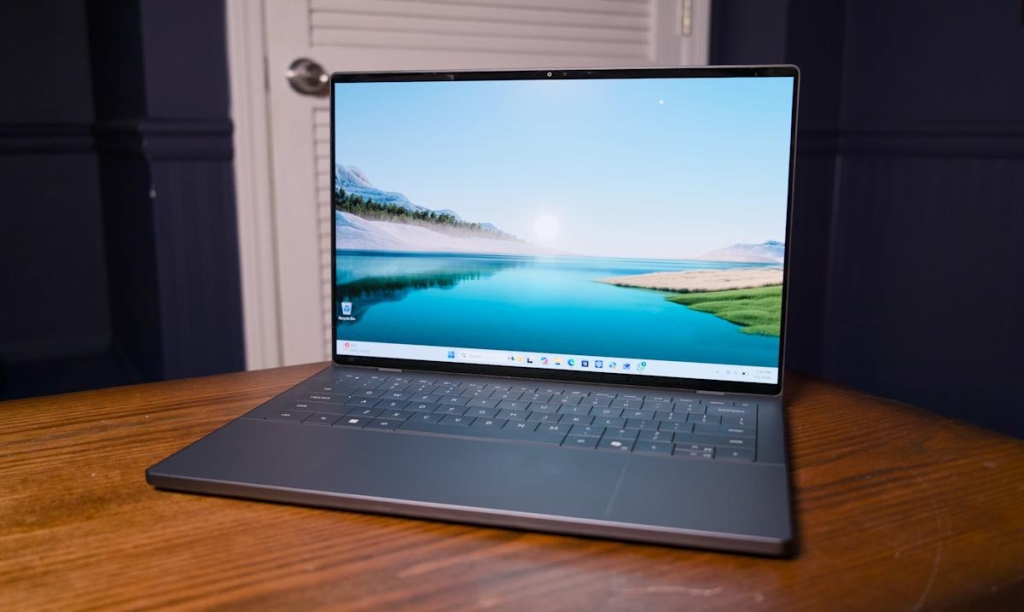
Dell XPS 14 (2026) Review: A Gorgeous Powerhouse with One Fatal Flaw
Dell’s new XPS 14 represents the company’s most ambitious redesign yet, delivering a machine that’s thinner, lighter, and more powerful than its predecessors. With Intel’s latest Panther Lake processors and a stunning OLED display, this laptop seems poised to reclaim the premium Windows laptop crown. But a critical keyboard issue threatens to undermine all that potential.
Design: MacBook-Level Thinness and Premium Build
The XPS 14’s transformation is immediately apparent when you pick it up. Weighing just three pounds, it sits comfortably between Apple’s 14-inch MacBook Pro (3.4 pounds) and the 13.6-inch MacBook Air (2.7 pounds). The smooth metal case feels distinctly MacBook-like, marking a departure from the boxier designs of previous XPS models.
Dell has clearly listened to criticism about the previous generation’s over-designed elements. The “invisible” trackpad now features two subtle lines that clearly delineate its boundaries, solving the usability issues of the completely flush design. The capacitive function row has been replaced with traditional physical keys, eliminating the frustrating sunlight visibility problems that plagued earlier models.
The 2.8K OLED touchscreen on our review unit delivers spectacular visuals with vibrant colors and deep blacks that make everything from photos to games pop. However, OLED is only available on the highest-end configurations, with other models receiving a standard 2K LCD display.
Performance: Intel’s Panther Lake Delivers
The star of this show is Intel’s new Core Ultra X7 358H processor, which brings significant graphics improvements over the previous generation. In our testing, the integrated Arc B390 GPU achieved an impressive 130fps in Arc Raiders at 1080p with medium settings, XeSS upscaling, and frame generation. For a machine in this class, that’s remarkable performance.
We also saw 63fps in Cyberpunk 2077 at 1080p with medium settings and XeSS enabled—not bad for one of the most demanding PC games available. While we wouldn’t recommend the XPS 14 as a primary gaming machine, it’s comforting to know it can handle modern titles when needed.
Benchmark results confirm the performance story:
- PCMark 10: 9,651
- Geekbench 6 (single/multi-core): 2,890/16,745
- Geekbench 6 GPU: 56,378
- Cinebench 2024: 125/685
These numbers put it on par with the MSI Prestige 14 Flip AI+ and significantly ahead of many competitors in its class.
Connectivity: Minimalist to a Fault
Dell has embraced minimalism with the XPS 14’s port selection, offering three USB-C ports and a headphone jack. The microSD card slot has been eliminated, and there’s no HDMI or USB Type-A connectivity. This puts it at a disadvantage compared to competitors like the MacBook Pro, which offers similar USB-C connectivity plus HDMI, SD card reader, and more traditional ports.
Battery Life: Disappointing for the Class
Perhaps the most surprising result in our testing was the battery performance. The XPS 14 lasted just 10 hours and 21 minutes in PCMark 10’s Modern Office battery test. This falls well short of Intel’s efficiency claims for Panther Lake systems and pales in comparison to the MSI Prestige 14’s 22+ hour runtime. While battery-saving features might extend this, it’s still a notable weakness for a premium ultraportable.
The Dealbreaker: A Keyboard That Doesn’t Work
Here’s where everything falls apart. The XPS 14’s keyboard has a fundamental flaw: it struggles to register key presses when typing at normal speed. This isn’t a matter of getting used to a new layout or developing muscle memory—the keyboard simply doesn’t recognize inputs quickly enough.
In my testing, rapid key presses were frequently missed or registered in reverse order. Simple sentences became frustrating exercises in typing, deleting, and retyping. Even after slowing down considerably, I still encountered more errors than with any other laptop I’ve tested.
Dell acknowledges the issue, attributing it to “a small batch of early XPS units” and promising a firmware fix later this month. However, given that these laptops have been available for weeks, this review reflects the current state of the product. The company maintains that units shipping now don’t have this problem, but that doesn’t help existing owners or potential buyers who might receive affected units.
Pricing: Premium Costs for Premium Performance
The XPS 14’s pricing structure reflects its positioning at the top of Dell’s lineup. The base configuration starts at $1,450 with an Intel Core Ultra 7 355, 16GB RAM, and 512GB storage. Our review unit, featuring the Core Ultra X7 358H, 32GB RAM, and Intel’s Arc B390 GPU, starts at $2,250 with 64GB RAM on Dell’s site.
The Bottom Line
The Dell XPS 14 (2026) is a study in contradictions. It’s a beautifully designed, incredibly thin and light laptop with powerful performance that can even handle some gaming. The OLED display is gorgeous, the build quality is premium, and it fixes many of the usability issues from the previous generation.
But none of that matters if you can’t type on it reliably. A laptop’s primary function is input, and the XPS 14 fails at this fundamental task for fast typists. Until Dell resolves this keyboard issue—either through a successful firmware update or by ensuring affected units aren’t shipped—the XPS 14 remains a beautiful machine that’s frustrating to use.
If you’re a slow typist or primarily use your laptop for media consumption rather than content creation, the XPS 14 might still be worth considering. But for anyone who values typing accuracy and speed, this remains a machine to avoid until the keyboard issues are fully resolved.
Viral Tags & Phrases:
- “The keyboard that broke a thousand thumbs”
- “Type slower or suffer the consequences”
- “Dell’s beautiful mistake”
- “A MacBook killer that can’t type”
- “The XPS 14: Pretty but punishing”
- “When form completely trumps function”
- “The most frustrating premium laptop of 2026”
- “Dell’s keyboard catastrophe”
- “Type at your own risk”
- “A premium laptop with a cheap keyboard”
- “The typing tax you didn’t ask for”
- “Dell’s design triumph, typing tragedy”
- “Beautiful hardware, broken basics”
- “The XPS 14’s fatal flaw”
- “When your $2,000 laptop can’t keep up with your typing”
- “Dell’s keyboard regression”
- “The typing test that broke the internet”
- “A premium machine with amateur-hour input”
- “Dell’s keyboard mystery: Solved?”
- “The laptop that made me question everything”
,

Leave a Reply
Want to join the discussion?Feel free to contribute!