
Affinity by Canva (2026) review
Affinity 3.0: The Free Adobe Killer That Could Change Everything
The design world is buzzing with the news that Affinity, once a premium competitor to Adobe’s Creative Suite, has gone completely free – and the implications are massive.
The $500 Million Gamble
Back in March 2024, Canva acquired Serif’s Affinity suite for a staggering $500 million. For years, Affinity had been the go-to alternative for designers frustrated with Adobe’s subscription model – offering Affinity Designer (Illustrator competitor), Photo (Photoshop competitor), and Publisher (InDesign competitor) at a one-time price that was a fraction of Adobe’s Creative Cloud.
Now, in a bold move that’s sent shockwaves through the creative industry, Canva has merged all three apps into a single powerhouse and made it completely free. No subscriptions, no perpetual licenses – just “free forever.”
The Freemium Reality
But here’s the catch: while the core functionality remains free, Canva is betting that users will eventually pay for access to AI-powered tools. A Canva Pro subscription at $15/month or $120/year unlocks features like AI-based object selection, generative fill, upscaling, and more.
For designers who don’t care about AI, this is essentially a completely free alternative to Adobe’s $600+/year Creative Cloud. Even if you do want the AI features, $120/year is still dramatically cheaper than Adobe.
The Interface: Three Apps, One Elegant Solution
Launching Affinity for the first time reveals a slight wrinkle – you need to log in to a Canva account. It’s a small price to pay for what comes next.
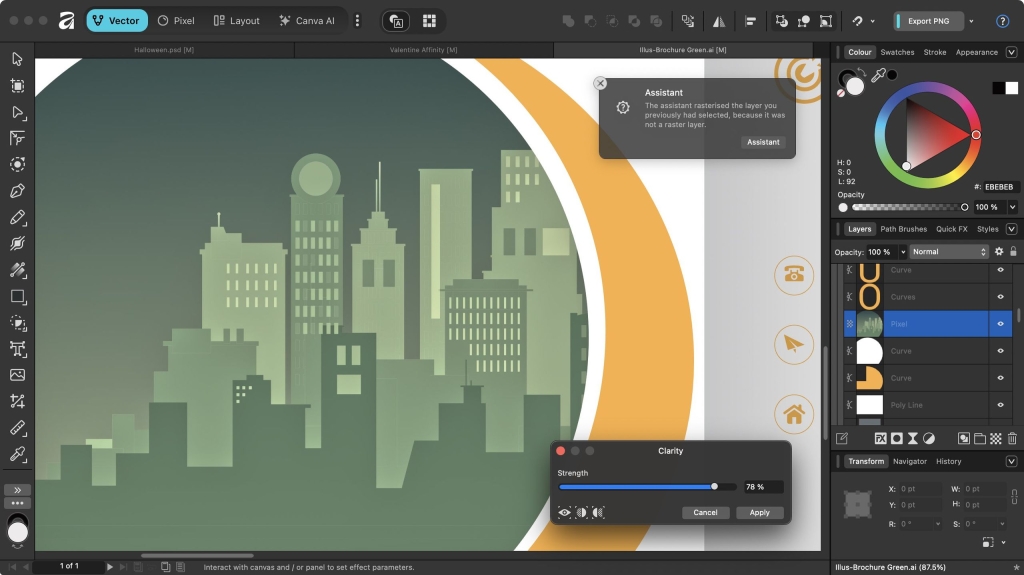
The genius of Affinity 3.0 is how it handles being three apps in one. Instead of overwhelming users, it divides the interface into “studios” – Vector, Pixel, Layout, and Canva AI. Switching between them is seamless, and you can even create custom studios tailored to your workflow.
What really impressed me was the attention to detail. Hover over any tool and you get comprehensive information about its purpose, complete with a “learn more” button that opens detailed help documentation. It’s like having a patient tutor built right into the software.
Importing from Adobe: Mostly Smooth, With Some Hiccups
If you’re thinking of switching from Adobe, Affinity can import PSD and AI files without major issues. However, there are some limitations. Smart Objects don’t transfer perfectly, and if you’re using Adobe Fonts (cloud-based typefaces), those won’t carry over.
The biggest frustration? Opening complex files can take an agonizingly long time with no progress indicator. You’re left wondering if the software has frozen, only to have your file eventually appear minutes later.
The Tools: Powerful, If Not Quite Complete
Affinity’s tool selection is impressive. While it doesn’t have every single feature Adobe crams into its software, it has the vast majority of what most designers actually use. The real magic is in the thoughtful touches – like automatically creating new layers when you start drawing, preventing you from accidentally overwriting existing work.
One standout feature is the Trace tool, which can convert raster images to vector with remarkable accuracy. It’s the kind of feature that makes you wonder why Adobe hasn’t implemented something similar.
The AI Question: Worth Paying For?
This is where things get interesting. The AI tools behind the Canva Pro paywall – things like generative fill and AI object selection – are competent but not revolutionary. They’re good, but not good enough to make most designers feel they absolutely need them.
Canva is clearly hoping these tools will improve over time and become must-haves, but for now, they feel more like nice-to-haves than essential features.
Should You Download Affinity?
Get it if… you’re tired of paying Adobe’s subscription fees and want powerful design tools that won’t cost you a dime. The interface is polished, the tools are comprehensive, and the ability to switch between vector, raster, and layout work seamlessly is genuinely impressive.
Don’t get it if… you’re heavily invested in Adobe’s ecosystem and rely on specific tools that Affinity doesn’t offer. If you’re working with complex Smart Objects or need exact replication of Adobe’s more esoteric features, you might find yourself frustrated.
The Bottom Line
Affinity 3.0 represents one of the most significant shifts in the creative software landscape in years. By making professional-grade design tools completely free, Canva has essentially called Adobe’s bluff on the subscription model.
Whether this is a brilliant long-term strategy or a $500 million gamble that won’t pay off remains to be seen. But for designers looking to save money without sacrificing quality, Affinity 3.0 is an opportunity too good to pass up.
Tags & Viral Phrases:
- Adobe Killer
- Free Forever
- Design Revolution
- Subscription Model Broken
- Canva’s $500M Bet
- Professional Tools For Free
- Game Changer
- Design Software Arms Race
- The End of Adobe’s Monopoly?
- Creative Freedom
- Budget Designer’s Dream
- AI Tools Behind Paywall
- Three Apps In One
- Seamless Workflow
- Vector, Raster, Layout Mastery
- Smart Layer Management
- Trace Tool Magic
- No More Subscription Fees
- Design Industry Disruption
- Professional Grade For Free
- The Future of Creative Software
- Canva’s Masterstroke
- Designer’s Best Friend
- Budget-Friendly Alternative
- Creative Suite Killer
- Free Professional Design Tools
- The Subscription Model Is Dead
- Design Software Evolution
- Canva vs Adobe
- Affinity 3.0 Review
- Free Design Software
- Professional Tools Without The Price Tag
,
Leave a Reply
Want to join the discussion?Feel free to contribute!