
AMD NPU monitoring arrives on Linux in Resources 1.10 update
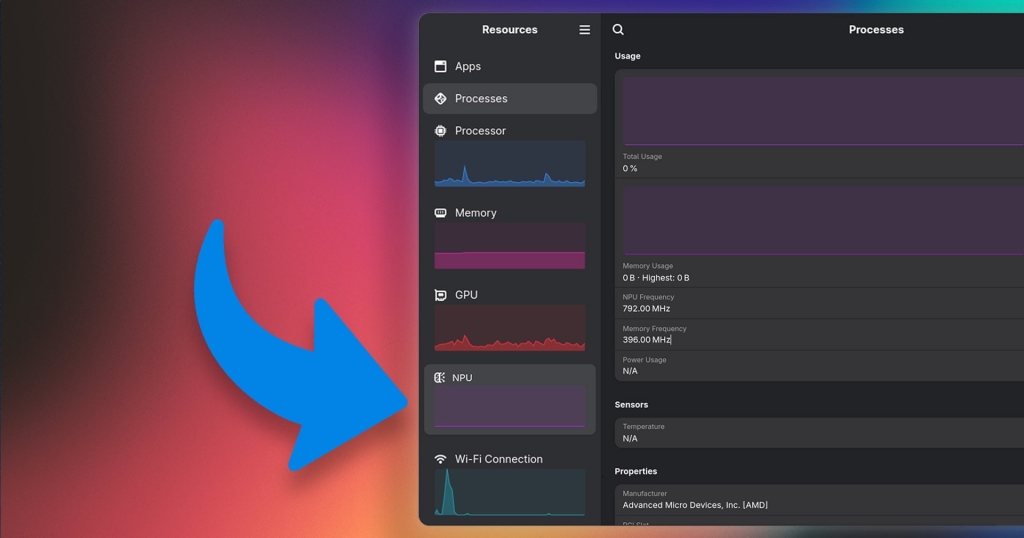
Linux Gets a Smarter Brain: Resources 1.10 Unleashes AMD NPU Monitoring and Smarter Memory Insights
In a move that’s sending ripples through the Linux performance monitoring community, the beloved system monitor Resources has just dropped version 1.10—and it’s packing some serious firepower. This isn’t just another incremental update; it’s a leap forward in how Linux users can track, analyze, and optimize their system’s performance, especially for those rocking AMD’s latest hardware.
AMD NPU Monitoring: Linux Finally Speaks Neural Network
For the first time ever on Linux, Resources 1.10 now supports real-time monitoring of AMD’s Neural Processing Unit (NPU). If you’re running a modern AMD Ryzen chip with an integrated NPU, you can now see exactly how much of that AI horsepower is being utilized—right from your system monitor.
This breakthrough is powered by the AMD XDNA driver, a piece of open-source wizardry that bridges the gap between Linux and AMD’s AI acceleration hardware. But there’s a catch: to unlock this feature, you’ll need Linux kernel 6.14 or newer, along with updated amdnpu firmware. If you’re running a cutting-edge distro or have kept your system fresh, you’re golden. If not, it might be time for an upgrade.
Why does this matter? NPUs are the unsung heroes of modern computing, handling AI tasks, machine learning workloads, and even everyday smart features with remarkable efficiency. Now, Linux users can finally see the NPU in action, making it easier than ever to optimize for AI workloads or simply marvel at the invisible work happening under the hood.
Memory Reporting Gets a Reality Check
If you’ve ever squinted at your system monitor, wondering why the RAM numbers never seem to add up, Resources 1.10 has your back. The app has switched to using VmRSS (Resident Set Size) for memory reporting—a move that promises to deliver a more accurate picture of your system’s actual memory pressure.
VmRSS measures the portion of a process that’s held in physical RAM, including shared libraries, mapped files, and even allocated (but unused) memory. The result? Reported RAM usage for processes will look higher than in previous versions. But don’t panic—this isn’t a bug; it’s a feature. It’s simply a more honest reflection of what’s really going on in your system.
If you’re comparing memory readings across different tools, remember: the lowest number isn’t always the right one. Resources 1.10 is here to give you the full, unvarnished truth about your system’s memory usage.
Smarter App Detection and Enhanced Accessibility
Resources 1.10 isn’t just about raw numbers—it’s also about making your life easier. The update brings smarter app detection, now recognizing AppImage applications via appimaged, apps managed by Portable, and even LXC bridge network interfaces. If you’re a Linux tinkerer who loves to experiment with different packaging formats, this is a welcome change.
Searching for processes just got a whole lot more powerful, too. You can now search for multiple process names by inserting a pipe (|) character between terms. Need to find both firefox and chrome processes? Just type firefox|chrome and let Resources do the heavy lifting.
Accessibility gets a boost as well. Resources 1.10 ensures column names are announced to screen readers and improves keyboard navigation in its Apps and Processes views. It’s a reminder that great software is for everyone, and the team behind Resources is committed to making sure no one is left out.
Leaner, Meaner, and More Efficient
All system monitors use system resources themselves, and Resources is no exception. But with version 1.10, the app’s companion process has seen its CPU usage “cut down significantly,” according to the release notes. That means you can keep an eye on your system without worrying about the monitor itself hogging your CPU cycles.
For the troubleshooters and power users out there, Resources 1.10 also introduces debug logs, making it easier than ever to diagnose and fix issues.
Built for the Future: Rust, GTK4, and Ubuntu 26.04 LTS
Resources is free, open-source software, written in Rust and GTK4/libadwaita—a modern, efficient stack that ensures the app is fast, reliable, and beautiful. If you’re running Ubuntu 26.04 LTS or later, you’ll find Resources preinstalled, ready to go out of the box. For those on earlier versions, you can grab the update from Flathub—a process most Linux users are now familiar with.
Why This Matters
In the ever-evolving world of Linux, Resources 1.10 is more than just a system monitor update—it’s a statement. It shows that the Linux desktop is keeping pace with the latest hardware innovations, from AMD’s NPUs to the latest kernel features. It’s a win for transparency (with honest memory reporting), accessibility (with improved screen reader support), and performance (with reduced CPU usage).
Whether you’re a developer pushing the boundaries of AI on Linux, a sysadmin keeping a data center humming, or just a curious user who loves to peek under the hood, Resources 1.10 has something for you. It’s a reminder that in the world of open source, the best tools are always getting better—and the future is looking brighter than ever.
Download Resources 1.10 from Flathub
net.nokyan.Resources on Flathub
Tags & Viral Phrases:
Linux #AMD #NPU #AI #MachineLearning #OpenSource #SystemMonitor #Resources #Ubuntu #Kernel #Performance #TechNews #Gadgets #LinuxDesktop #Hardware #Software #Innovation #TechTrends #FutureOfComputing #LinuxCommunity #AMDNPU #VmRSS #MemoryManagement #Accessibility #Rust #GTK4 #Ubuntu26.04 #TechUpdate #LinuxKernel #AIAcceleration #SystemOptimization #DebugLogs #ScreenReader #TechRevolution #LinuxGaming #LinuxHardware #NextGenLinux #TechBreakthrough #LinuxPerformance #OpenSourceSoftware #LinuxDev #LinuxNews #LinuxTips #LinuxLife #LinuxLove #LinuxPower #LinuxMagic #LinuxFuture
,


Leave a Reply
Want to join the discussion?Feel free to contribute!