
Android Auto bug causes your car to vanish from Google Maps
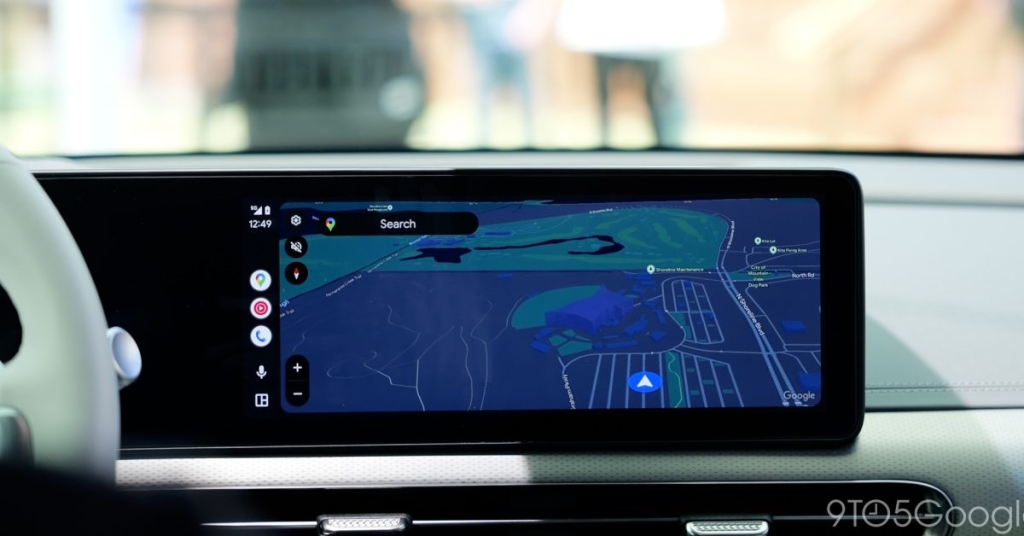
Android Auto Maps Glitch Makes Your Car Vanish—But Navigation Still Works
If you’re an Android Auto user, you might have noticed something strange lately: your car icon has gone missing from Google Maps. That’s right—no little blue arrow, no custom vehicle icon, just a blank map staring back at you. It’s a bizarre visual bug that’s been popping up across forums and social media, leaving drivers scratching their heads.
The Bug: No Car Icon, But Navigation Still Works
Over the past week, multiple Android Auto users have reported that their car’s location indicator disappears while using Google Maps. The map still tracks your position and updates in real time, navigation prompts still appear, and traffic data remains intact. But without the visual cue of your car’s icon, it can feel disorienting—especially if you’re used to glancing at the map for a quick location check.
One Reddit user shared a screenshot showing the issue in full effect—a completely blank spot where the car icon should be. Interestingly, the bug seems to affect users who’ve customized their car icon in Google Maps, though some with default settings have also reported the problem. It tends to occur when switching away from Maps—like when entering the car’s native infotainment screen or opening a media app via Android Auto.
What’s Causing It?
While Google hasn’t issued an official statement yet, the timing of the bug lines up suspiciously with the rollout of Android Auto 16.1, which began hitting devices late last week. That suggests the issue may be tied to the latest update, though nothing has been confirmed.
This isn’t the first time Android Auto has had visual glitches, but disappearing car icons are definitely among the stranger ones. Fortunately, since core navigation features remain functional, it’s more of an annoyance than a critical failure.
What You Can Do (For Now)
There’s no official fix yet, but some users have reported temporary workarounds:
- Restart Android Auto – Sometimes simply closing and reopening the Maps app helps.
- Switch back to default car icon – If you’re using a custom icon, try reverting to the default to see if that stabilizes things.
- Wait for Google’s fix – Given how noticeable this bug is, a patch is likely incoming soon.
The Bigger Picture
This glitch highlights how reliant drivers have become on visual feedback in navigation apps. Even if the tech underneath is working perfectly, a missing icon can throw off your sense of place—especially in complex driving environments.
As Android Auto continues to evolve with deeper integration into vehicle systems, these kinds of bugs remind us that even the smoothest tech experiences can have hiccups. The good news? Google is usually quick to address high-visibility issues like this one.
More on Android Auto:
- Android Auto 16.1 rolling out with new media widget and bug fixes
- How to customize your Google Maps car icon in Android Auto
- Best Android Auto tips and tricks for 2025
Tags & Viral Phrases:
AndroidAuto #GoogleMaps #TechBug #DrivingTech #CarTech #AndroidAuto16 #NavigationGlitch #TechNews #MobileTech #InCarEntertainment #GoogleBug #MapIcons #TechSupport #RedditFinds #SoftwareUpdate #AndroidAutoProblems #TechViral #AutoTechNews
,

Leave a Reply
Want to join the discussion?Feel free to contribute!