
Android Auto has quietly fixed a major Do Not Disturb issue that was frustrating passengers
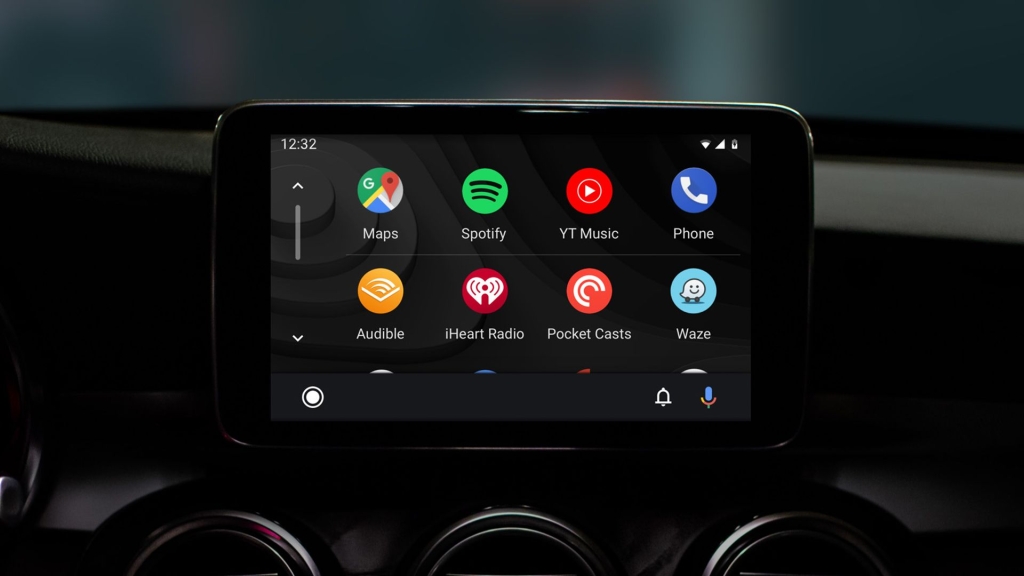
Google Fixes Annoying Android Auto Bug That Silenced Passengers’ Phones
In a quiet but significant update, Google has restored a long-missed Bluetooth detection feature in Android Auto that’s already making waves among drivers and passengers alike.
The Problem That Drove Everyone Crazy
For months, Android Auto users have been battling with an infuriating glitch: the system’s motion-based driving detection was too aggressive, automatically triggering Do Not Disturb mode and silencing notifications not just for drivers, but for everyone in the vehicle. Passengers found their phones mysteriously muted, missing important calls and alerts while simply riding along.
The issue stemmed from Android Auto’s reliance on motion sensors to determine when someone was “driving.” This binary approach meant that any detected movement—whether from the actual driver or a passenger fidgeting with their phone—would trigger the same blanket notification suppression.
The Bluetooth Solution Returns
Google’s fix brings back the smarter Bluetooth-based detection method that many users had grown accustomed to before it disappeared in earlier updates. Now, Android Auto will only enable Do Not Disturb when it detects a connection to a car’s dashboard system via Bluetooth—a far more reliable indicator that someone is actually behind the wheel.
This restoration represents Google’s acknowledgment that context matters. A phone connected to a car’s infotainment system through Bluetooth is a much stronger signal of driving intent than mere motion detection, which can be triggered by countless non-driving activities.
How to Check If You’ve Got the Fix
The update is rolling out gradually through Google Play Services version 26.05.32. To verify if your device has received the improvement:
- Open your phone’s Settings menu
- Navigate to “Modes” and select “Driving”
- Tap on “While driving” settings
- Look for the restored Bluetooth connection option
Pixel users will find this change most directly, while Samsung devices continue to lead with even more granular controls, including verification that the Bluetooth connection is specifically to an Android Auto-compatible dashboard rather than just any Bluetooth device.
Why This Matters for Road Safety
Beyond the convenience factor, this fix addresses a genuine safety concern. Distracted driving remains a leading cause of accidents, and notification overload while driving can be dangerous. However, the previous motion-based system created a different safety issue by potentially leaving passengers without access to their phones in emergency situations.
The Bluetooth-based approach strikes a better balance—maintaining driver focus while preserving passenger connectivity when needed.
The Bigger Picture for Android Auto
While this update solves a pressing annoyance, the broader Android Auto ecosystem continues evolving. Google’s next major Android release, version 17, is expected later this year with multiple enhancements, though specific Android Auto improvements haven’t been detailed yet.
For now, users can breathe easier knowing their passenger status won’t automatically render them digitally deaf. It’s a small change that demonstrates Google’s responsiveness to user feedback and its commitment to refining the driving experience.
Android Auto Bluetooth fix
Google Play Services update
Do Not Disturb while driving
Android Auto passenger mode
Motion detection Android Auto
Google fixes Android Auto bug
Android Auto notifications
Bluetooth car connection
Google Android update
Android Auto settings
Driving mode Android
Pixel Android Auto
Samsung Android Auto
Android Auto improvements
Google Play Services 26.05.32
Android Auto Bluetooth detection
Motion sensor Android Auto
Android Auto passenger issue
Google Android Auto fix
Android Auto Do Not Disturb
Car Bluetooth Android
Android Auto notification control
Google Android Auto update
Android Auto driving detection
Android Auto bug fix
Google Android Auto improvement
Android Auto passenger notifications
Android Auto Bluetooth connection
Google Android Auto settings
Android Auto motion detection fix
Android Auto passenger mode fix
Google Android Auto Bluetooth
Android Auto notification suppression
Android Auto driving mode
Google Android Auto bug
Android Auto passenger problem
Android Auto Bluetooth fix
Google Android Auto solution
Android Auto notification issue
Android Auto Bluetooth restore
Google Android Auto update
Android Auto passenger fix
Android Auto Bluetooth detection fix
Google Android Auto improvement
Android Auto notification control fix
Android Auto driving detection fix
Google Android Auto bug fix
Android Auto passenger notification fix
Android Auto Bluetooth connection fix
Google Android Auto solution fix
,

Leave a Reply
Want to join the discussion?Feel free to contribute!