
Apple Music buttons: What do they all do?
Apple Music’s Hidden Symbols: A Comprehensive Guide to Every Button, Icon, and Control
If you’ve ever stared blankly at Apple Music’s Now Playing screen wondering what all those mysterious symbols mean, you’re not alone. The streaming service’s interface is packed with tiny icons that seem designed to confuse rather than inform. From the enigmatic infinity symbol to the wavy lines that appear out of nowhere, navigating Apple Music can feel like deciphering ancient hieroglyphics.
This definitive guide breaks down every single button, symbol, and control you’ll encounter in Apple Music’s Now Playing screen—the heart of your music listening experience. Whether you’re a longtime Apple Music subscriber or a recent Spotify defector, you’ll finally understand what each cryptic icon actually does.
The Basic Controls: Play, Pause, Skip, and Favorite
Let’s start with the most recognizable symbols—the ones you probably figured out through trial and error. The triangular icons in the center of the Now Playing screen follow a design language that dates back to the 1960s when music lived on magnetic tape reels.
The Play ▶️ button does exactly what you’d expect—it starts or resumes playback. The Previous Track ⏪ button rewinds to the beginning of the current song, and tapping it again jumps to the previous track in your queue. The Next Track ⏩ button skips forward to whatever’s coming up next.
But here’s a pro tip many users miss: the Favorite ⭐ button (that star icon) is your secret weapon for training Apple Music’s algorithm. Every time you tap it on a track you love, the service learns more about your taste preferences. Over time, this seemingly simple action transforms your “For You” recommendations from generic suggestions to a personalized soundtrack that actually understands your musical soul.
Live Lyrics and Karaoke Mode: Sing Your Heart Out
In the bottom-left corner of the Now Playing screen sits what looks like a quotation mark icon. This unassuming symbol unlocks one of Apple Music’s most impressive features: Live Lyrics.
When you tap this button, the screen transforms to display perfectly timed lyrics that scroll in sync with the music. It’s like having a teleprompter for your favorite songs. The playback controls temporarily disappear, giving you an immersive lyrics experience. Want them back? Just tap the album artwork in the upper left corner.
But wait—there’s more. If you’re in Live Lyrics mode, you’ll notice a microphone icon on the right side. This activates Sing, Apple Music’s built-in karaoke feature. When enabled, Sing automatically lowers the original vocal track, letting you (and your friends) take center stage. You can fine-tune the experience using the Vocal Volume slider—slide up to hear more of the original vocals, slide down to make them nearly disappear.
This feature is perfect for parties, road trips, or those moments when you’re convinced you could be the next pop star if only someone would give you a chance. And yes, it works even if your friends don’t have Apple Music subscriptions—they just need the Music app installed.
AirPlay and SharePlay: Control Your Audio Everywhere
Just to the right of the Live Lyrics button, you’ll find the audio output control. What you see here depends on your current setup.
If you’re not connected to headphones or AirPods, you’ll see the AirPlay icon (a triangle with circles). Tapping this reveals all available playback destinations: your iPhone’s speakers, connected headphones, nearby AirPlay-compatible devices like Macs or Apple TVs, and even smart speakers from other manufacturers that support AirPlay.
Here’s a game-changing feature: if there’s an Apple TV nearby, you can tap the All Speakers & TVs button to switch control to that device, with your iPhone functioning as a remote control. Imagine queuing up a party playlist on your phone, then seamlessly switching playback to your living room sound system with a single tap.
If you’re connected to a car or Bluetooth speaker, you might see a SharePlay button instead. This collaborative feature lets multiple people control playback and add songs to the queue simultaneously. It’s perfect for long drives—no more awkward phone-passing when someone wants to play their favorite track. The best part? Your passengers don’t need Apple Music subscriptions; they just need the Music app.
The Playing Next Menu: Your Queue Command Center
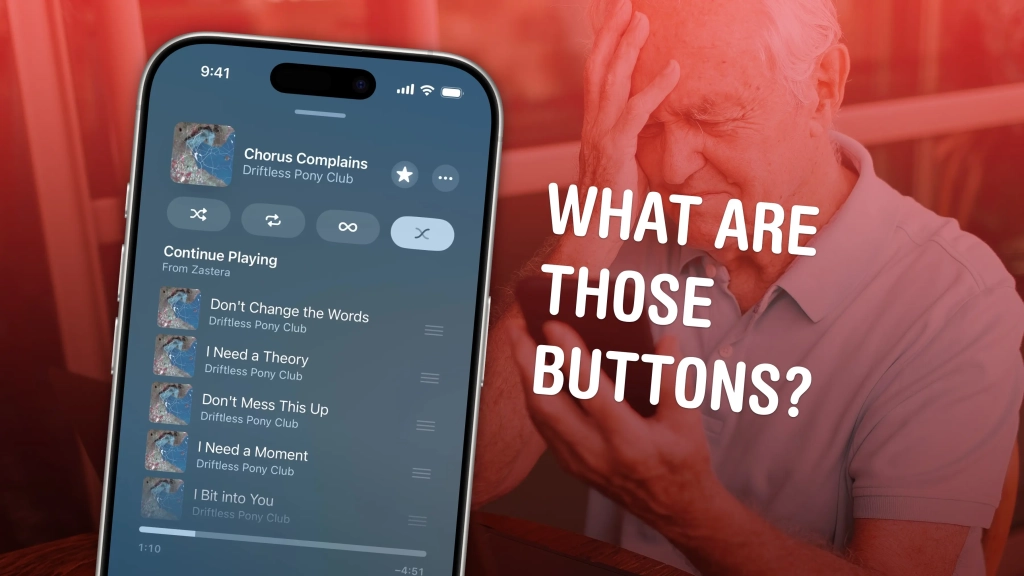
The button in the bottom-right corner of the Now Playing screen opens the Playing Next menu—arguably the most powerful yet overlooked feature in Apple Music.
The “Queue” section shows every song you’ve lined up to play next. This is where the magic happens: you can build custom playlists on the fly, rearrange tracks with simple drag-and-drop gestures, or remove songs you’re no longer feeling. Swipe left on any song to remove it, or tap Clear to wipe the entire queue clean.
Below the Queue, the “Continue Playing” section automatically populates with songs from whatever playlist, album, or radio station you started with. It’s Apple Music’s way of keeping the music flowing when your manual queue runs dry.
Scroll up in this menu to access your playback history. Tap any previously played song to jump back to it instantly. This history feature is particularly useful when you hear something amazing but forget to add it to your library—just scroll back through and save it before it disappears into the musical ether.
The Mystery Buttons: Shuffle, Repeat, Autoplay, and Automix
At the top of the Playing Next menu sit four buttons that desperately need labels. From left to right, here’s what they actually do:
Shuffle randomizes the order of songs in your Queue and Continue Playing lists. It’s perfect when you want to rediscover tracks you haven’t heard in a while or when you’re tired of listening to albums in the same order.
Repeat cycles through three states: repeat all songs, repeat the current song only, and repeat off. Tap once for repeat all, twice for single-song repeat (great for that one track you can’t stop playing), and a third time to disable it completely.
Autoplay is your musical guardian angel. When enabled, it automatically adds similar songs to the end of your queue when it runs low, ensuring you never experience that awkward silence between tracks. It’s like having a DJ who knows exactly what you want to hear next.
Automix is where things get really interesting. This feature acts like a professional DJ, automatically blending the end of one song into the beginning of the next. It adjusts tempo and key to create seamless transitions, and can even skip through long silences or quiet endings. If you’ve ever wished your music would flow together like a continuous mix, Automix is your answer.
Pro Tips and Hidden Features
Want to see your year in music? Apple Music Replay generates personalized statistics showing your top songs, artists, and albums for the entire year, complete with an annual playlist of your most-played tracks. It’s like Spotify Wrapped, but available all year round.
Classical music lovers, rejoice! Apple Music Classical is a dedicated app (included free with your Apple Music subscription) featuring a specialized interface designed specifically for navigating the complexities of classical compositions. Say goodbye to searching for “Symphony No. 5 in C minor” and hello to intuitive browsing by composer, work, conductor, and orchestra.
Music Haptics brings a whole new dimension to your listening experience. If you have an iPhone with a Taptic Engine, this feature lets you feel the beat physically through vibrations in your hand. It’s particularly immersive when using headphones or in situations where you can’t play music out loud.
For the social butterflies, SharePlay isn’t just for car rides. You can use it to collaboratively build playlists with friends, whether you’re in the same room or halfway across the world. Everyone can add tracks, rearrange the queue, and control playback—it’s like being the DJ at a virtual party.
Master Your Music Experience
Understanding these symbols and controls transforms Apple Music from a confusing jumble of icons into a powerful, personalized music platform. Each button serves a purpose, from the basic play controls to the advanced features like Automix and Music Haptics.
The next time you open Apple Music’s Now Playing screen, you’ll know exactly what each symbol does—no more guessing, no more frustration, just pure musical enjoyment. Whether you’re building the perfect party playlist, singing along to your favorite tracks, or just trying to figure out how to stop that one song from repeating endlessly, you now have the knowledge to take complete control of your listening experience.
Tags & Viral Phrases:
Apple Music symbols explained, Apple Music buttons guide, Apple Music Now Playing screen, Apple Music karaoke mode, Apple Music Live Lyrics, Apple Music AirPlay, Apple Music SharePlay, Apple Music queue, Apple Music Shuffle, Apple Music Repeat, Apple Music Autoplay, Apple Music Automix, Apple Music tips and tricks, Apple Music hidden features, Apple Music tutorial, Apple Music controls, Apple Music interface guide, Apple Music symbols meaning, Apple Music button functions, Apple Music playback controls, Apple Music features explained, Apple Music user guide, Apple Music navigation, Apple Music playlist management, Apple Music streaming tips, Apple Music subscription benefits, Apple Music vs Spotify, Apple Music best features, Apple Music how to, Apple Music setup guide, Apple Music customization, Apple Music advanced features, Apple Music pro tips, Apple Music complete guide, Apple Music everything you need to know, Apple Music ultimate guide, Apple Music beginner’s guide, Apple Music expert tips, Apple Music music discovery, Apple Music personalization, Apple Music recommendations, Apple Music algorithm, Apple Music listening experience, Apple Music music control, Apple Music audio output, Apple Music collaborative listening, Apple Music party mode, Apple Music road trip essentials, Apple Music karaoke party, Apple Music DJ features, Apple Music seamless transitions, Apple Music music mixing, Apple Music beat matching, Apple Music vibration feedback, Apple Music haptic feedback, Apple Music physical feedback, Apple Music touch controls, Apple Music gesture controls, Apple Music swipe gestures, Apple Music tap controls, Apple Music icon meanings, Apple Music symbol guide, Apple Music interface icons, Apple Music control panel, Apple Music music management, Apple Music song queue, Apple Music playback history, Apple Music song favorites, Apple Music star ratings, Apple Music music preferences, Apple Music taste training, Apple Music algorithm learning, Apple Music personalized recommendations, Apple Music custom playlists, Apple Music smart playlists, Apple Music automatic playlists, Apple Music music discovery features, Apple Music new music recommendations, Apple Music similar artists, Apple Music related tracks, Apple Music music exploration, Apple Music genre discovery, Apple Music mood-based playlists, Apple Music activity playlists, Apple Music workout music, Apple Music study music, Apple Music relaxation music, Apple Music sleep sounds, Apple Music ambient music, Apple Music background music, Apple Music focus music, Apple Music concentration music, Apple Music productivity music, Apple Music creativity music, Apple Music inspiration music, Apple Music motivation music, Apple Music energy music, Apple Music calming music, Apple Music uplifting music, Apple Music emotional music, Apple Music nostalgic music, Apple Music throwback music, Apple Music current hits, Apple Music trending music, Apple Music popular songs, Apple Music viral tracks, Apple Music chart music, Apple Music top 40, Apple Music billboard hits, Apple Music music charts, Apple Music music rankings, Apple Music song popularity, Apple Music artist discovery, Apple Music new artists, Apple Music emerging artists, Apple Music underground music, Apple Music indie artists, Apple Music alternative music, Apple Music rock music, Apple Music pop music, Apple Music hip hop music, Apple Music electronic music, Apple Music dance music, Apple Music country music, Apple Music jazz music, Apple Music blues music, Apple Music classical music, Apple Music world music, Apple Music international music, Apple Music multilingual music, Apple Music language learning, Apple Music cultural music, Apple Music traditional music, Apple Music folk music, Apple Music acoustic music, Apple Music instrumental music, Apple Music vocal music, Apple Music a cappella music, Apple Music live music, Apple Music concert recordings, Apple Music studio recordings, Apple Music demo recordings, Apple Music remix music, Apple Music cover songs, Apple Music tribute music, Apple Music soundtrack music, Apple Music score music, Apple Music film music, Apple Music television music, Apple Music video game music, Apple Music podcast music, Apple Music spoken word, Apple Music poetry, Apple Music audiobooks, Apple Music educational content, Apple Music language content, Apple Music cultural content, Apple Music historical content, Apple Music archival content, Apple Music rare recordings, Apple Music exclusive content, Apple Music original content, Apple Music curated content, Apple Music expert curation, Apple Music algorithmic curation, Apple Music human curation, Apple Music music experts, Apple Music DJ curation, Apple Music artist curation, Apple Music influencer curation, Apple Music community curation, Apple Music user-generated content, Apple Music social features, Apple Music sharing features, Apple Music collaboration features, Apple Music community features, Apple Music social listening, Apple Music group listening, Apple Music family sharing, Apple Music friend sharing, Apple Music public playlists, Apple Music private playlists, Apple Music collaborative playlists, Apple Music playlist sharing, Apple Music song sharing, Apple Music album sharing, Apple Music artist sharing, Apple Music music discovery sharing, Apple Music recommendation sharing, Apple Music taste sharing, Apple Music music conversations, Apple Music music discussions, Apple Music music communities, Apple Music music forums, Apple Music music groups, Apple Music music clubs, Apple Music music societies, Apple Music music organizations, Apple Music music institutions, Apple Music music education, Apple Music music learning, Apple Music music theory, Apple Music music history, Apple Music music appreciation, Apple Music music analysis, Apple Music music criticism, Apple Music music journalism, Apple Music music writing, Apple Music music blogging, Apple Music music podcasting, Apple Music music video, Apple Music music streaming, Apple Music music downloads, Apple Music music storage, Apple Music music backup, Apple Music music synchronization, Apple Music music cross-platform, Apple Music music integration, Apple Music music ecosystem, Apple Music music platform, Apple Music music service, Apple Music music subscription, Apple Music music pricing, Apple Music music plans, Apple Music music tiers, Apple Music music features, Apple Music music benefits, Apple Music music value, Apple Music music quality, Apple Music music resolution, Apple Music music formats, Apple Music music codecs, Apple Music music compression, Apple Music music streaming quality, Apple Music music audio quality, Apple Music music sound quality, Apple Music music fidelity, Apple Music music experience, Apple Music music enjoyment, Apple Music music satisfaction, Apple Music music happiness, Apple Music music emotions, Apple Music music feelings, Apple Music music impact, Apple Music music influence, Apple Music music power, Apple Music music magic, Apple Music music wonder, Apple Music music awe, Apple Music music inspiration, Apple Music music creativity, Apple Music music expression, Apple Music music communication, Apple Music music connection, Apple Music music bonding, Apple Music music relationships, Apple Music music memories, Apple Music music nostalgia, Apple Music music time travel, Apple Music music history, Apple Music music future, Apple Music music evolution, Apple Music music progress, Apple Music music innovation, Apple Music music technology, Apple Music music advancement, Apple Music music development, Apple Music music growth, Apple Music music expansion, Apple Music music exploration, Apple Music music adventure, Apple Music music journey, Apple Music music discovery, Apple Music music treasure, Apple Music music gems, Apple Music music hidden treasures, Apple Music music secrets, Apple Music music mysteries, Apple Music music puzzles, Apple Music music challenges, Apple Music music games, Apple Music music fun, Apple Music music entertainment, Apple Music music leisure, Apple Music music relaxation, Apple Music music therapy, Apple Music music healing, Apple Music music wellness, Apple Music music health, Apple Music music mindfulness, Apple Music music meditation, Apple Music music yoga, Apple Music music exercise, Apple Music music fitness, Apple Music music workout, Apple Music music training, Apple Music music performance, Apple Music music practice, Apple Music music rehearsal, Apple Music music preparation, Apple Music music readiness, Apple Music music confidence, Apple Music music courage, Apple Music music bravery, Apple Music music strength, Apple Music music power, Apple Music music energy, Apple Music music vitality, Apple Music music life, Apple Music music living, Apple Music music breathing, Apple Music music heartbeat, Apple Music music pulse, Apple Music music rhythm, Apple Music music beat, Apple Music music tempo, Apple Music music speed, Apple Music music pace, Apple Music music flow, Apple Music music movement, Apple Music music dance, Apple Music music groove, Apple Music music swing, Apple Music music bounce, Apple Music music sway, Apple Music music rock, Apple Music music roll, Apple Music music slide, Apple Music music glide, Apple Music music float, Apple Music music soar, Apple Music music fly, Apple Music music dream, Apple Music music imagination, Apple Music music fantasy, Apple Music music escape, Apple Music music journey, Apple Music music adventure, Apple Music music exploration, Apple Music music discovery, Apple Music music treasure, Apple Music music gems, Apple Music music hidden treasures, Apple Music music secrets, Apple Music music mysteries, Apple Music music puzzles, Apple Music music challenges, Apple Music music games, Apple Music music fun, Apple Music music entertainment, Apple Music music leisure, Apple Music music relaxation, Apple Music music therapy, Apple Music music healing, Apple Music music wellness, Apple Music music health, Apple Music music mindfulness, Apple Music music meditation, Apple Music music yoga, Apple Music music exercise, Apple Music music fitness, Apple Music music workout, Apple Music music training, Apple Music music performance, Apple Music music practice, Apple Music music rehearsal, Apple Music music preparation, Apple Music music readiness, Apple Music music confidence, Apple Music music courage, Apple Music music bravery, Apple Music music strength, Apple Music music power, Apple Music music energy, Apple Music music vitality, Apple Music music life, Apple Music music living, Apple Music music breathing, Apple Music music heartbeat, Apple Music music pulse, Apple Music music rhythm, Apple Music music beat, Apple Music music tempo, Apple Music music speed, Apple Music music pace, Apple Music music flow, Apple Music music movement, Apple Music music dance, Apple Music music groove, Apple Music music swing, Apple Music music bounce, Apple Music music sway, Apple Music music rock, Apple Music music roll, Apple Music music slide, Apple Music music glide, Apple Music music float, Apple Music music soar, Apple Music music fly, Apple Music music dream, Apple Music music imagination, Apple Music music fantasy, Apple Music music escape
,


Leave a Reply
Want to join the discussion?Feel free to contribute!