
Apple Watch texting: How custom replies make it bearable
Make Texting More Bearable with Custom Apple Watch Replies
Apple Watch texting is notoriously cumbersome, but a few simple tweaks can transform your wrist-based messaging experience. Setting up personalized canned replies makes responding on your watch faster, more natural, and actually useful.
Apple Watch Texting: A Modern Frustration
Texting on the Apple Watch remains one of its most frustrating limitations. Whether you’re using the tiny on-screen keyboard available on newer Series or Ultra models or relying on dictation, the experience often falls short. The small display makes typing challenging, while voice dictation frequently misinterprets proper nouns and homophones.
The Apple Watch excels at displaying notifications—one of its greatest strengths—allowing you to quickly glance at your wrist to see who’s calling or texting. However, replying effectively has always been its Achilles’ heel.
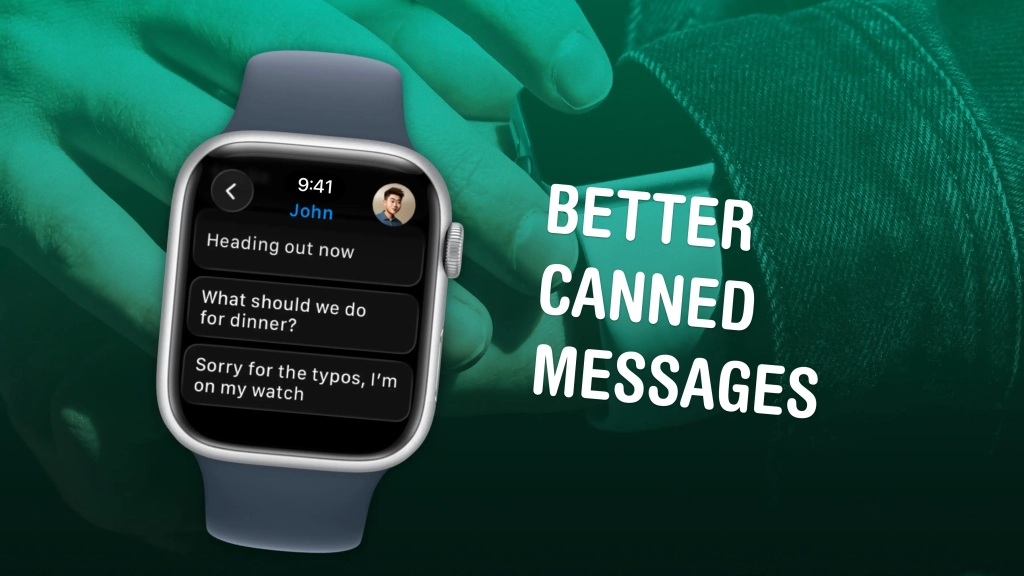
Apple includes a default set of pre-written messages you can send with a simple tap, but these generic options often fail to capture the nuances of real conversation. Fortunately, customizing these replies is straightforward and can dramatically improve your Apple Watch messaging experience.
Transform Your Apple Watch Texting Experience
Add Personalized Text Replies
On your iPhone, open the Watch app (located in the Utilities folder of your App Library). Scroll down to Messages, then tap Default Replies. This is where you can customize your quick response options.
Tap Add reply… to create your own messages. Consider adding responses you actually use in daily conversations:
- “Sorry can’t talk right now” – A more natural way to indicate unavailability
- “Okay!” – Adds personality compared to the flat “Ok”
- “Sounds good” – A versatile affirmative response
- “I don’t know” – Surprisingly absent from Apple’s defaults
- “Maybe” – Perfect for non-committal responses
- “Heading out now” – Convenient for on-the-go situations
- “What should we do for dinner?” – Because we all ask this too late
- “Sorry for the typos, I’m on my watch” – A helpful disclaimer when technology fails
Remove and Reorganize Default Replies
Tap Edit at the top of the screen to delete built-in options you never use, such as “Ok” or “Can I call you later?” You can also drag the grabber on the right side to rearrange the order. Place your most frequently used replies at the top for faster access.
Tap Done (the checkmark in the upper right) to save your changes.
Pro Tips for Apple Watch Power Users
- Water Lock: Learn how to use Water Lock on Apple Watch to protect your device during water activities
- Do Not Disturb: Master silencing your Apple Watch with Do Not Disturb and Theater Mode
- Time Management: Discover the easy Apple Watch hack that keeps you on time, even if you’re chronically late
- Activity Tracking: Understand how to track your Apple Watch activity rings and manage your streak
- Gym Integration: Learn how to connect your Apple Watch to a Planet Fitness treadmill
- Find My iPhone: Never lose your phone again with Apple Watch’s built-in iPhone finder
By customizing your Apple Watch replies, you’ll transform a frustrating experience into a seamless extension of your communication style. The few minutes spent setting up personalized responses will save you countless headaches and make your Apple Watch feel more like a true communication companion rather than just a notification display.
Tags: Apple Watch, texting tips, custom replies, wearable tech, iPhone integration, messaging hacks, smartwatch productivity, Apple ecosystem
Viral phrases: “Game-changing Apple Watch hack,” “Stop struggling with tiny keyboards,” “The secret to better Apple Watch texting,” “Transform your wrist into a messaging powerhouse,” “Finally, texting that doesn’t suck on your watch”
,


Leave a Reply
Want to join the discussion?Feel free to contribute!