
Apple @ Work: DDM OS Reminder 2.0 fixes the biggest flaw in Declarative Device Management software updates
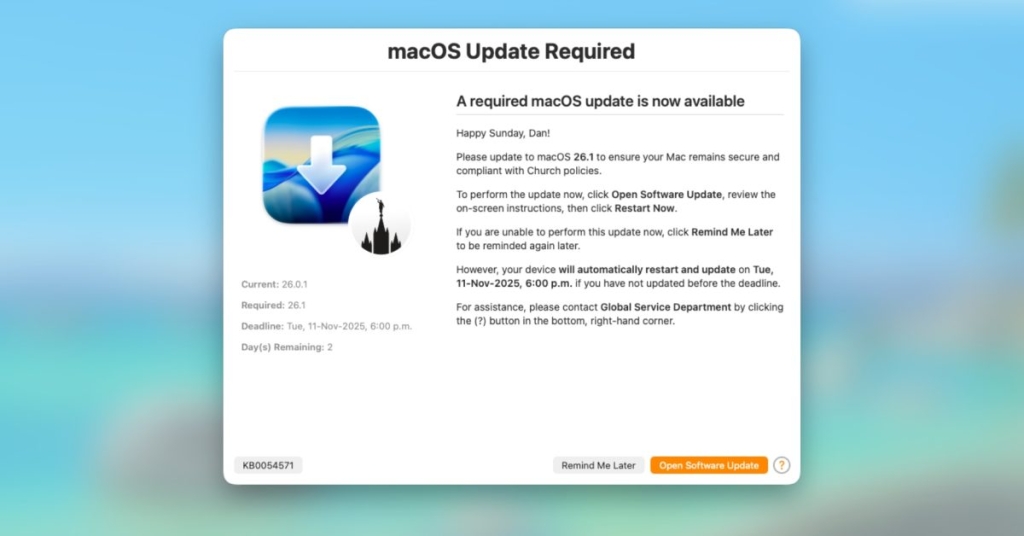
Apple’s Declarative Device Management Just Got a Major Upgrade — Here’s Why IT Pros Are Rejoicing
Apple’s Declarative Device Management (DDM) has officially transitioned from a futuristic concept to the present-day standard for enterprise device management. This paradigm shift moves the intelligence from centralized servers directly onto the devices themselves, creating a faster, more autonomous, and significantly more reliable management experience for IT teams worldwide.
For software updates specifically, DDM represents a quantum leap forward. Administrators can now set firm deadlines, and devices autonomously enforce these timelines without constant server communication. This approach elegantly solves numerous pain points that plagued legacy management systems, where devices would frequently check in with servers, creating delays and inconsistencies.
However, as many IT professionals have discovered through real-world deployment, Apple’s native DDM notifications suffer from being too subtle for enterprise environments. The understated alerts that work perfectly for home users become problematic when applied to knowledge workers who might lose unsaved work to an unexpected forced restart. This gap between enforcement capability and user communication has been a persistent challenge.
Enter DDM OS Reminder 2.0 — the ingenious solution that bridges this critical communication divide and has IT administrators buzzing with excitement.
The Problem It Solves
The core issue is straightforward yet critical: Apple designed DDM notifications to be unintrusive by default, which creates friction in professional settings. When a macOS update is pending with an enforced deadline, the native system alerts are easily missed, ignored, or misunderstood by end users.
DDM OS Reminder operates as a local agent on managed devices. It employs a LaunchDaemon that continuously monitors the /var/log/install.log file, specifically watching for entries that indicate a DDM-enforced software update with an approaching deadline. Upon detecting an imminent deadline, the tool leverages swiftDialog to present clear, actionable notifications to users.
What makes this solution particularly clever is its “intelligently intrusive” approach. The application can detect whether a user is currently in an active online meeting through platforms like Zoom or Microsoft Teams, preventing disruptive interruptions during critical presentations. Users receive a clear countdown timer and the option to initiate the update on their own schedule before the automatic forced restart occurs.
Version 2.0: A Complete Overhaul
The original DDM OS Reminder was already impressive, but it required direct script modification for customization — a process that wasn’t ideal for enterprise deployment. Version 2.0 represents a fundamental reimagining of the user experience and administrative workflow.
Configuration Profile Support
This headline feature transforms how administrators interact with the tool. Instead of editing scripts directly to modify settings, icons, or messaging, IT teams can now deploy standard .mobileconfig profiles through their existing device management infrastructure. This architectural change separates configuration from logic, enabling rapid updates to notification content or deadline thresholds without redeploying the entire application package.
Demo Mode
Testing update notifications in production environments has traditionally been challenging — administrators would need to wait for actual macOS updates to become available. Version 2.0 introduces “Demo Mode,” allowing IT teams to simulate the complete user experience without waiting for Apple’s release cycle. This capability enables thorough testing and user training without disrupting actual workflows.
Refactored Logic
The “Blur Screen” feature, designed to capture user attention as deadlines approach, has undergone significant refinement. The logic has transitioned from day-based calculations to second-based precision, giving administrators unprecedented control over the timing and intensity of final alerts. This granular control ensures that users receive appropriate notification levels based on their specific organizational policies and user base characteristics.
The Impact on Enterprise IT
With DDM now serving as the modern standard for macOS software update management, organizations need communication tools that match the reliability and sophistication of the enforcement mechanisms. DDM OS Reminder eliminates the “surprise factor” of forced reboots while providing users with comprehensive information about what’s happening and why.
The tool represents more than just a notification system — it’s a complete user experience enhancement that respects both organizational security requirements and individual productivity needs. By giving users agency within enforced boundaries, it reduces support tickets, minimizes productivity disruption, and improves overall compliance with update policies.
Looking Forward
Version 3.0.0 is already in its first alpha release, with multi-language support on the horizon — a crucial feature for global enterprises managing diverse, international workforces. The development team’s commitment to continuous improvement suggests this tool will remain at the forefront of enterprise macOS management solutions.
For IT administrators managing Apple device fleets, DDM OS Reminder 2.0 isn’t just a nice-to-have utility — it’s becoming an essential component of any comprehensive DDM deployment strategy.
Tags & Viral Phrases:
- Apple DDM
- Declarative Device Management
- macOS enterprise management
- IT admin tools
- Software update notifications
- Enterprise Apple devices
- Forced restart prevention
- User communication tools
- swiftDialog integration
- Configuration profile deployment
- Demo mode testing
- Blur screen notifications
- LaunchDaemon monitoring
- Install.log parsing
- Multi-language support coming
- Version 2.0 release
- Enterprise macOS updates
- Knowledge worker productivity
- Meeting detection technology
- Update deadline enforcement
- Apple @ Work solutions
- Mosyle partnership
- IT management revolution
- Enterprise device security
- User experience enhancement
- Support ticket reduction
- Compliance improvement
- Global enterprise tools
- Apple ecosystem management
- IT department must-have
- Enterprise software deployment
- User empowerment tools
- Professional device management
- Apple enterprise solutions
- IT infrastructure modernization
- Device management evolution
- Enterprise Apple strategy
- macOS update management
- IT workflow optimization
- Enterprise technology trends
- Apple business solutions
- Device lifecycle management
- Enterprise IT innovation
- Apple device deployment
- Professional Apple management
- Enterprise technology stack
- Apple business transformation
- IT operational excellence
- Enterprise Apple adoption
- Apple enterprise ecosystem
,

Leave a Reply
Want to join the discussion?Feel free to contribute!