
Beelink ME Pro mini PC + NAS review
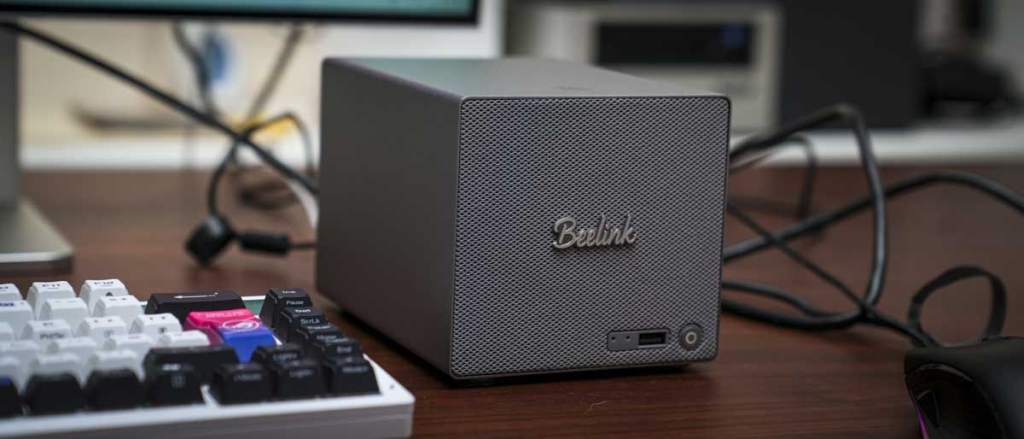
Beelink ME Pro: The Ultimate Hybrid Mini PC and NAS Solution
Why You Can Trust This Review
We’ve spent countless hours testing the Beelink ME Pro to bring you an in-depth, honest review. Our rigorous testing process ensures you get the most accurate information before making your purchase decision.
Beelink ME Pro: 30-Second Review
The Beelink ME Pro is a revolutionary hybrid device that combines the functionality of a Mini PC and a Network Attached Storage (NAS) system in one compact package. Powered by the Intel N95 CPU with integrated Intel UHD graphics, this versatile machine comes pre-installed with Windows 11 Home, making it incredibly user-friendly for those familiar with the Windows ecosystem.
At its core, the ME Pro is designed to be a powerful storage solution that can be accessed by multiple devices across your network. Whether you’re using Windows, macOS, or Linux, you can easily connect to the ME Pro and access its internal storage just like any traditional NAS.
But the ME Pro doesn’t stop there. It’s also fully capable of serving as your media server, with support for various NAS operating systems like TrueNAS, UNRAID, and FNOS. You can even run Linux or virtual machines such as Proxmox or ESXi, making this device incredibly versatile for different use cases.
During our extensive testing, we utilized the pre-installed Windows 11 Home OS and configured network access for Apple computers, allowing us to use our wired network as a central resource for storing files. The experience was seamless, and we were impressed by the device’s capabilities.
Design and Build Quality
One of the first things that struck us about the Beelink ME Pro was its exceptional build quality. The device is incredibly well-thought-out, with a premium all-metal construction that feels solid and durable. Despite its powerful capabilities, the ME Pro is surprisingly compact, measuring just 166 x 121 x 112 mm and weighing 2.1 kg without drives or power adapter.
The modular design is particularly noteworthy. While currently only available with Intel N95 or N150 motherboards, the ability to swap out the motherboard for future AMD or ARM options adds a layer of future-proofing that’s rare in this category.
Storage installation is straightforward and well-designed. The two 3.5-inch drive bays pull out easily, allowing you to install large-capacity HDDs. Beelink has paid special attention to vibration reduction, using a holder design that’s superior to the loose plastic grommet systems found in many NAS devices.
The three M.2 SSD slots are equally well-implemented, with the device shipping with a pre-installed 120GB SSD containing Windows 11 Home. During testing, we installed additional SSDs to experiment with different operating systems, including TrueNAS.
Cooling has been a major focus in the design. Air is drawn through the front and base of the machine, pushed through the system, and exhausted out the back above the motherboard. This comprehensive cooling solution ensures optimal performance even under heavy load.
Connectivity and Ports
The ME Pro offers an impressive array of connectivity options. On the rear, you’ll find two LAN ports – one 2.5GbE and one 5GbE – providing lightning-fast network speeds. There’s also an HDMI port for direct monitor connection, two USB-A ports, and a USB-C port with 10Gbps transfer speeds.
The front of the device features another USB Type-A port, which proved incredibly useful during our testing. We were able to keep our keyboard and mouse plugged into the rear ports while using the front port for installing operating systems from USB keys, without having to reconfigure anything.
Storage Capabilities
The storage potential of the ME Pro is truly impressive. Each of the two 3.5-inch bays can accommodate up to 30TB HDDs, while the three M.2 NVMe slots can each take 4TB drives. This brings the total potential storage capacity to an astounding 72TB – one of the highest capacities we’ve seen in a device of this size.
During our testing, we installed two 4TB Western Digital Red drives and configured them using Windows’ storage spaces feature, which is equivalent to RAID 0. This gave us 8TB of fast, accessible storage that we used for backing up images and video files.
Performance
The Intel N95 CPU, while not the most powerful on the market, is perfectly suited for the ME Pro’s intended use cases. Our benchmark results showed:
- CrystalDiskMark Read: 212.58 MB/s
- CrystalDiskMark Write: 204.26 MB/s
- Geekbench CPU Multi: 2034
- Geekbench CPU Single: 1056
- Geekbench GPU: 3190
- PCMark Overall: 2786
These scores reflect a machine that’s optimized for storage and media serving rather than high-performance computing tasks. The integrated UHD graphics performed admirably for video playback and streaming, handling 4K content without issues.
The low power consumption of the N95 CPU is a significant advantage for a NAS device. You can leave the ME Pro running 24/7 without worrying about excessive electricity costs, making it an economical choice for always-on storage solutions.
Software and Operating Systems
One of the ME Pro’s greatest strengths is its software flexibility. Out of the box, it comes with Windows 11 Home pre-installed, which makes initial setup and everyday use incredibly straightforward. The familiar Windows interface means that even users with limited IT experience can get up and running quickly.
However, the device’s capabilities extend far beyond Windows. You can install various NAS operating systems like TrueNAS, UNRAID, or FNOS. During our testing, we installed TrueNAS on one of the M.2 slots and found the process to be relatively simple, though it did require creating a bootable USB key.
The ability to run virtual machines adds another layer of versatility. You could potentially have Windows 11 on one SSD, a NAS OS on another, and a virtual machine on the third, tailoring the system to your specific needs.
Real-World Usage
In practical terms, the ME Pro excelled as a network storage solution. After initial setup, we used it as a central repository for our office’s image and video files. The speed over the wired network was impressive, and once we configured the two WD Red drives for shared access, all machines on the network could easily connect and use the storage.
We also experimented with using the ME Pro as a media server, installing Plex to stream content throughout our home and office. The integrated graphics handled 4K streaming admirably, and the low power consumption meant we could leave it running continuously without concern.
For office work, the ME Pro is adequate but not exceptional. Basic tasks like word processing, web browsing, and email work fine, but more demanding applications may struggle. This isn’t a criticism – it’s simply a reflection of the device’s optimization for storage and media serving rather than general computing.
Value Proposition
The Beelink ME Pro offers excellent value, especially considering its versatility. The base model with Intel N95, 12GB LPDDR5 RAM, and 128GB SSD starts around $369, while the upgraded Intel N150 version with 16GB RAM and 1TB SSD is approximately $529.
When you consider that you’re getting both a capable mini PC and a robust NAS solution in one device, the pricing becomes even more attractive. The ability to expand storage up to 72TB means the device can grow with your needs, potentially saving you from having to purchase separate storage solutions as your requirements increase.
Who Should Buy the Beelink ME Pro?
The ME Pro is ideal for:
- Home office users who need reliable network storage without complex setup
- Media enthusiasts who want a dedicated media server
- Small businesses looking for an affordable NAS solution
- Tech enthusiasts who want a flexible platform for experimentation
- Anyone who needs a compact, powerful storage solution with expandability
Who Might Want to Look Elsewhere?
You might want to consider other options if:
- You need a high-performance mini PC for gaming or intensive applications
- You require advanced NAS features and enterprise-level functionality
- You prefer a dedicated NAS device with more processing power
- You need extensive software support and regular updates
Final Verdict
The Beelink ME Pro represents an impressive achievement in compact computing. It successfully bridges the gap between mini PC and NAS, offering a solution that’s both powerful and accessible. The build quality is excellent, the storage options are extensive, and the software flexibility is commendable.
While it may not replace a high-end gaming PC or a professional-grade NAS, it excels in its intended role as a versatile, user-friendly storage and media serving solution. The combination of Windows 11 Home pre-installation, extensive storage options, and the ability to run various operating systems makes it one of the most flexible devices in its category.
For home offices, small businesses, and tech enthusiasts looking for an all-in-one solution that won’t break the bank, the Beelink ME Pro is definitely worth considering. It’s not just a device – it’s a platform that can adapt to your changing needs over time.
Tags: #BeelinkMEPro #MiniPC #NAS #NetworkAttachedStorage #Windows11 #MediaServer #HomeLab #TechReview #StorageSolution #CompactPC
Viral Phrases:
- “72TB of storage in a device smaller than a shoebox”
- “The Swiss Army knife of home networking”
- “Windows 11 meets enterprise-grade storage”
- “Future-proof modular design that grows with your needs”
- “Plug-and-play NAS that even your grandma could set up”
- “The affordable alternative to expensive NAS solutions”
- “Gaming rig? No. Storage powerhouse? Absolutely”
- “Low power consumption meets high capacity”
- “From office work to 4K streaming and everything in between”
- “The device that replaces three separate machines”
,

Leave a Reply
Want to join the discussion?Feel free to contribute!