
BenQ PD2706QN QHD monitor review
BenQ PD2706QN Review: A Color-Accurate Powerhouse That Doesn’t Break the Bank
In the ever-evolving world of monitors, we’ve officially entered the era of 4K dominance. It’s becoming increasingly difficult to find displays that aren’t 4K these days, as manufacturers chase the coveted 4K badge. However, in this race to pack more pixels, some companies have lost sight of what truly matters for creative professionals: color accuracy.
For business users who don’t need their reds to be the perfect red or their blacks to be absolute black, this may not be a significant issue. But for those working in the creative space, particularly in design where colors are your world, accuracy and factory calibration are paramount.
BenQ recognized this gap in the market and created the PD2706QN, focusing on achieving color accuracy in their pixels rather than just chasing density. For creatives and designers working in photo editing, illustration, graphic design, and more, this monitor is not just a welcome addition to the market – it’s a gap that BenQ has filled with ease.
BenQ PD2706QN: Price and Availability
The BenQ PD2706QN retails for around $400 and is available at various online retailers. However, at the time of this review, it’s discounted to an impressive $280 on Amazon.com. In the UK, it’s similarly widely available, priced at £300 on Amazon.co.uk.
For that price, it’s a solid monitor. BenQ also offers higher-end PD displays with greater resolution for a few hundred dollars more, but if you don’t need 4K, the PD2706QN may be the better choice.
BenQ PD2706QN: Design & Build Quality
BenQ has always excelled at build quality, striking an excellent balance between price and craftsmanship across every monitor I’ve tested. The PD2706QN features a functional stand that gets the job done – though I do miss their Ergo lineup. Since BenQ now sells dedicated monitor arms, I’ll forgive this and consider using one across multiple displays.
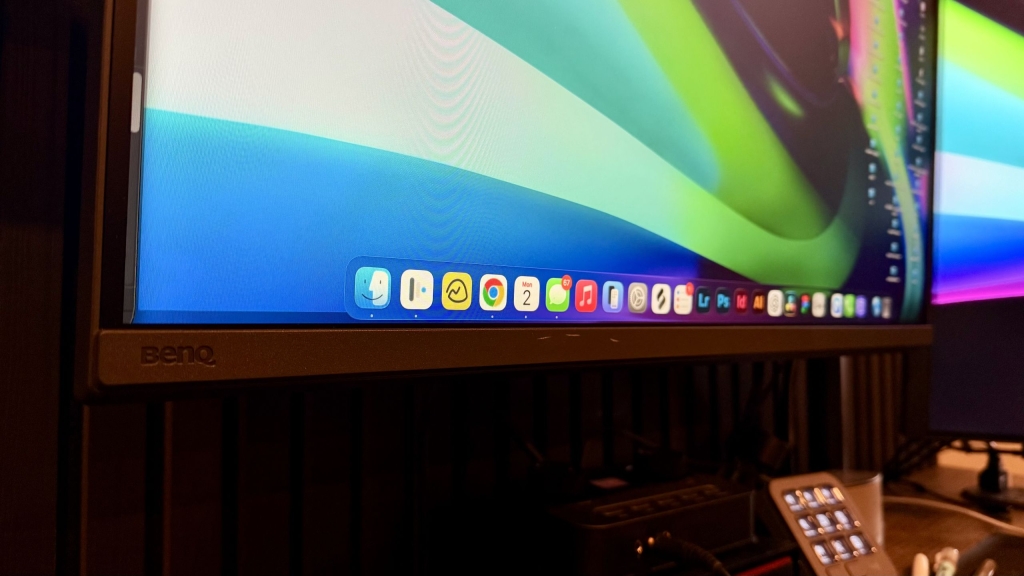
The Nano Matte display is absolutely phenomenal. The screen remains high-precision, blocks light beautifully, and reduces glare, even when direct light hits the display. Even when light hits the panel directly, color accuracy stays sharp and precise, making it easier to keep your projects as picture-perfect as possible, whether you are editing during the day or at night.
The physical build of this panel is clean and professional without being boring or dated. It has relatively slim bezels and a matte black finish on the casing, keeping it looking professional and sleek. This is the kind of monitor you don’t feel the need to hide behind a wall – you can showcase it on your desk without it feeling too loud.
The stand is pretty good, too. I’ve not been a fan of basic monitor stands for quite some time now, but this one gets the job done. It’s nothing fancy, and I’d still prefer the ergo arms personally, but if you really want that feel, you can pop your monitor on a monitor arm like I usually do.
Some monitors feel premium, like the notorious Apple monitors and other pro-tier monitors, and some feel cheap. The BenQ PD2706QN is a nice middle ground. It can blend in if needed, but it can also fit on a higher-end desk. Though odds are this tier display would be used on more budget-conscious setups.
BenQ PD2706QN: In Use
The BenQ PD2706QN has been a great display for my team and me over the last three months. A member of my team or I have used it nearly daily over that span, and we have put it to the test and then some. This monitor has been used mostly for creative work, including Photoshop, Illustrator, Web Design, Video Editing in DaVinci Resolve, and more. It’s been great for ensuring color consistency across all projects.
Since BenQ emphasizes skin tone accuracy and shadow detail, we tested it extensively – not just in theory, but in real-world use. We work extensively with photos of people in our projects, so we edited them as we normally would using the PD2706QN and found that this panel reproduced a wide range of skin tones exceptionally well.
We also used this display as a reference monitor for a podcast recording, plugging the camera directly into the HDMI port to ensure we were in frame, properly focused, and had correct settings. Since BenQ included standard display inputs on this monitor, we easily switched between camera monitoring and editing – connecting our MacBook via USB-C, charging while connected, and switching between devices with the simple on-screen controls.
An upgrade over previous models, this unit offers a 100Hz refresh rate, making video playback and editing buttery-smooth. It’s not 120Hz, yes, but for our editing experience, we didn’t notice any massive loss in productivity or usability. I will say that for our 4K edits, we would cross-check some shots on the MacBook Pro display to confirm they looked good, but we were always pleased with the 4K output, even though we couldn’t fully appreciate it on this display.
Moving on, I used this monitor for some web design and coding. While it’s not a dedicated programming monitor like the BenQ RD280UG (Review Coming Soon, currently in progress), it does a great job of showing deep blacks in a terminal and even in a blank web design window.
For day-to-day productivity and business tasks, this monitor shines. It’s smooth, it looks great, there is no glare from the gorgeous Nano Matte coating, and the 100Hz refresh rate reduces eye strain, helping us use the panel all day with less fatigue than we would experience with other monitors. In our testing, we had users on this panel for admittedly 6 or even 9-hour days+ pretty frequently, with no excessive fatigue, discomfort, or desire to switch to another monitor.
BenQ PD2706QN: Final Verdict
The BenQ PD2706QN occupies a smart position in the monitor market. It delivers factory-calibrated color accuracy that matches displays costing hundreds more, while staying practical for designers who don’t need 4K resolution for their daily work.
After three months of real-world testing across photo editing, design work, and video projects, this monitor proved itself as a reliable workhorse. If you prioritize accurate, consistent color over pixel density, and want professional results without a professional price tag, the PD2706QN delivers exactly what it promises.
Tags and Viral Phrases:
- Color-accurate monitor
- Factory-calibrated display
- Creative professional monitor
- BenQ PD2706QN review
- Best monitor for photo editing
- Affordable pro monitor
- Nano Matte display technology
- 100Hz refresh rate monitor
- USB-C hub monitor
- DCI-P3 color gamut
- Delta E ≤ 2 accuracy
- Design and illustration monitor
- Video editing monitor
- Skin tone accuracy
- Shadow detail performance
- Professional color reproduction
- Budget-friendly creative monitor
- Monitor for graphic designers
- Photo editing display
- Web design monitor
- Coding monitor with great blacks
- Eye-friendly monitor for long hours
- BenQ color accuracy champion
- QHD resolution professional monitor
- Best value color-accurate monitor
- Creative workflow enhancer
- Design studio essential
- Professional monitor under $300
- Color-critical work display
- BenQ Nano Matte coating
- Accurate color reproduction
- Monitor for creative professionals
- Design monitor with USB-C
- Factory-calibrated for creatives
- Color-accurate workhorse
- Professional results without premium price
- Reliable creative monitor
- Consistent color across projects
- Monitor for Photoshop and Illustrator
- Video editing with accurate colors
- Design monitor for long sessions
- Affordable professional display
- Color-accurate monitor for designers
- Best monitor for illustration
- Graphic design display
- Creative monitor with great build quality
- Monitor for photo retouching
- Design monitor with slim bezels
- Professional monitor with 100Hz
- Color-critical monitor for creatives
- BenQ PD series monitor
- Monitor for creative workflow
- Accurate colors for design work
- Professional monitor for creatives
- Color-accurate display for designers
- Best monitor for creative professionals
- Design monitor with great color accuracy
- Monitor for creative productivity
- Color-accurate monitor for photo editing
- Professional monitor for illustration
- Design monitor with USB-C hub
- Monitor for creative professionals on a budget
- Color-accurate display for graphic design
- Professional monitor for video editing
- Design monitor with Nano Matte coating
- Monitor for creative work and productivity
- Color-accurate monitor for web design
- Professional monitor for coding and design
- Design monitor with great build quality
- Monitor for creative professionals and designers
- Color-accurate display for creative work
- Professional monitor for creative workflow
- Design monitor with accurate colors
- Monitor for creative professionals and illustrators
- Color-accurate display for photo retouching
- Professional monitor for graphic designers
- Design monitor with 100Hz refresh rate
- Monitor for creative productivity and comfort
- Color-accurate monitor for creative professionals
- Professional monitor for design and illustration
- Design monitor with great color reproduction
- Monitor for creative work and long hours
- Color-accurate display for creative professionals
- Professional monitor for creative workflow and productivity
- Design monitor with accurate colors and great build quality
- Monitor for creative professionals, designers, and illustrators
- Color-accurate display for creative work and photo editing
- Professional monitor for creative workflow, productivity, and comfort
,

Leave a Reply
Want to join the discussion?Feel free to contribute!