
Circle to Search is still Google’s best AI feature — these are 3 clever ways to use it
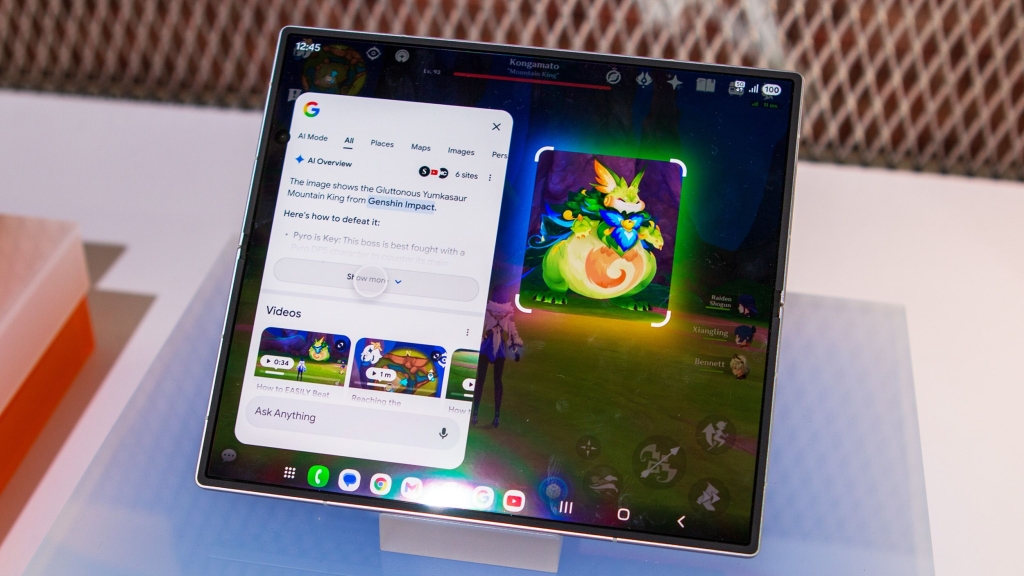
Circle to Search: The AI Feature That Keeps Getting Better
Two years after its debut, Google’s Circle to Search remains one of Android’s most practical and versatile AI tools. While flashy new AI features have grabbed headlines, this quietly powerful feature has evolved significantly since its introduction alongside the Samsung Galaxy S24 series.
What started as a simple way to circle content on your screen and search has transformed into a multifunctional AI powerhouse that can replace several standalone apps. Here are three Circle to Search capabilities that make it indispensable in 2026:
Remix Anything on Your Screen with Nano Banana
You might not realize that Circle to Search gives you direct access to Nano Banana, Google’s generative AI image creation and editing model. Instead of opening separate apps like Gemini or Google Messages, you can activate Circle to Search, circle any photo on your screen, and tap the “Create” button featuring the Nano Banana emoji.
This opens a Google AI Mode conversation right within the Circle to Search interface. You can make changes to photos, add elements, or request both simultaneously. Need to blur sensitive information in a screenshot? Want to transform a boring spreadsheet into an engaging graphic? Circle to Search eliminates the hassle of importing files as context in other apps.
The feature complements Circle to Search’s crop and share function perfectly. Rather than taking a screenshot and manually cropping it, you can simply circle what you want and export it instantly.
Translate Text Instantly Without a Separate App
Circle to Search’s full-screen translation feature is a game-changer for anyone dealing with foreign language content. Unlike apps that require copy-pasting or manual selection, Circle to Search translates all text on your screen instantly, working anywhere in Android.
Google significantly upgraded this feature late last year by adding scrolling support. Now, the translation continues as you move through apps or websites, eliminating the need to activate Circle to Search multiple times for content that doesn’t fit on a single screen.
While you could use the Google Translate app, Circle to Search’s convenience factor is unmatched—it works in any app or website without switching between applications.
Scan QR Codes and Barcodes on Your Screen
Scanning QR codes and barcodes is straightforward when they’re printed or on another device, but it becomes trickier when they appear within apps or websites on your own phone. Circle to Search solves this elegantly.
When you activate Circle to Search on a barcode or QR code displayed on your screen, it intelligently detects the code and presents an action chip. You can copy the code or follow the link to a website directly. This proves invaluable for eSIM activations, joining Wi-Fi networks, or sharing various types of data presented through QR codes.
The Genius of Context-Aware AI
What makes Circle to Search truly remarkable is its context-aware intelligence. The feature presents different tools based on what’s on your screen: Nano Banana for images, translation for text, and scanning for codes. This adaptive approach could make Circle to Search replace not just Google Lens, but also Pixel Studio, Google Translate, and several other apps.
Two years in, Circle to Search may go down in history as Android’s best AI feature. It masterfully blends artificial intelligence with practical benefits, making tasks like selecting text, searching images, using generative AI, and scanning codes significantly easier. Add in features like song recognition and on-screen translation, and you have a tool that keeps getting better without becoming cluttered or complicated.
If you’re still only using Circle to Search for basic Google searches or Google Lens access, you’re missing out on its full potential. It’s the one AI tool that belongs on every Android phone, and its continuous evolution suggests it will only become more essential in the years to come.
Tags: Circle to Search, Google AI, Android features, Nano Banana, QR code scanning, real-time translation, generative AI, mobile productivity, AI tools, Google Pixel
Viral phrases: “The AI feature that keeps getting better,” “Replace multiple apps with one tool,” “Context-aware intelligence at its finest,” “Android’s best-kept secret,” “AI that actually makes life easier,” “The future of mobile interaction,” “Why you’re not using this enough,” “Google’s quiet revolution,” “The feature that does it all,” “AI evolution in your pocket”
,


Leave a Reply
Want to join the discussion?Feel free to contribute!