
Claude in PowerPoint expands to Pro subscribers with connector support and double usage promo
Anthropic Expands Claude’s PowerPoint Integration to All Paid Users, Doubles Usage Limits in Limited-Time Offer
In a strategic move to deepen its foothold in the enterprise productivity space, Anthropic has announced that its Claude in PowerPoint extension is now available to Pro subscribers, expanding access beyond its initial rollout to Max, Team, and Enterprise users. The expansion comes alongside a limited-time promotion doubling usage limits for all paid plans until March 19, signaling the company’s aggressive push to embed its AI assistant directly into workplace workflows.
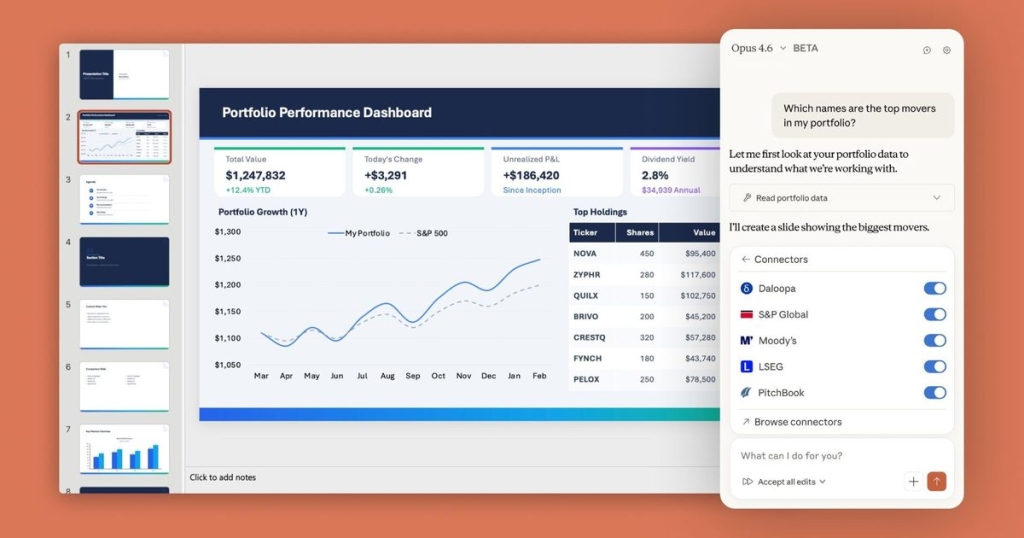
The announcement, made via Anthropic’s official X (formerly Twitter) account, also revealed that Claude in PowerPoint now supports connectors—a feature that allows the AI to pull information from linked apps and services, providing richer context when generating or updating presentations. This enhancement transforms Claude from a simple slide generator into a connected knowledge assistant capable of synthesizing information across multiple platforms.
From Research Preview to Mainstream Tool
Initially launched as a research preview, Claude in PowerPoint has evolved rapidly since its debut. The extension functions as an add-in that brings Anthropic’s large language model directly into the Microsoft PowerPoint workflow, eliminating the need to switch between applications when creating or refining presentations. Users can now describe what they need in natural language—whether generating an entirely new deck, rewriting existing content, or restructuring slides—and Claude handles the heavy lifting.
The tool’s capabilities extend far beyond basic text generation. Claude can revise selected content without requiring users to rework entire presentations, intelligently adapting to match existing layouts, themes, and formatting. Perhaps most impressively, it can transform bullet points into editable native PowerPoint charts and diagrams, dramatically reducing the time professionals spend manually building visual elements.
Connectors: The Game-Changing Feature
The introduction of connector support represents a significant leap forward in Claude’s utility. By allowing the AI to access information from linked applications, Anthropic has effectively created a presentation assistant that can draw from multiple data sources to create more informed, contextually relevant slides.
Setting up connectors is straightforward: users simply open the Claude sidebar within PowerPoint, select the connectors icon, and choose from available options. While specific partner integrations weren’t detailed in the announcement, the potential applications are vast—imagine Claude pulling real-time sales data from a CRM, financial figures from accounting software, or project metrics from project management tools directly into your presentation.
This capability addresses one of the most time-consuming aspects of presentation creation: gathering and synthesizing information from disparate sources. Instead of manually copying data between applications, users can now instruct Claude to “create a quarterly performance deck using the latest sales figures and marketing metrics,” and the AI will handle the integration automatically.
The Double Usage Promotion: A Strategic Play
The decision to double usage limits for all paid plans until March 19 appears calculated to drive adoption during a critical growth period. By removing usage constraints temporarily, Anthropic is encouraging users to fully explore Claude’s PowerPoint capabilities without hesitation—a classic “try before you buy” strategy that could convert casual users into long-term subscribers.
This promotion also serves as a stress test, allowing Anthropic to gather valuable usage data and identify potential scaling issues before the feature becomes a permanent offering. The company’s transparency about the extension being in “research preview” suggests they’re still refining the tool based on real-world feedback.
Best Practices and Limitations
Anthropic is candid about the current limitations of Claude in PowerPoint. The company explicitly states that, as a research preview, the tool is best suited for iterative editing and drafting rather than highly sensitive or final deliverables. This positioning is prudent given the inherent challenges of AI-generated content, including occasional inaccuracies or formatting inconsistencies.
Users should approach the tool as a powerful assistant rather than an autonomous presentation designer. While Claude excels at generating content and basic layouts, human oversight remains essential for ensuring accuracy, maintaining brand consistency, and making strategic decisions about presentation flow and messaging.
The extension is available through the Microsoft Marketplace, making installation straightforward for organizations already using PowerPoint. However, users should verify compatibility with their specific PowerPoint version and operating system before deployment.
The Broader Implications
Claude’s expansion into PowerPoint represents more than just another AI productivity tool—it signals a fundamental shift in how knowledge workers will interact with presentation software. The traditional PowerPoint workflow, which typically involves hours of manual content creation, formatting, and data integration, is being reimagined through the lens of conversational AI.
This development also intensifies the competition in the AI productivity space. While Microsoft has its own Copilot integration for Office applications, Anthropic’s approach with Claude emphasizes flexibility and cross-platform connectivity through its connector system. The company appears to be positioning Claude as a more open, adaptable alternative to native AI assistants.
For businesses, the implications are significant. Teams that adopt Claude in PowerPoint could see substantial productivity gains, particularly in industries where presentations are a core communication tool—consulting, sales, marketing, education, and corporate training, to name a few. The ability to generate polished presentations quickly while maintaining the option for granular control could become a competitive advantage.
Looking Ahead
As the March 19 deadline for the doubled usage promotion approaches, all eyes will be on adoption metrics and user feedback. Will Anthropic make the increased limits permanent? How will they price the feature once the promotion ends? And perhaps most importantly, how will competitors respond to this aggressive move into the PowerPoint ecosystem?
The answers to these questions could shape the future of AI-assisted productivity tools. For now, Pro subscribers have a unique opportunity to explore Claude’s full PowerPoint capabilities without usage restrictions—a window that may close quickly as Anthropic evaluates the feature’s performance and commercial potential.
What’s clear is that the line between AI assistants and traditional productivity software continues to blur. With Claude now embedded directly in PowerPoint, Anthropic has taken a significant step toward making AI an indispensable part of the modern workplace workflow—one slide at a time.
Tags
Claude AI, Anthropic, Microsoft PowerPoint, AI productivity tools, presentation software, workplace automation, connectors, research preview, Pro subscribers, enterprise AI, large language models, productivity enhancement, business technology, AI integration, digital transformation
Viral Phrases
“AI that writes your slides while you sip coffee,” “Goodbye manual PowerPoint formatting forever,” “Claude just ate my presentation workload,” “The future of work is already in your PowerPoint,” “Double the AI, double the productivity,” “Connectors that make your data dance,” “Research preview that feels like the future,” “Anthropic’s Trojan horse in Office 365,” “Slide decks generated in seconds, not hours,” “The AI assistant that actually understands context”
,


Leave a Reply
Want to join the discussion?Feel free to contribute!