
Compact Safari Tab Bar Returns in macOS Tahoe 26.4 and iPadOS 26.4
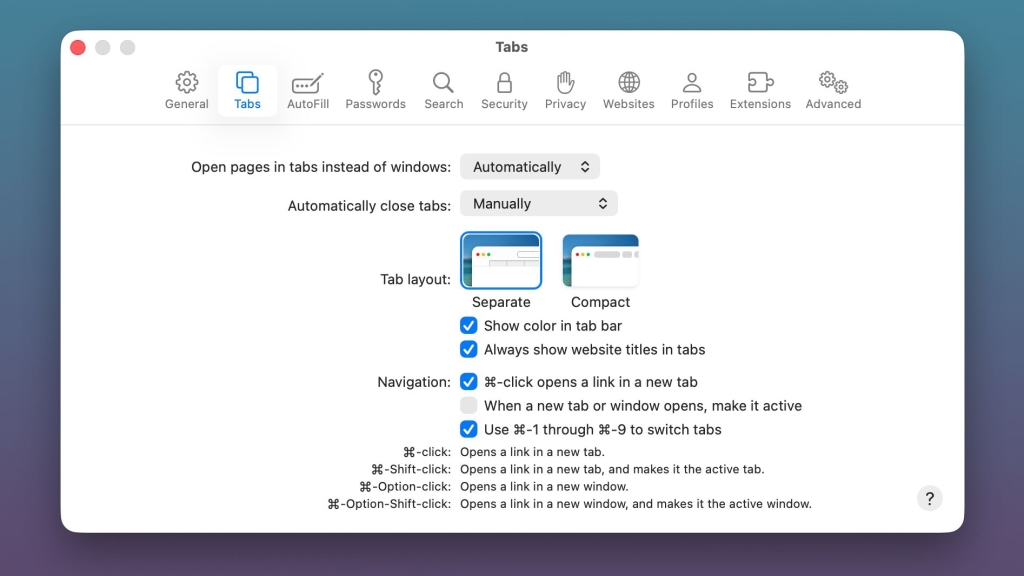
Apple Bends to User Demand: Compact Safari Tab Bar Returns in macOS Tahoe 26.4 Beta
In a surprising yet welcome move, Apple has reintroduced the beloved compact Safari Tab Bar option in the latest macOS Tahoe 26.4 and iPadOS 26.4 developer betas, just weeks after its controversial removal sparked frustration across the Mac and iPad user communities.
The tech giant, known for its bold design decisions, appears to have reversed course following an avalanche of user feedback. The compact tab bar—a streamlined alternative to the separate tab bar introduced with the initial Tahoe and iPadOS 26.4 releases—is now accessible through both the Safari app on Mac and the Safari section within the Settings app on iPad.
The Compact Tab Bar: A Beloved Feature Returns
For those unfamiliar with the distinction, the compact tab bar presents a more condensed browsing experience, displaying tabs inline with the address bar and search field. This design philosophy appeals to power users who prefer a minimalist interface that maximizes screen real estate—particularly valuable on smaller MacBook displays and iPad screens where every pixel counts.
The separate tab bar, which Apple initially pushed as the default, places tabs in their own dedicated horizontal space below the address bar. While this approach offers visual clarity and easier tab management for some users, many long-time Apple enthusiasts found it unnecessarily space-consuming and disruptive to their established workflows.
Developer Beta Signals Broader Rollout
Currently limited to developer beta participants, the macOS Tahoe 26.4 and iPadOS 26.4 updates are expected to reach public beta testers within the coming weeks. Industry analysts anticipate the final public release will arrive in spring 2026, giving Apple time to refine the implementation based on developer feedback.
This rapid turnaround demonstrates Apple’s growing responsiveness to user preferences—a departure from its historically top-down approach to interface design. The company has faced mounting pressure in recent years to balance its design vision with practical user needs, particularly as competitors like Microsoft and Google have become more aggressive in courting power users with customizable interfaces.
User Backlash and Corporate Response
The initial removal of the compact tab bar option drew sharp criticism from Apple’s most loyal user base. Forums and social media platforms buzzed with complaints from professionals who rely on Safari for daily productivity, many threatening to explore alternative browsers if Apple didn’t restore the feature.
Apple’s swift action suggests the company recognized the potential damage to user satisfaction and brand loyalty. This incident joins a growing list of instances where Apple has walked back controversial changes, including the butterfly keyboard fiasco and the initial removal of the escape key from MacBook Pro models.
Broader Implications for Apple’s Design Philosophy
The return of the compact tab bar raises interesting questions about Apple’s evolving approach to user experience design. For years, the company has championed a “we know best” mentality, often removing options in favor of streamlined defaults. However, the Safari tab bar reversal suggests a potential shift toward greater user agency and customization.
This development aligns with broader industry trends emphasizing personalization and user choice. As computing devices become increasingly central to professional and creative workflows, users are demanding more control over their digital environments. Apple’s apparent willingness to adapt signals recognition that even the most carefully crafted design decisions must ultimately serve user needs.
Technical Considerations and Implementation
From a technical perspective, the compact tab bar’s return required relatively minimal engineering effort. The feature essentially toggles between two CSS display modes within Safari’s interface, making it a straightforward addition rather than a complete redesign. This simplicity likely contributed to Apple’s decision to reintroduce it so quickly.
The implementation appears seamless, with users able to switch between compact and separate tab bars without restarting Safari or experiencing interface glitches. This smooth integration suggests the feature was always intended as an optional setting rather than a permanent removal, possibly indicating internal testing or a miscommunication during the initial Tahoe and iPadOS 26.4 rollout.
What This Means for the Future
As Apple continues to refine macOS Tahoe and iPadOS 26.4, the company’s responsiveness to user feedback on the tab bar issue may set a precedent for future development cycles. Users now have tangible evidence that vocal, organized feedback can influence Apple’s product decisions—potentially encouraging more constructive dialogue between the company and its user base.
The incident also highlights the delicate balance technology companies must strike between innovation and familiarity. While pushing boundaries and introducing new design paradigms remains crucial for progress, maintaining core functionality that users depend upon proves equally important for long-term platform success.
Looking Ahead: Spring 2026 Release
With the public beta expected in the coming weeks and a spring 2026 final release timeline, Apple has ample opportunity to gather additional feedback and make refinements. The company may use this window to introduce further customization options or address other pain points that emerged during the initial Tahoe and iPadOS 26.4 rollout.
For now, Safari users can breathe a sigh of relief knowing their preferred browsing experience remains intact. The compact tab bar’s return represents more than just a feature restoration—it symbolizes Apple’s growing recognition that its most passionate users are also its most valuable partners in product development.
Tags & Viral Phrases
- Apple caves to user demand
- Safari tab bar controversy
- macOS Tahoe 26.4 beta surprises
- Compact tab bar makes triumphant return
- Apple listens to feedback finally
- Tech giant reverses controversial decision
- Safari users celebrate victory
- Developer beta reveals hidden gems
- Apple’s design philosophy questioned
- Spring 2026 software update incoming
- iPadOS 26.4 matches macOS changes
- User experience takes priority
- Apple’s biggest U-turn yet
- Compact vs separate tab bar debate
- Power users rejoice
- Screen real estate matters
- Apple’s responsiveness tested
- Safari customization options expand
- Tech community celebrates small wins
- Apple’s evolving design approach
- User feedback shapes product development
- Compact tab bar saves the day
- Apple’s mea culpa moment
- Browser interface wars continue
- Spring software release excitement builds
,


Leave a Reply
Want to join the discussion?Feel free to contribute!