
Coolest (and weirdest) keyboards for Mac setups
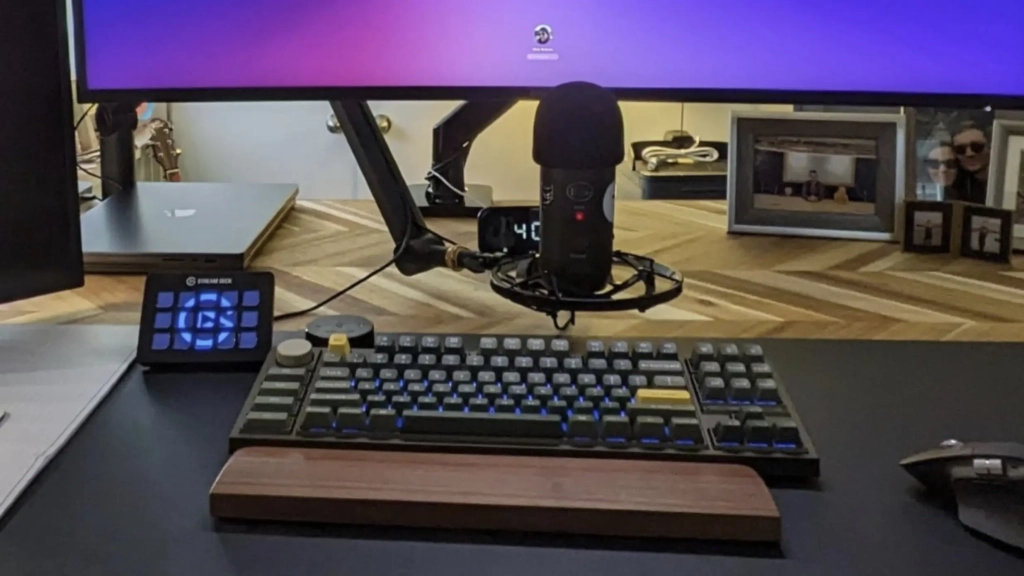
The Mechanical Keyboard Revolution: How Mac Users Are Ditching Apple’s Magic Keyboards
For years, Mac users contentedly typed away on Apple’s sleek but simple keyboards. Then the mechanical keyboard revolution really took off, transforming computer setups everywhere.
These days, more and more Mac enthusiasts are trading their Magic Keyboards for an astonishing variety of mechanical alternatives—some practical, some quirky, and some downright bizarre. I’ve collected 16 fascinating examples that showcase just how far this trend has gone.
The Mechanical Keyboard Boom
This post contains affiliate links. Cult of Mac may earn a commission when you use our links to buy items.
From transparent keycaps that showcase intricate internal mechanisms to split keyboards that look like they belong on a spaceship, the world of mechanical keyboards offers endless customization possibilities. These aren’t just about Mac-setup aesthetics, though. Beyond membrane-scissor-switch keyboards like Apple’s Magic Keyboard, mechanical keyboards promise better typing feel and increased durability. And, for gamers, they offer the crucial ability to register multiple simultaneous keystrokes without cancellation.
The keyboards featured here represent the full spectrum of what’s possible when function meets personal expression. You’ll find affordable entry points for newcomers, premium options for enthusiasts, and experimental layouts that challenge everything you thought you knew about typing. Some prioritize ergonomics with radical split designs, while others focus on portability with ultra-low profiles.
16 Coolest (and Weirdest) Keyboards in Mac Setups
16. Dual 5K Displays Meet Badass Mechanical Keyboard
I recently upgraded my own setup from dual 4K displays to a pair of 5K touchscreen displays—and finally dove into serious mechanical keyboards for the first time. Running an M4 Pro MacBook Pro as the daily driver, my workstation represents a significant leap forward in both visual real estate and typing experience with a heavy, high-profile, delightfully noisy Wobkey Rainy 75 mechanical keyboard.
The Wobkey Rainy 75 Silver Pro Mechanical Keyboard features a CNC aluminum construction that feels solid and sturdy, offering great typing sounds. It features triple-mode connectivity (Bluetooth, 2.4GHz wireless, and USB-C wired), RGB lighting, and VIA/QMK customization support. The keyboard’s heft and premium build quality make it feel like a serious piece of equipment rather than just another peripheral.
15. Ortholinear Keyboard Defies Convention
This setup pairs an unusual dual-display laptop configuration with an even more unusual mechanical keyboard featuring an ortholinear layout—the first such keyboard to appear in Cult of Mac’s setup coverage. Unlike traditional staggered keyboards, the ortholinear design arranges keys in straight columns and rows, reducing finger movement and theoretically increasing typing efficiency once users adapt to the unconventional grid pattern.
The YMDK ortholinear mechanical keyboard kit offers this unique typing experience with an anodized aluminum case, plate, and hot-swappable PCB. The ortholinear layout may look strange at first, but many users report increased typing speed and comfort once they’ve adapted to the grid pattern.
14. Slick But Affordable Mechanical Gaming Keyboard
For those curious about mechanical keyboards but hesitant to invest heavily, this MacBook Pro and gaming PC setup demonstrates an excellent entry point at just $40. Mechanical keyboards offer distinct advantages for gamers since simultaneous keystrokes register without cancellation—a limitation of membrane keyboards. This budget-friendly option provides a taste of mechanical customization without the typical premium price tag.
The Newmen GM1000 Wireless Mechanical Gaming Keyboard features Bluetooth 5.0/2.4GHz/USB-C connectivity, hot-swappable switches and keycaps, a number pad, RGB backlighting, and a choice of Gateron switches. At this price point, it’s an accessible way to experience the mechanical keyboard world.
13. Radically Split Keyboard Challenges Norms
This M2 Mac mini setup features one of the most unconventional keyboard designs imaginable: two completely separate halves positioned on either side of a Magic Trackpad 2. While some split keyboards maintain a somewhat traditional appearance, this particular model looks almost alien in comparison. The radical split design prioritizes ergonomic health over familiar aesthetics, offering a more natural hand position for extended typing sessions.
The Kinesis Advantage 360 Pro Split Keyboard takes this concept further with its contoured shape, adjustable tenting, and fully programmable layout. The split design allows each hand to type at a more natural angle, potentially reducing strain during long typing sessions.
12. Premium Realforce R3 Mechanical Keyboard
This MacBook Pro setup relies on a high-end Realforce R3 TKL mechanical keyboard paired with a Magic Trackpad. Like many laptop-based setups, the MacBook sits on a stand where accessing its built-in keyboard proves awkward or impossible. The pricey Realforce represents a premium solution for users who demand exceptional build quality and typing feel for their external keyboard setup.
The Realforce R3 TKL features genuine Topre capacitive switches, which offer a unique typing experience that’s neither fully mechanical nor membrane-based. The switches provide a smooth, consistent feel with a distinctive tactile bump that many typists find satisfying.
11. Keychron K10 Full-Size Mechanical Keyboard
This M1 Mac mini user enthusiastically recommends the Keychron K10, a full-size mechanical keyboard from a brand that appears frequently in Mac setups. While Keychron’s popular K line offers many affordable options, this full-size model with its complete number pad appears less often than compact alternatives. That’s because many users nowadays prefer smaller keyboards that save desk space.
The Keychron K10 Wireless Mechanical Gaming Keyboard offers 104 keys in a full-size layout with Gateron Brown switches, white LED backlighting, and rechargeable USB-C connectivity. It’s a solid choice for users who need a complete keyboard layout.
10. NZXT Function Gaming Keyboard Powers Mac Mini
This M1 Mac mini setup incorporates multiple devices from NZXT, a Los Angeles-based company specializing in high-performance gaming PCs and accessories. The centerpiece NZXT Function keyboard is a customizable mechanical option designed specifically for gamers. It features high-level functionality that caters to demanding gaming scenarios while working perfectly with Mac systems.
The NZXT Compact Tenkeyless Gaming Keyboard offers hot-swappable switches, RGB backlighting, an aluminum top plate, and sound-dampening foam. The tenkeyless design saves desk space while maintaining all the essential keys.
9. NuPhy Air75 v3 Low-Profile Wireless Keyboard
This Mac mini and Studio Display setup showcases the NuPhy Air75 v3 low-profile wireless mechanical keyboard and the BenQ ScreenBar Halo 2 monitor light. The NuPhy keyboard represents the latest evolution in low-profile mechanical keyboards, delivering the satisfying mechanical typing experience in a slimmer form factor than traditional mechanical options.
The NuPhy Air75 V2 Portable Mechanical Keyboard supports Bluetooth/2.4G/USB-C connectivity and features RGB lighting. Compatible with Windows/Mac OS/Linux systems, it offers Gateron Brown switches in a compact 75% layout.
8. Keychron Tenkeyless (TKL) Mechanical Keyboard
In an era where ultra-compact 60% layout keyboards dominate social media, this MacBook Pro setup takes a different approach with a tenkeyless keyboard—almost full-sized but without the number pad. The excellent Keychron mechanical keyboard offers customization options while maintaining a more traditional size that many typists find comfortable for extended use.
The Keychron Q3 Pro SE Wireless Custom Mechanical Keyboard features a full aluminum construction with QMK programmability, Bluetooth or wired operation, and hot-swappable Keychron K Pro Red Switches. The tenkeyless layout strikes a balance between compactness and functionality.
7. Velcro Touch ID Solution with Keychron Q1
This MacBook Pro user found an ingenious if unconventional solution for combining their preferred Keychron Q1 mechanical keyboard with Apple’s Touch ID functionality. They Velcroed a Magic Keyboard with Touch ID to the desk edge, keeping it within reach for biometric authentication while typing on their superior mechanical keyboard. That’s a practical hack for Touch ID enthusiasts who refuse to compromise on typing experience.
The Keychron Q1 Wired Custom Mechanical Keyboard offers a 75% layout with a control knob, QMK/VIA programmability, and hot-swappable Gateron G Pro Red switches. The wired connection ensures zero latency for gaming or intensive typing sessions.
6. Transparent Yunzii X75 Mechanical Keyboard
Following in the footsteps of the iconic iMac G3, transparent computer accessories cycle in and out of fashion. This MacBook Pro setup features the Yunzii X75 Mechanical Keyboard, capitalizing on the current moment for see-through designs. The crystal-clear construction showcases the keyboard’s internal mechanisms while adding visual interest to any desk setup.
The Yunzii X75 features 82 keys with transparent keycaps and switches, gasket mounts, and RGB backlighting. The hot-swappable design allows users to customize their typing experience by swapping out switches easily.
5. Keychron Q2, the Customization King
This M3 Pro MacBook Pro setup features a Keychron Q2 custom mechanical keyboard, representing the enthusiast approach to typing. Unlike those content with quiet membrane keyboards like Apple’s Magic Keyboard, some users obsess over customizing their mechanical keyboards with specific keycaps, switches, and design details. The Q2 offers excellent customization at a moderate price point.
The Keychron Q2 Wired Custom Mechanical Keyboard features an ultra-compact 65% layout with a customizable control knob and macro keys. The full aluminum construction and QMK programmability make it a favorite among keyboard enthusiasts.
4. NuPhy Air96 V2 Wireless Mechanical Keyboard
This M1 Pro MacBook Pro setup, run by a software developer, combines dual external displays with a compelling input device pairing: the ubiquitous Logitech MX Master 3S wireless mouse and the super-cool NuPhy Air96 V2 Wireless Mechanical Keyboard. The combination represents a popular choice among developers seeking both precision pointing and satisfying mechanical typing.
The NuPhy Air96 V2 features 100 keys with Grey Gateron Moss switches, Bluetooth 5.1/2.4G/wired connectivity, and hot-swappable switches. The low-profile design maintains the mechanical typing feel while reducing the overall height.
3. Model F Labs F77 Buckling Spring Keyboard
My colleague, Cult of Mac writer D. Griffin Jones, reviewed a mechanical keyboard that absolutely deserves to be on this list. He uses the Model F Labs F77 buckling spring keyboard in his M2 Pro Mac mini setup. Not only is it a great Mac keyboard, it’s highly unusual. It doesn’t use a classic mechanical switch. Instead of a plastic key sitting on a microswitch, it’s a plastic key sitting on a skinny metal spring. You push down on the key with your finger, the spring bends under the pressure, pushes down a metal lever, and you have typed a single letter.
The resulting typing experience is described as “sublime” with a distinctive tactile feedback that’s unlike any other keyboard switch. The buckling spring mechanism provides a crisp, tactile feel with a satisfying click that many typists find addictive.
2. NuPhy Halo75 with Custom Keycaps
This Mac Studio and dual-Studio Display setup showcases a NuPhy Halo75 mechanical gaming keyboard outfitted with custom keycaps. Mechanical keyboards appeal to enthusiasts for their nuanced typing feel, extensive customizability, and satisfying clickety-clackety sound. NuPhy provides numerous keycap and switch options, allowing users to fine-tune their keyboard’s appearance and performance.
The NuPhy Halo75 features a 75% layout with RGB lighting, Gateron G Pro Red 2.0 switches, and support for Bluetooth, 2.4G, and wired connections. The hot-swappable design makes it easy to experiment with different switches and keycaps.
1. Keychron Q3 Pro Custom Keyboard
This dual MacBook setup with dual displays features the beautiful Keychron Q3 Pro custom mechanical keyboard. While the two powerful MacBooks have perfectly functional built-in keyboards, the owner chooses to use this premium mechanical external keyboard instead—except perhaps when working away from the desk. The Q3 Pro represents the kind of quality that makes users abandon their laptops’ integrated keyboards entirely.
The Keychron Q3 Pro SE Wireless Custom Mechanical Keyboard features a full aluminum construction with QMK programmability, Bluetooth or wired operation, RGB backlighting, and hot-swappable Keychron K Pro Red Switches. The tenkeyless layout provides a compact footprint while maintaining all essential keys.
Tags: mechanical keyboard, Mac setup, custom keyboard, gaming keyboard, ergonomic keyboard, split keyboard, ortholinear keyboard, low-profile keyboard, transparent keyboard, buckling spring, Keychron, NuPhy, Realforce, Wobkey, NZXT, YMDK, Model F Labs
Viral Phrases: “mechanical keyboard revolution,” “ditching Apple’s Magic Keyboard,” “keyboard customization obsession,” “typing experience transformation,” “gaming keyboard advantages,” “ergonomic split design,” “transparent keyboard trend,” “buckling spring magic,” “custom keycaps obsession,” “keyboard enthusiast culture”
,

Leave a Reply
Want to join the discussion?Feel free to contribute!