
Copilot is now Microsoft’s peanut-butter cup
Microsoft’s Latest Copilot Update Blurs the Line Between App and Browser
In a move that feels like a tech version of the classic Reese’s Peanut Butter Cup ad—”You got peanut butter in my chocolate! You got chocolate in my peanut butter!”—Microsoft is once again mixing its digital ingredients. This time, the company is folding browser capabilities directly into the Copilot app, creating a hybrid experience that sits somewhere between a chatbot and a lightweight web browser.
For years, Microsoft’s AI assistant, Copilot, has been scattered across the Windows ecosystem. It’s embedded in Office apps like Word and PowerPoint, offering real-time suggestions and content generation. It’s also present in Edge, where it can summarize pages, rewrite text, and even answer questions about what you’re reading. But Copilot also exists as a standalone app—one that, until now, many users have largely ignored.
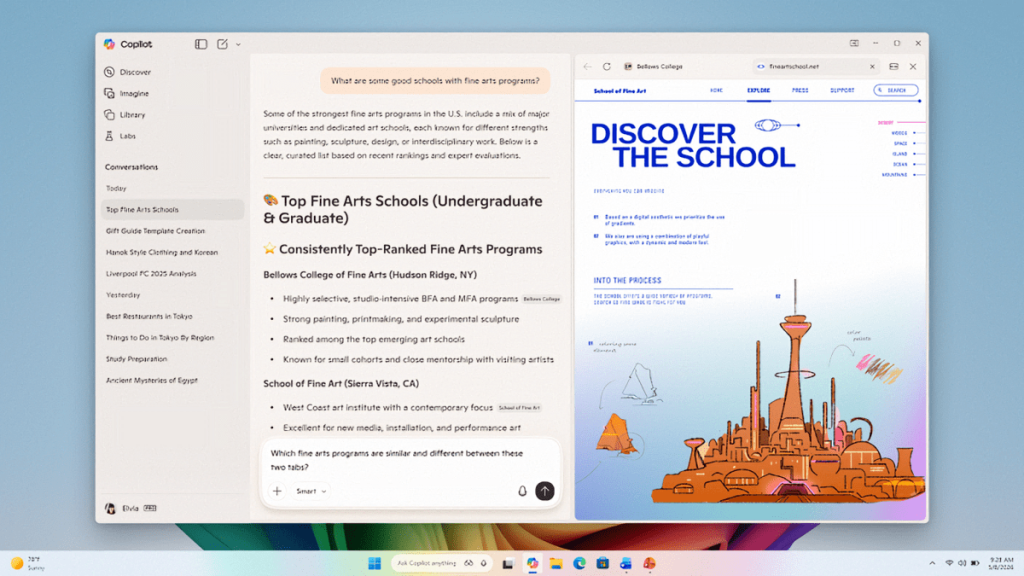
That’s about to change. In the latest beta builds of the Copilot app (version 146.0.3856.39 and higher), Microsoft is introducing integrated browser functionality. This means that within the Copilot app, users can now open web pages in a sidebar panel that stays tethered to the current conversation. The browser operates in a kind of sandbox: it only has access to the tabs opened during that specific chat, and those tabs are saved within the context of the conversation. Return to the chat later, and those same tabs will reappear, ready for you to pick up where you left off.
This development is more than just a feature update—it’s a strategic move. By embedding a browser inside Copilot, Microsoft is essentially creating a mini version of Edge within its AI assistant. Conversely, Edge already has Copilot built in, so the two are now circling each other in a kind of digital ouroboros. The goal appears to be making Copilot more useful and sticky, encouraging users to spend more time inside the app rather than bouncing between different tools.
Microsoft is rolling out these changes to all Insider channels, but not everyone will see the same features. Some functionalities, like Podcasts and Study and Learn mode (which were previously available on Copilot.com), are being added, while others may be temporarily removed as the company refines the experience. This iterative approach suggests Microsoft is still experimenting with the best way to integrate browsing and AI assistance.
The timing of this update is noteworthy. According to recent data from SimilarWeb, Copilot’s website usage accounts for just 1.1 percent of the AI market, trailing far behind ChatGPT’s 64.5 percent and Gemini’s 21 percent. Clearly, Microsoft is feeling the pressure to make Copilot more competitive. By adding browser capabilities, the company is betting that users will find more reasons to choose Copilot over rival AI tools.
But will this be the “two great tastes that go great together” moment Microsoft is hoping for? That remains to be seen. On one hand, the integration could make Copilot a more versatile tool, especially for users who want quick access to web information without leaving their AI assistant. On the other hand, there’s a risk of feature bloat—adding more capabilities could make the app feel cluttered or confusing, especially if the experience isn’t seamless.
There’s also the question of whether users actually want a browser inside their chatbot. Some might prefer the simplicity of dedicated apps, while others could appreciate the convenience of an all-in-one tool. Microsoft’s challenge will be to strike the right balance between functionality and usability.
For now, the new browser features are limited to beta testers, giving Microsoft a chance to gather feedback and iron out any kinks before a wider release. If the experiment is successful, it could signal a new direction for AI assistants—one where the lines between apps, browsers, and chatbots continue to blur.
In the end, this update is a reminder of how rapidly the tech landscape is evolving. What started as a simple AI assistant is now morphing into a multifaceted tool, capable of handling everything from document editing to web browsing. Whether this is the future of AI—or just another step in an ongoing experiment—only time will tell. But one thing is clear: Microsoft isn’t content to let Copilot remain a niche product. With this latest move, the company is making a bold bet on the power of integration.
Tags & Viral Phrases:
- Microsoft Copilot browser integration
- AI market share battle
- Copilot vs ChatGPT vs Gemini
- Browser inside chatbot
- Feature bloat in apps
- Tech crossover experiments
- Windows AI assistant evolution
- Beta testing new features
- Digital sandbox browsing
- Reese’s Peanut Butter Cup tech analogy
- Microsoft Edge vs Copilot
- AI assistant competition
- SimilarWeb AI usage stats
- Copilot app update
- Insider channel features
- Podcasts and Study mode in Copilot
- All-in-one AI tools
- Tech innovation or bloat?
- Microsoft’s AI strategy
- Future of AI assistants
,


Leave a Reply
Want to join the discussion?Feel free to contribute!