
Don’t let RAM clearance wreck your PC build
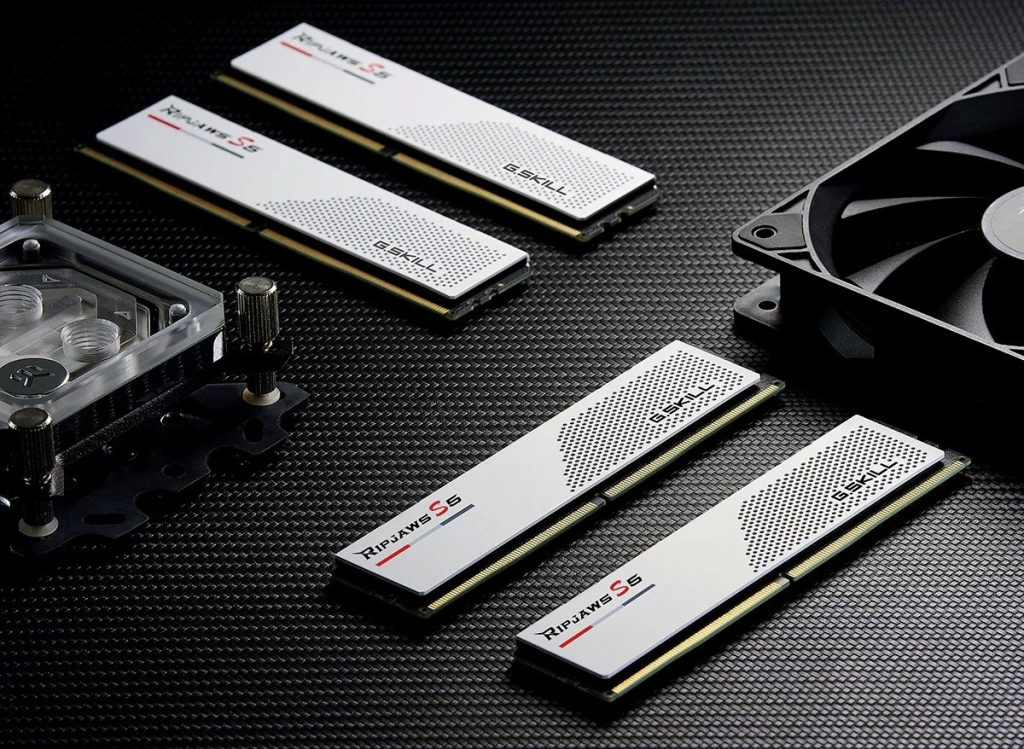
RAM Clearance: The Overlooked PC Building Challenge That Can Make or Break Your Setup
When assembling a high-performance PC, enthusiasts often focus on the latest CPUs, GPUs, and storage solutions. Yet, there’s a surprisingly common obstacle that catches many builders off guard: RAM clearance. This seemingly minor detail can transform what should be an exciting build into a frustrating puzzle of incompatible components.
The Space Crunch: When Coolers and RAM Clash
The heart of the problem lies in the physical dimensions of modern PC components. Tower-style CPU coolers, particularly those with large heat sinks and low-mounted fans, often extend far enough to interfere with RAM modules—especially those equipped with tall heat spreaders or elaborate RGB lighting.
Consider this scenario: You’ve invested in a premium air cooler with exceptional thermal performance, only to discover it blocks your RAM slots completely. The heat sink’s overhang leaves no room for your chosen memory modules, forcing you into an unwelcome choice between thermal performance and memory capacity.
Understanding RAM Clearance Specifications
Savvy builders know that successful PC assembly requires attention to specifications that aren’t always prominently displayed. Motherboard manufacturers typically provide clearance measurements around RAM slots, but these details often hide in the fine print of technical documentation.
Cooler manufacturers, meanwhile, usually specify maximum RAM height compatibility. This measurement indicates how tall your memory modules can be while still fitting beneath the cooler’s heat sink or fan assembly. These specifications become particularly critical when working with compact form factors like Micro-ATX or Mini-ITX motherboards, where space constraints amplify clearance challenges.
The Low-Profile Solution
For builders seeking maximum compatibility, low-profile RAM modules offer a practical solution. These memory sticks feature shorter heat spreaders that easily fit beneath even the most substantial CPU coolers. While they may sacrifice some aesthetic appeal compared to taller, more decorative modules, their functional advantage cannot be overstated.
Alternatively, all-in-one (AIO) liquid cooling systems present another path to RAM compatibility. By relocating the cooling apparatus away from the CPU socket area, AIO solutions free up the entire RAM region, eliminating clearance concerns entirely. This approach proves particularly valuable in compact builds where every millimeter matters.
Retrofitting: When Upgrades Create New Problems
The clearance challenge doesn’t only affect new builds. System upgrades often introduce unexpected complications. Adding memory to an existing system might seem straightforward, but if your current modules feature tall heat spreaders, installing additional sticks in adjacent slots could become impossible.
This issue intensifies when all four motherboard slots are populated. With memory modules occupying every available position, even minor dimensional differences between heat spreader designs can determine whether your system assembles smoothly or requires component swapping.
Cooler Orientation: The Hidden Variable
Another factor that significantly impacts RAM clearance is CPU cooler mounting orientation. Some high-performance coolers feature asymmetrical designs or heat pipe configurations that limit mounting options. When a cooler can only be installed in one specific orientation, the fan position becomes fixed—potentially creating clearance issues that wouldn’t exist with alternative mounting.
Motherboard layout also influences orientation possibilities. Certain designs position components in ways that restrict cooler mounting positions, further complicating the clearance equation.
Planning for Success
The most effective approach to RAM clearance involves proactive planning. Before purchasing components, cross-reference cooler specifications with your chosen RAM modules’ dimensions. Many manufacturers provide compatibility charts or recommended module heights for their cooling solutions.
For those building compact systems—whether gaming PCs or home theater setups—this planning becomes even more critical. The space constraints inherent in smaller form factors amplify clearance challenges, making compatibility verification essential.
The Bottom Line
RAM clearance may seem like a minor consideration in the grand scheme of PC building, but its impact can be substantial. A few millimeters of height difference can determine whether your build proceeds smoothly or requires last-minute compromises.
By understanding clearance requirements, considering low-profile alternatives, and planning component compatibility in advance, builders can avoid the frustration of discovering too late that their chosen components won’t play nicely together. In PC assembly, as in many technical endeavors, careful preparation prevents poor performance—and ensures your dream build doesn’t become a clearance nightmare.
Tags: RAM clearance, PC building tips, CPU cooler compatibility, memory installation, gaming PC build, computer hardware, component compatibility, low-profile RAM, AIO cooling, motherboard specifications
Viral Phrases: “The PC building mistake everyone makes,” “Why your expensive cooler might not fit,” “The clearance problem killing your build dreams,” “How to avoid the RAM clearance nightmare,” “The hidden spec that determines build success”
,

Leave a Reply
Want to join the discussion?Feel free to contribute!