
Finally! Firefox Is Getting a Kill Switch for Its (Unwanted) AI Features
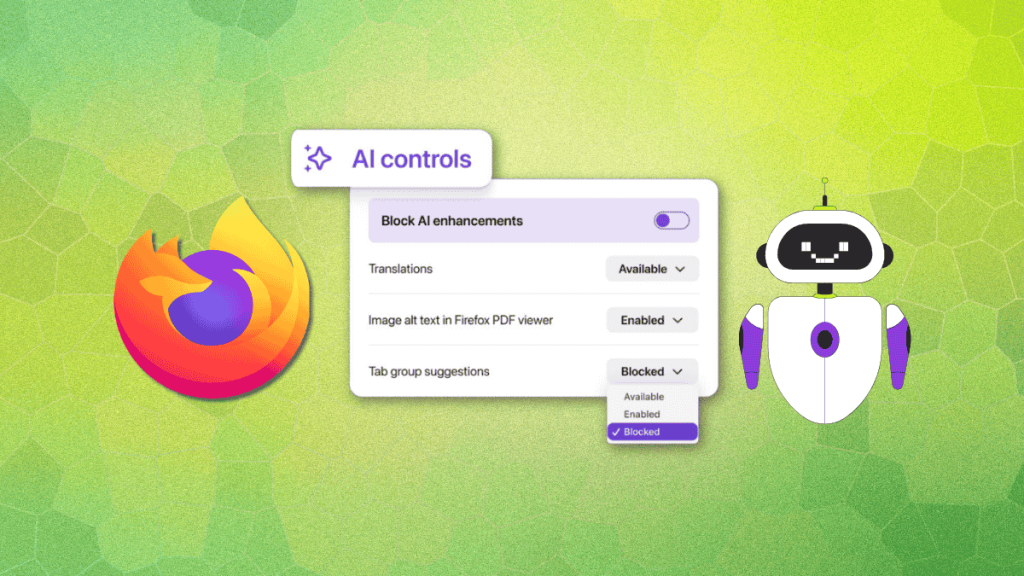
Firefox Finally Listens: AI Controls Arrive to Silence the Noise
In a stunning pivot that feels like a direct response to user backlash, Mozilla has unveiled a new “AI Controls” configuration page for Firefox—essentially admitting that its aggressive AI integration strategy was pushing away its core user base.
The timing couldn’t be more perfect. For months, Firefox users have been complaining about the browser’s increasingly AI-heavy direction, with many longtime fans threatening to abandon ship. Mozilla’s leadership changes last year did little to quell the frustration, as the company continued pushing features like AI-powered link previews and chatbot integrations that many users found intrusive rather than helpful.
Now, with Firefox 148 scheduled for release on February 24, 2025, Mozilla is offering what amounts to a digital surrender: complete control over every AI feature in the browser.
The Nuclear Option: Block All AI Features
The headline feature is the “Block AI Enhancements” toggle—a single switch that promises to disable every AI feature in Firefox simultaneously. This isn’t just about turning off fancy features; it’s about eliminating those persistent popups begging you to “use our AI features pls” that have become the digital equivalent of a pushy salesperson.
But Mozilla isn’t stopping at the nuclear option. The new AI Controls page offers granular control over individual features:
- Translations: Toggle AI-powered translation services on or off
- Alt text for images in PDFs: Control whether Firefox automatically generates descriptions
- AI tab grouping: Decide if you want Firefox to automatically organize your tabs using AI
- Link previews: Manage those contextual summaries that appear when hovering over links
Chatbot Customization
For users who actually want AI features, Firefox is introducing chatbot configuration options. You can now choose your preferred AI companion from a selection that includes Claude, ChatGPT, Copilot, Gemini, and Le Chat Mistral. The browser will remember your preferences across updates, eliminating the need to reconfigure after each upgrade.
Early Access for the Brave
If you can’t wait until February 24, Firefox Nightly builds will be receiving the AI Controls feature “very soon.” This experimental channel is where adventurous users can test the new controls and provide feedback before the stable release.
The Bigger Picture
This move represents a significant course correction for Mozilla. After years of positioning Firefox as a privacy-focused alternative to Chrome, the company seemed to be losing its way with AI integration. The introduction of AI Controls suggests Mozilla has finally recognized that its strength lies in giving users choice and control—not in forcing features upon them.
For Linux users and privacy advocates who have long championed Firefox, this could be the turning point that restores faith in the browser. After all, the beauty of open-source software has always been about user empowerment, not corporate mandates.
Whether this will be enough to win back users who’ve already migrated to alternatives remains to be seen. But one thing is clear: Mozilla is listening, and it’s giving users exactly what they’ve been asking for—the power to make Firefox their browser again.
firefox ai controls
mozilla firefox ai features
firefox ai toggle
block ai enhancements firefox
firefox 148 release date
firefox ai chatbot configuration
firefox link previews ai
firefox translations ai
firefox alt text ai
firefox tab grouping ai
mozilla listens to users
firefox privacy controls
firefox ai backlash
firefox user control
firefox ai settings
firefox experimental features
firefox nightly ai controls
firefox february 2025 update
mozilla firefox course correction
firefox ai customization
firefox chatbot options
firefox ai granular control
firefox ai disable
firefox ai enable
firefox ai preferences
mozilla firefox ai strategy
firefox ai features toggle
firefox ai popup blocker
firefox ai sidebar chatbot
firefox ai link summary
firefox ai image description
firefox ai tab organization
firefox ai translation service
firefox ai user choice
firefox ai empowerment
firefox ai user control
firefox ai configuration page
firefox ai management
firefox ai preferences page
firefox ai settings menu
firefox ai feature control
firefox ai opt-in opt-out
firefox ai user experience
firefox ai feature selection
firefox ai personalization
firefox ai customization options
firefox ai feature management
firefox ai user preferences
firefox ai control center
,


Leave a Reply
Want to join the discussion?Feel free to contribute!