
FRANK OS Turns a Microcontroller Into a Tiny Retro Desktop PC
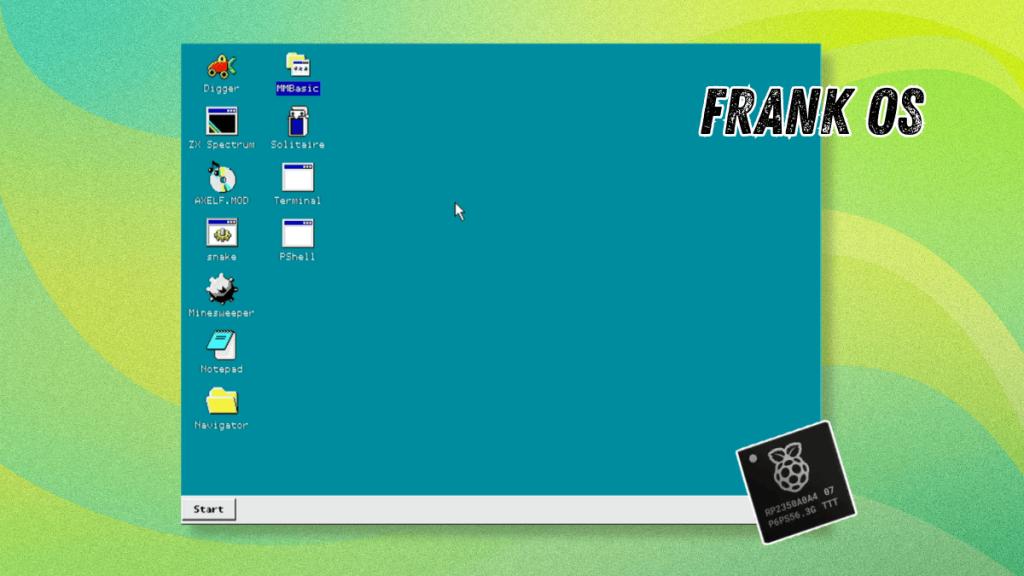
FRANK OS: The Desktop Operating System That Shouldn’t Exist—But Does
In a world where microcontrollers are typically reserved for blinking LEDs and reading sensors, one developer has decided to throw convention out the window and build a full desktop operating system on a chip that’s more accustomed to running washing machines than Windows.
Meet FRANK OS, the desktop operating system that’s turning heads in the embedded computing community and making engineers question their life choices. Built on a humble Raspberry Pi RP2350 microcontroller, this Frankenstein-esque creation brings windowed GUIs, multitasking, and even a Start menu to hardware that typically can’t dream of such luxuries.
The Microcontroller That Could
Before we dive into this technological marvel, let’s understand what we’re working with. Microcontrollers are the unsung heroes of modern electronics—tiny, low-power chips designed to handle specific tasks with ruthless efficiency. They’re the brains inside your microwave, the muscle in your thermostat, and the silent operators in countless industrial machines.
These chips typically run either bare-metal firmware or lightweight real-time operating systems (RTOS) like Zephyr or Eclipse ThreadX. They’re not supposed to run desktop environments. They’re definitely not supposed to have taskbar clocks and volume sliders.
But Mikhail Matveev, a tinkerer from Greece with apparently too much time and ambition, decided that rules are meant to be broken.
FRANK OS: When Less Is More Complicated
FRANK OS is built on top of FreeRTOS, the open-source RTOS that’s become the backbone of countless embedded projects. From this modest foundation, Matveev constructed an entire desktop ecosystem complete with windowed GUI, shell, filesystem stack, and application runtime.
The operating system sports a distinctly Windows 95-era aesthetic—think chunky windows, a taskbar at the bottom, and that unmistakable retro charm. It recently hit its first stable release (v1.0) and is licensed under the GNU General Public License v3.0, because of course it is.
The Hardware: RP2350 and the FRANK M2 Board
FRANK OS targets the Raspberry Pi RP2350 microcontroller, a chip that packs a dual-core Arm Cortex-M33 processor with 520 KB of on-chip SRAM. For context, that’s less memory than your average smart fridge has spare for caching images.
The OS was designed to run on Matveev’s custom FRANK M2 board, which includes DVI output (because who needs HDMI?), PS/2 ports for keyboard and mouse input, PSRAM for additional memory, and an SD card slot for storage. It’s like someone took a time machine to 1998 and brought back the perfect hardware for a retro desktop experience.
Engineering Magic: Making Two Cores Do the Work of Ten
The real wizardry in FRANK OS lies in how it splits the workload across the RP2350’s two cores:
- Core 0 handles the FreeRTOS scheduler, window manager, input handling, and applications
- Core 1 is dedicated entirely to real-time DVI scanline rendering via the DispHSTX driver
This clever division of labor allows the system to maintain smooth video output while simultaneously running applications—a feat that would make most single-core microcontrollers weep with inadequacy.
Applications are compiled as standalone ARM ELF binaries and loaded from SD cards. The OS even includes MOS2 compatibility for running Murmulator OS 2 applications, because why limit yourself to just one ecosystem when you can support two?
Features That Defy Logic
FRANK OS packs an impressive array of features that seem wildly inappropriate for its target hardware:
Desktop Environment: Windows can overlap, be dragged, resized from edges and corners, minimized, maximized, or closed. The taskbar includes a Start button, buttons for open windows, and a system tray with clock and volume slider.
Application Management: The Start menu can scan /fos/ on the SD card at boot to list applications. The system supports up to 24 desktop shortcuts via right-click context menu, and Alt+Tab brings up a window switcher overlay.
Built-in Tools: PShell serves as the built-in shell inside the Terminal application, handling file operations, vi editing, C compilation, and launching MOS2-compatible console applications.
Control Panel: Four applets cover background color, system info, mouse settings, and CPU/PSRAM clock frequencies.
Audio Capabilities: I2S stereo output with 4 concurrent sound channels, MP3 and MOD playback, MIDI/OPL FM synthesis, and even a startup sound.
Out of the Box Applications
FRANK OS comes pre-loaded with nine applications that would feel right at home on any 90s desktop:
- Terminal – For all your command-line needs
- Notepad – Text editing, but make it retro
- Solitaire – Because no desktop is complete without it
- Minesweeper – For when you need to waste time productively
- Digger – A classic arcade game, now on a microcontroller
- ZX Spectrum 48K Emulator – For when you need to go even further back in time
- FrankAmp – An audio application (because why not?)
- MMBasic – A BASIC interpreter for when you need to feel nostalgic
- PShell – The command-line interface that ties it all together
Why This Matters
FRANK OS represents something fascinating about the maker and open-source communities: the relentless drive to push hardware beyond its intended limits. It’s a testament to human creativity and the democratization of technology that allows a single developer to create something this ambitious.
This project also serves as an educational tool, demonstrating concepts like real-time rendering, memory management, and GUI development in a constrained environment. For students and hobbyists, FRANK OS provides a playground for learning operating system concepts without needing a powerful computer.
The Future of FRANK OS
With its first stable release complete, the future of FRANK OS depends largely on community adoption and Matveev’s continued interest. The project’s GitHub repository contains detailed installation instructions, source code, and documentation for those brave enough to venture into this retro-computing rabbit hole.
Whether FRANK OS becomes a lasting contribution to the embedded systems world or remains a fascinating curiosity, it stands as a reminder that in the world of open-source development, the only limit is imagination—and perhaps the amount of PSRAM you can attach to your microcontroller.
Suggested Read 📖: 11 Interesting ESP32 Microcontroller Projects Beginners Can Try
Tags: #FRANKOS #Microcontroller #DesktopOS #RaspberryPi #RP2350 #FreeRTOS #EmbeddedSystems #RetroComputing #OpenSource #DIY #TechInnovation
Viral Phrases: “desktop operating system on a microcontroller”, “Windows 95 on a chip”, “engineering magic”, “pushing hardware beyond limits”, “retro computing revival”, “microcontroller madness”, “impossible made possible”, “tiny chip, big dreams”, “hardware hacking at its finest”, “the desktop that shouldn’t exist”
,

Leave a Reply
Want to join the discussion?Feel free to contribute!