
FreeBSD’s KDE Desktop Install Option Ready For Testing
FreeBSD Gets a KDE Plasma Desktop Installer Option: A Game-Changer for Linux Enthusiasts
In a move that’s sending ripples through the open-source community, FreeBSD developers have unveiled a groundbreaking addition to their operating system: a dedicated KDE Plasma desktop installer option. This long-awaited feature, designed to simplify the deployment of the sleek and powerful KDE Plasma desktop environment, is now ready for testing—marking a significant milestone in FreeBSD’s evolution as a user-friendly, modern operating system.
For years, FreeBSD has been celebrated for its stability, security, and performance, but it has often been perceived as a niche choice for developers and sysadmins due to its text-based installer and lack of a streamlined desktop experience. That perception is about to change. With this new installer option, FreeBSD is poised to attract a broader audience, including Linux users who have been craving a BSD-based alternative with a polished desktop environment.
What’s New in FreeBSD’s KDE Desktop Installer?
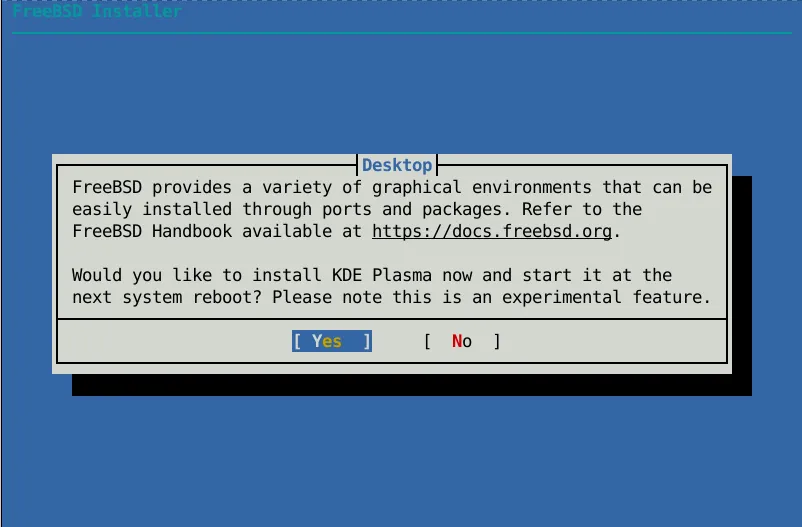
The FreeBSD KDE Desktop Installer Option is a seamless addition to the existing text-based installer. It allows users to effortlessly install KDE Plasma, the SDDM display manager, X.Org, and the necessary GPU drivers—all in one go. This eliminates the need for manual configuration, making FreeBSD more accessible to users who may not be familiar with the intricacies of BSD systems.
The feature was initially planned for inclusion in FreeBSD 15.0, but due to the complexity of integrating all the components, it was deferred. Now, after months of meticulous development, the KDE desktop installer option is ready for testing, and the FreeBSD community is buzzing with excitement.
A Leap Forward for FreeBSD on Laptops and Desktops
This development is part of a broader effort to enhance FreeBSD’s usability on laptops and desktops. The FreeBSD Foundation’s Laptop Project, which has been at the forefront of these improvements, recently published its January 2026 development summary. The report highlights several key advancements, including:
- Enhanced s0ix Standby Support: Modern standby features have been merged, improving power efficiency for laptops.
- S4 Hibernation Improvements: Ongoing work to refine hibernation support, ensuring a smoother experience for users.
- WiFi Hardware Enhancements: Updates to improve compatibility and performance with a wide range of WiFi hardware.
- Graphics Driver Updates: Continuous integration of open-source graphics driver code from Linux, ensuring better GPU support.
These improvements, combined with the new KDE desktop installer option, position FreeBSD as a formidable contender in the desktop operating system market.
Why KDE Plasma?
KDE Plasma is renowned for its customization, elegance, and user-friendly interface. By integrating KDE Plasma into its installer, FreeBSD is tapping into a vibrant ecosystem that appeals to both casual users and power users alike. Whether you’re a developer, designer, or simply someone who values a polished desktop experience, KDE Plasma offers a versatile and visually appealing environment.
The inclusion of SDDM (Simple Desktop Display Manager) and X.Org further enhances the desktop experience, providing a robust foundation for running KDE Plasma. Additionally, the installer ensures that the necessary GPU drivers are installed, eliminating potential compatibility issues and ensuring optimal performance.
How to Test the KDE Desktop Installer Option
For those eager to try out the new KDE desktop installer option, the FreeBSD community has provided detailed instructions. You can find the call for testing and step-by-step guidance in this mailing list post. The FreeBSD team is actively seeking feedback from testers to iron out any bugs and ensure a smooth experience for the final release.
What’s Next for FreeBSD?
The KDE desktop installer option is expected to be included in the upcoming FreeBSD 15.1 release, slated for June 2026. This release promises to be a game-changer, offering users a seamless path to a modern, feature-rich desktop environment.
For more details on the January 2026 FreeBSD laptop improvements, you can refer to the official status report.
Conclusion
FreeBSD’s new KDE Plasma desktop installer option is more than just a convenience—it’s a statement. It signals FreeBSD’s commitment to evolving with the times while staying true to its core principles of stability, security, and performance. By making it easier than ever to deploy a modern desktop environment, FreeBSD is opening its doors to a wider audience and solidifying its place in the competitive landscape of operating systems.
Whether you’re a seasoned FreeBSD user or a curious newcomer, this development is worth keeping an eye on. The future of FreeBSD is looking brighter than ever, and the KDE desktop installer option is just the beginning.
Tags and Viral Phrases:
- FreeBSD KDE Plasma desktop installer
- FreeBSD 15.1 release
- Open-source desktop environment
- BSD vs Linux comparison
- Modernizing FreeBSD
- KDE Plasma customization
- FreeBSD laptop improvements
- SDDM display manager
- X.Org integration
- GPU driver support
- FreeBSD Foundation Laptop Project
- s0ix standby support
- S4 hibernation enhancements
- WiFi hardware compatibility
- Graphics driver updates
- FreeBSD community testing
- June 2026 release
- FreeBSD status report
- Desktop operating system evolution
- User-friendly FreeBSD
- BSD operating system innovation
,


Leave a Reply
Want to join the discussion?Feel free to contribute!