
Gemini in Google Calendar now helps you find the best meeting time for all attendees
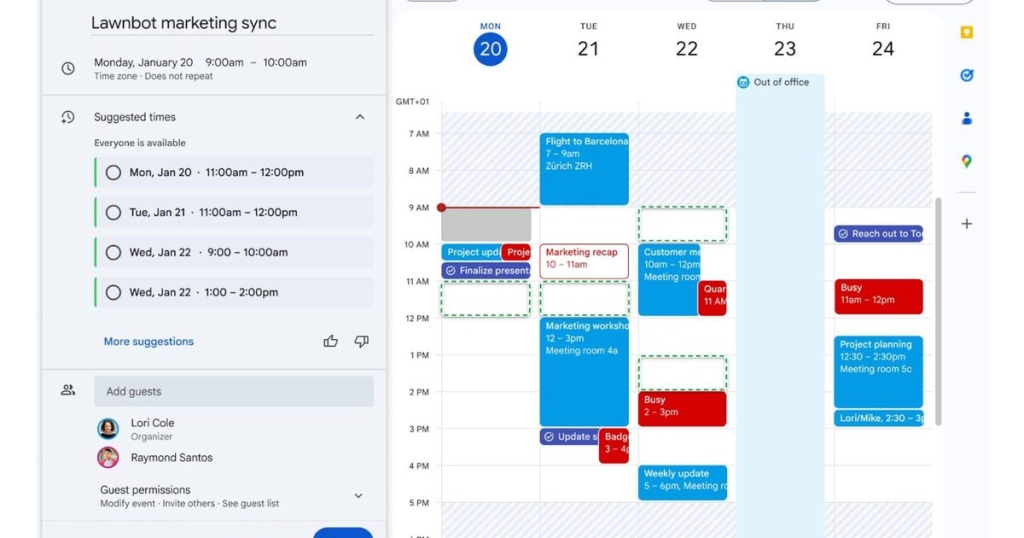
Google Calendar Gets a Gemini-Powered Upgrade: Suggested Times Make Scheduling Effortless
In a world where coordinating schedules across teams, time zones, and busy calendars often feels like solving a complex puzzle, Google is rolling out a game-changing update to its Calendar app. The tech giant is leveraging the power of Gemini AI to introduce a new feature called Suggested Times, designed to eliminate the tedious back-and-forth of finding the perfect meeting slot. If you’ve ever spent way too long trying to match up everyone’s availability, this update is about to become your new best friend.
This isn’t Google’s first foray into AI-powered scheduling. Last year, the company introduced Help me schedule in Gmail, a clever Gemini-powered tool that scans your inbox and calendar to suggest optimal meeting times when you’re replying to emails. It’s a small but mighty feature that has already saved users from endless email chains. Now, Google is bringing that same magic to Google Calendar itself, making it even easier to plan events without the usual scheduling headaches.
How Suggested Times Works
The Suggested Times feature takes the guesswork out of scheduling by analyzing everyone’s calendars, working hours, and potential conflicts to recommend the best time slots for your event. No more manually cross-checking schedules or sending multiple invites in hopes of finding a free slot. With just a few clicks, you can create an event that works for everyone involved.
But Google didn’t stop there. The company has also streamlined the rescheduling process. If multiple attendees decline your invite, Google Calendar will now display a banner showing a time when everyone is available. With a single click, you can update the event and send out the new invite—no more starting from scratch or digging through calendars to find a better time.
Availability and Limitations
The Suggested Times feature is rolling out starting today to Workspace Business Standard and Plus, Enterprise Standard and Plus users, as well as accounts with the Google AI Pro for Education add-on. It will be enabled by default, so you won’t need to dig through settings to turn it on. Google expects the feature to reach all eligible users over the next few weeks.
However, there are a few limitations to keep in mind. According to Google’s support page, Suggested Times won’t be available in the Google Calendar app for Android, iPhone, or iPad. It also won’t work for events longer than 8 hours, if there are too many attendees, or if the date range is in the past. While these restrictions might be a bit frustrating for some users, they make sense from a technical standpoint—after all, AI needs clear data to work its magic.
Why This Matters
In today’s fast-paced, hybrid work environment, time is one of our most valuable resources. The ability to quickly and efficiently schedule meetings can make a huge difference in productivity and collaboration. By integrating Gemini AI into Google Calendar, Google is not only simplifying the scheduling process but also setting a new standard for how we manage our time.
This update is part of Google’s broader push to integrate AI into its productivity tools, making them smarter and more intuitive. From Gmail’s Help me schedule to Calendar’s Suggested Times, these features are designed to take the friction out of everyday tasks, freeing up time for more meaningful work.
The Future of Scheduling
As AI continues to evolve, we can expect even more innovative features like this to emerge. Imagine a future where your calendar not only suggests meeting times but also predicts the best times for deep work, reminds you to take breaks, or even reschedules meetings based on your energy levels. With Google leading the charge, that future might be closer than we think.
For now, Suggested Times is a significant step forward in making scheduling less of a chore and more of a breeze. Whether you’re a busy professional juggling multiple projects or a team leader trying to coordinate across time zones, this feature is poised to save you time, reduce stress, and maybe even make scheduling—dare we say it—fun.
So, the next time you’re planning a meeting, keep an eye out for Google Calendar’s Suggested Times. It might just be the scheduling superhero you didn’t know you needed.
Tags: Google Calendar, Gemini AI, Suggested Times, scheduling tool, productivity, Workspace Updates, Help me schedule, Gmail, meeting planning, AI-powered features, time management, hybrid work, calendar integration, Google Workspace, event scheduling
Viral Sentences:
- Google Calendar just got a Gemini-powered upgrade—scheduling has never been this easy!
- Say goodbye to endless email chains—Google’s Suggested Times feature is here to save the day.
- AI is taking over your calendar, and honestly, we’re here for it.
- Scheduling meetings just got a whole lot smarter with Google’s latest AI feature.
- Google Calendar’s new Suggested Times feature is a game-changer for busy professionals.
- No more manual scheduling—Google’s AI is here to do the heavy lifting.
- The future of scheduling is here, and it’s powered by Gemini AI.
- Google’s Suggested Times feature is the productivity hack you didn’t know you needed.
- Scheduling made simple: Google Calendar’s AI feature is a must-try.
- With Suggested Times, Google is making scheduling feel like magic.
,

Leave a Reply
Want to join the discussion?Feel free to contribute!