
Gemini rolls out Android app automation on Galaxy S26
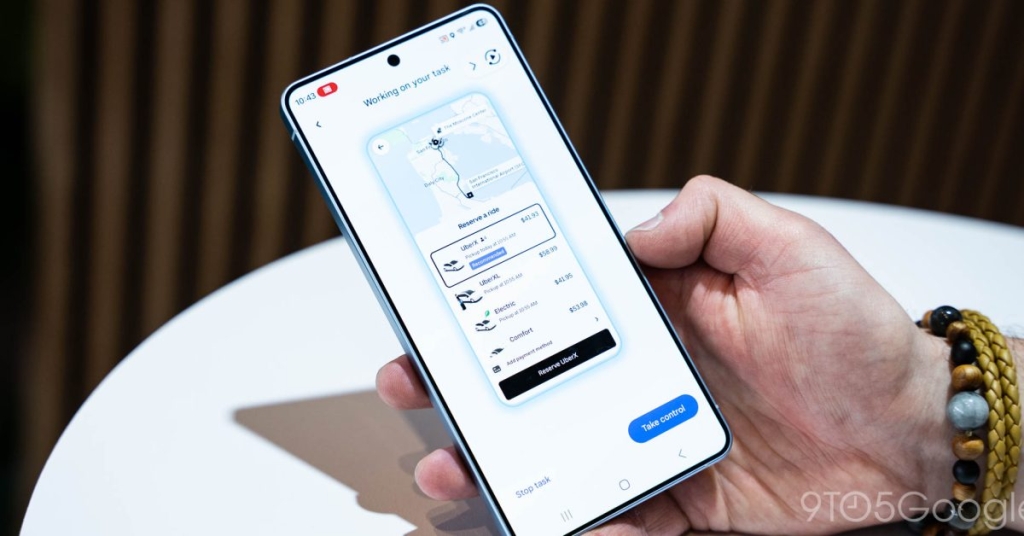
Gemini’s New Agentic Task Automation Feature Launches on Galaxy S26 Series: Your AI Assistant Takes Control of Apps
The future of AI-powered smartphone interactions has arrived with Gemini’s groundbreaking agentic task automation feature now live on Samsung’s Galaxy S26 series. This revolutionary capability allows Google’s AI assistant to take control of Android apps on your behalf, performing tasks with just a simple voice command.
What Is Agentic Task Automation?
Gemini’s task automation, also referred to as “screen automation,” represents a significant leap forward in AI functionality. The feature hands over control of certain Android applications to your AI assistant, enabling it to navigate interfaces, add items to carts, and perform multi-step processes without requiring manual input.
When activated, Gemini essentially becomes a digital proxy for your smartphone interactions. You can simply tell the AI what you want to accomplish, and it will execute the necessary steps within compatible apps, presenting you with the final result or asking for confirmation before completing transactions.
Real-World Testing: Ordering Food Made Effortless
Our hands-on testing with the Galaxy S26 Ultra revealed the impressive capabilities of this new feature. We asked Gemini to “order a spicy chicken sandwich from Popeye’s on Uber Eats,” and the AI sprang into action. Within seconds, Gemini was navigating the Uber Eats interface, searching for the restaurant, and adding the requested item to the cart.
The automation proved remarkably intelligent, even skipping past promotional add-on screens to reach the order confirmation page directly. However, Gemini stops short of completing purchases automatically. When it reaches the payment stage, it sends a notification with strong haptic feedback, returning control to the user to review the order and finalize the transaction.
Current App Compatibility
At launch, Gemini supports task automation with a select group of popular Android applications:
- Lyft – Book rides without manual navigation
- Uber – Schedule transportation with voice commands
- Grubhub – Order food from your favorite restaurants
- DoorDash – Get meals delivered without lifting a finger
- Uber Eats – The tested platform for food ordering automation
- Starbucks – Order your daily coffee fix hands-free
Google has indicated that this list will expand over time, with the company already opening doors for developers to integrate their apps with Gemini’s automation capabilities. Obvious candidates for future support include Instacart for grocery delivery, Amazon for shopping, and various banking apps for financial transactions.
The User Experience: Convenience Meets Control
The automation feature strikes an interesting balance between convenience and user control. While it might not necessarily be faster than performing tasks manually—since Gemini still requires confirmation for purchases—the true value lies in multitasking capabilities. You can have Gemini handle the tedious parts of app interactions while you focus on other activities.
During our testing, we encountered one notable glitch where the preview screen locked us into a fullscreen view that couldn’t be dismissed without forcing a phone reboot. This suggests the technology, while impressive, still has some rough edges that need polishing.
Device Availability and Future Rollout
Currently, the feature is exclusive to the Galaxy S26 series, rolling out as part of the Gemini app update. Google has confirmed plans to bring this functionality to its own Pixel lineup, specifically the upcoming Pixel 10, Pixel 10 Pro, and Pixel 10 Pro XL models. However, the rollout to Pixel devices hasn’t begun yet.
To access the feature, users need to look for “screen automation” in the Gemini app’s settings. This setting was our first indication that the rollout had begun, appearing suddenly in the app’s configuration options.
The Bigger Picture: AI as Digital Assistant
This development represents a significant step toward truly agentic AI—systems that can not only understand and respond to requests but actively perform tasks on behalf of users. It’s reminiscent of science fiction portrayals of AI assistants that handle mundane digital tasks while humans focus on more important matters.
The implications extend beyond simple convenience. For users with accessibility needs, this technology could provide unprecedented independence in navigating complex app interfaces. For busy professionals, it offers the ability to delegate routine digital tasks to an AI while maintaining oversight.
Tags: #Gemini #AI #TaskAutomation #GalaxyS26 #Samsung #Google #Android #ArtificialIntelligence #VoiceCommands #MobileTechnology #TechInnovation #DigitalAssistant #AppAutomation #FutureTech #SmartphoneAI
Viral Phrases:
- “Your AI assistant just got a promotion”
- “Gemini takes the wheel in your favorite apps”
- “The future of hands-free smartphone interaction”
- “AI that doesn’t just talk—it acts”
- “Digital delegation has arrived”
- “Voice command meets real-world execution”
- “Your personal app navigator is here”
- “The assistant that actually assists”
- “Automation that understands context”
- “Smart enough to handle your apps”
- “The next evolution of digital assistance”
- “AI that gets things done for you”
- “Your voice, your command, your results”
- “The line between suggestion and action blurs”
- “Technology that works while you work”
- “The assistant that never gets tired”
- “Digital multitasking redefined”
- “Voice-powered app control”
- “The future is hands-free”
- “AI that bridges the intention-action gap”
,

Leave a Reply
Want to join the discussion?Feel free to contribute!