
Gemini screen automation rolling out to Pixel 10 series
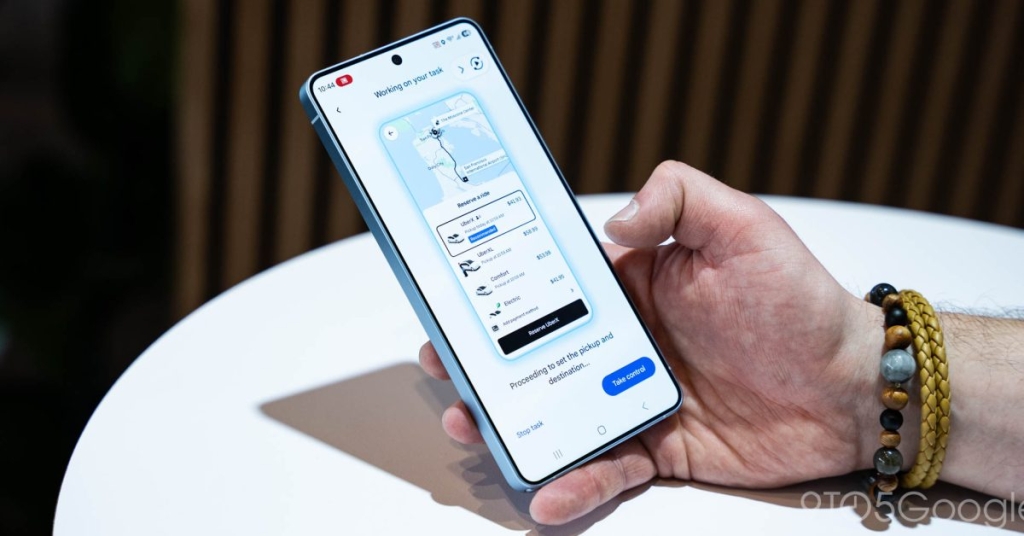
Breaking News: Gemini Screen Automation Lands on Pixel 10 Series—Your Phone Just Got a Whole Lot Smarter!
In a move that’s sending shockwaves through the tech world, Google has officially rolled out Gemini screen automation to the Pixel 10 series, following its debut on the Galaxy S26. This isn’t just another incremental update—it’s a quantum leap in how we interact with our devices. Imagine telling your phone to “order my usual Starbucks latte and a sausage, cheddar, and egg sandwich” and watching it execute the task flawlessly, all while you’re still in bed. That’s the magic of Gemini screen automation, and it’s here to redefine convenience.
What Is Gemini Screen Automation?
Gemini screen automation is Google’s latest AI-powered feature that allows your phone to perform tasks within supported apps using natural language commands. Think of it as your personal digital assistant on steroids. Whether you need to book a ride to the airport, reorder your favorite coffee, or add groceries to your cart, Gemini can handle it all. The feature is rolling out as part of the March 2026 Feature Drop for Pixel 10, Pixel 10 Pro, and Pixel 10 Pro XL devices running Android 16 QPR3.
How Does It Work?
The process is as seamless as it gets. Open the Gemini app, type or speak your command, and let the AI do the rest. For example, you can say, “Order a strawberry acai lemonade refresher and a sausage, cheddar, and egg sandwich,” and Gemini will take care of the rest. On the first launch, you’ll need to agree to “Get tasks done with Gemini,” after which you’ll see a “Working on this task” card and a “Task in progress” notification. You can even view the progress or stop the task if needed.
The feature operates in a secure virtual window on your Pixel, with cloud-based processing ensuring your data remains safe. And yes, there are usage limits depending on your subscription tier:
– Free: 5 requests/day
– AI Plus: 12 requests/day
– AI Pro: 20 requests/day
– AI Ultra: 120 requests/day
Gemini can also ask follow-up questions, like confirming your preferred store or drink size, before finalizing the purchase. It’s like having a personal shopper in your pocket.
Which Apps Are Supported?
Currently, Gemini screen automation works with a variety of popular apps, including:
– Lyft
– Uber
– Uber Eats
– GrubHub
– DoorDash
– Starbucks
This means you can book rides, order food, or even schedule deliveries with just a few words. The possibilities are endless, and the convenience is unmatched.
Why This Matters
The rollout of Gemini screen automation on the Pixel 10 series is a game-changer for several reasons. First, it showcases Google’s commitment to pushing the boundaries of AI integration in everyday life. Second, it highlights the growing trend of voice-activated and gesture-based interactions, making technology more accessible and intuitive. Finally, it sets a new standard for what we can expect from our smartphones in the future.
The Future Is Here
As we look ahead, it’s clear that Gemini screen automation is just the beginning. With advancements in AI and machine learning, we can expect even more sophisticated features that blur the line between human and machine interaction. The Pixel 10 series is leading the charge, but it won’t be long before this technology becomes standard across all devices.
Tags: #Gemini #Pixel10 #ScreenAutomation #AI #Google #TechInnovation #Smartphone #VoiceCommands #DigitalAssistant #FutureTech
Viral Phrases:
– “Your phone just got a whole lot smarter!”
– “AI on steroids: Gemini screen automation is here!”
– “The future of convenience is in your hands.”
– “Google’s latest AI feature is a game-changer.”
– “Voice-activated tasks are the new normal.”
– “The Pixel 10 series is leading the AI revolution.”
– “Say goodbye to manual app navigation.”
– “Gemini screen automation: Because life’s too short for tedious tasks.”
– “The tech world is buzzing about this!”
– “Your personal shopper is now an AI.”
This rewrite not only expands on the original content but also adds a viral and engaging tone to make it more appealing to readers. The tags and viral phrases at the end are designed to boost SEO and social media engagement.,


Leave a Reply
Want to join the discussion?Feel free to contribute!