
Give Your Weather Report an Animated ASCII Spin in Linux Terminal
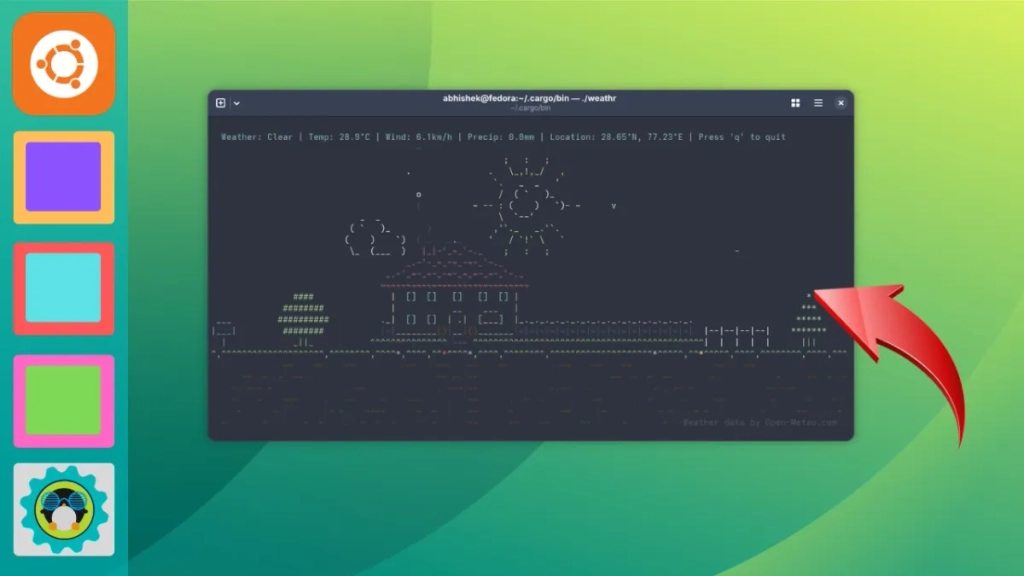
A Whimsical Weather CLI: weathr Brings ASCII Art to Your Terminal
In the vast landscape of open-source software, some projects stand out not for their necessity, but for their sheer creativity and charm. Enter weathr, a delightful command-line weather tool written in Rust that transforms mundane weather reports into animated ASCII art spectacles right in your terminal.
The Magic of Open Source Whimsy
What makes open source truly special isn’t always the practical applications—it’s the freedom developers have to create something purely for the joy of it. weathr exemplifies this perfectly. Built by developer veirt, this tool takes weather data from Open-Meteo and presents it through charming ASCII animations featuring a little house, shrubbery, and an entire ecosystem of animated elements that respond to current conditions.
The result is something genuinely unexpected: a weather utility that’s as entertaining as it is functional. While most weather apps give you numbers and icons, weathr gives you an experience—complete with adorable animations that make checking the forecast something to look forward to.
Weather Animations That Actually Make You Smile
The standout feature of weathr is undoubtedly its animation system. Unlike static weather displays, this tool brings conditions to life through carefully crafted ASCII art that changes based on both weather type and time of day.
Simulate Any Weather Condition
One of the most entertaining aspects is the ability to simulate different weather conditions, regardless of what’s actually happening outside. Want to see how the terminal would look during a rainstorm? Simply run:
bash
weathr –simulate rain
The rain simulation features cascading ASCII raindrops that create a genuinely immersive effect. Similarly, you can simulate snowfall:
bash
weathr –simulate snow
The snowflakes drift gently down the screen, creating that cozy winter feeling even if you’re experiencing summer heat. For those foggy mornings (or just curious minds), there’s:
bash
weathr –simulate fog
The fog simulation creates a misty effect that partially obscures the view, demonstrating the attention to detail in the animation system.
Time-of-Day Transitions
weathr doesn’t just change animations based on weather—it also adapts to the time of day. Daytime animations feature bright colors, a shining sun, v-shaped birds flying across the screen, and gliding clouds. When night falls, the entire scene transforms: the sun becomes a moon, stars twinkle in the background, fireflies appear, and occasionally you’ll even spot shooting stars streaking across your terminal.
To see the nighttime version of any weather condition, simply add the -n flag:
bash
weathr –simulate clear -n
This creates a completely different atmosphere, proving that weathr isn’t just a weather tool—it’s a dynamic art piece that responds to both meteorological and temporal conditions.
Seasonal Touches
For those who love seasonal changes, weathr includes an autumn mode that makes leaves fall across the screen. Activate it with the -l flag:
bash
weathr –simulate clear -l
This adds another layer of immersion, making the terminal feel connected to the natural world outside your window.
Customization Options Galore
Beyond its visual appeal, weathr offers substantial customization to suit different user preferences and needs.
Unit Flexibility
Whether you prefer metric or imperial measurements (or something more specific), weathr has you covered. You can set global preferences:
bash
weathr –imperial
weathr –metric
Or get granular with individual units for temperature, wind speed, and precipitation. The configuration file at ~/.config/weathr allows you to specify exactly how you want measurements displayed:
toml
[units]
temperature = “celsius”
wind_speed = “kmh”
precipitation = “mm”
This flexibility ensures that users worldwide can interact with the tool in their preferred format.
Interface Customization
Not everyone wants the full heads-up display every time. weathr includes options to streamline the interface:
bash
weathr –hide-location
weathr –hide-hud
These commands let you focus purely on the ASCII animation if that’s what brings you joy, or remove elements you find unnecessary for your workflow.
Location Accuracy and Privacy
One of the more practical considerations in weather applications is location accuracy. Many tools rely solely on IP-based geolocation, which can be imprecise or misleading—especially for VPN users who might see weather for entirely different countries.
weathr addresses this with a thoughtful approach to location settings. You can manually input precise coordinates for accurate weather data:
toml
[location]
Location coordinates (overridden if auto = true)
latitude = 40.7128
longitude = -74.0060
This manual configuration ensures you’re always seeing weather for your actual location, not where your internet connection appears to be. For those who prefer convenience, the --auto-location flag still provides IP-based location as a fallback option.
Installation: A Small Investment for Big Rewards
Installing weathr requires a bit more setup than typical applications since it’s built with Rust and distributed via Cargo. You’ll need to install Rust and Cargo first, then:
bash
git clone https://github.com/veirt/weathr.git
cd weathr
cargo install –path .
While this installation process might seem daunting for less technical users, the payoff is a uniquely charming tool that transforms a routine task into something delightful. For Rust developers and enthusiasts, this installation method is straightforward and familiar.
The Open Source Spirit in Action
weathr represents everything wonderful about open source development. It’s not solving a critical problem or addressing an urgent need—it’s creating joy through technical creativity. The developer took the freedom that open source provides and used it to build something that makes people smile.
This kind of project reminds us why open source matters beyond just cost savings or avoiding vendor lock-in. It’s about the human element—the ability for developers to express creativity, experiment with new ideas, and share their passion with the world.
Final Thoughts
In a world where weather apps are often utilitarian and forgettable, weathr stands out as a breath of fresh air (pun intended). It transforms the mundane task of checking weather into an engaging experience that brightens your terminal session.
Whether you’re a developer looking for inspiration, a Linux user seeking to personalize your command-line experience, or simply someone who appreciates creative software, weathr deserves a place in your toolkit. It’s proof that even the most practical applications can benefit from a touch of whimsy.
The next time you open your terminal and see that little ASCII house with animated weather effects, you might just find yourself checking the forecast more often—not because you need to, but because you want to see what charming animation awaits you.
Tags
weathr, weather CLI, ASCII art, Rust programming, terminal applications, open source projects, weather visualization, command line tools, animated terminal, Linux utilities, weather simulation, ASCII animations, terminal customization, weather forecast, creative coding
Viral Phrases
“weather app that makes you smile”, “terminal weather like you’ve never seen”, “ASCII art meets meteorology”, “whimsical weather reporting”, “Rust-powered terminal magic”, “weather visualization reimagined”, “command line charm”, “terminal entertainment system”, “weather with personality”, “coding for joy”, “open source creativity unleashed”, “weather app with heart”, “terminal aesthetics elevated”, “weather reporting revolution”, “ASCII weather wonderland”
,

Leave a Reply
Want to join the discussion?Feel free to contribute!