
Google Chrome Now Has Split View (and Two More New Productivity Features)
Chrome Gets a Productivity Boost: Split View, PDF Annotations, and Google Drive Integration
Google Chrome continues to evolve beyond its reputation as a simple web browser, now transforming into a true productivity powerhouse with its latest desktop update. The tech giant has introduced three game-changing features designed to streamline workflows for both everyday users and enterprise professionals: Split View for multitasking, built-in PDF annotations, and direct downloads to Google Drive. These enhancements arrive without the need for a Google Workspace subscription, making them accessible to all Chrome users.
Split View: The Multitasking Marvel You Didn’t Know You Needed
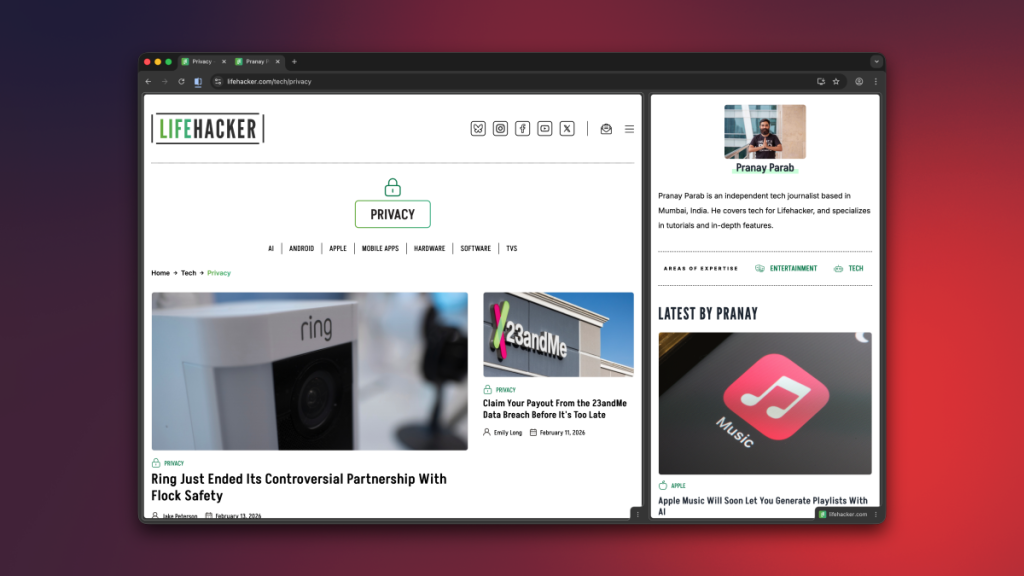
Remember the glory days of split-screen gaming? Google has brilliantly adapted that concept for modern web browsing. Split View allows you to display two tabs side-by-side within the same Chrome window, eliminating the tedious process of manually resizing multiple windows to create your own makeshift split-screen setup.
Activating Split View is refreshingly simple. Right-click any tab and select “Add Tab to New Split View,” or use the dedicated Split View button that appears when you merge tabs. Currently limited to two tabs, this feature is perfect for scenarios like taking notes in Google Docs while watching tutorial videos, comparing product specifications across different websites, or conducting research while writing.
The interface offers intuitive controls—drag the divider to adjust screen real estate between tabs, or use the Arrange Split View menu (accessible via right-click or the Split View button) to reverse tab order, separate them, or close individual tabs. It’s the kind of thoughtful design that makes you wonder how you ever managed without it.
PDF Annotations: Chrome Becomes Your Go-To PDF Tool
Let’s face it—most people default to opening PDFs in their browser rather than dedicated applications. Google has recognized this behavior and elevated Chrome’s PDF capabilities from basic viewing to functional editing. The enhanced PDF Viewer now includes tools for highlighting text, adding sticky notes, and creating digital signatures directly within the browser.
While power users will still need specialized software for complex PDF manipulations, Chrome now handles the 80% of PDF tasks that most people encounter daily. Whether you’re reviewing contracts, marking up research papers, or signing documents electronically, these built-in tools eliminate the friction of switching between applications.
Google Drive Integration: Cloud-First File Management
Chrome’s download behavior has traditionally defaulted to your local Downloads folder, contributing to digital clutter and storage constraints. The new Google Drive integration fundamentally changes this paradigm by allowing direct cloud storage of downloaded files.
When viewing a PDF in Chrome, a Google Drive icon appears alongside the standard download button. Clicking it instantly saves the file to a dedicated “Saved from Chrome” folder in your Drive account. This feature is particularly valuable for users who prioritize cloud storage, work across multiple devices, or simply want to maintain a cleaner local file system.
The Bigger Picture: Chrome’s Evolution
These updates represent Google’s strategic vision of Chrome as more than just a browser—it’s becoming an integrated productivity platform. By addressing common pain points like multitasking limitations, PDF workflow inefficiencies, and file management challenges, Google is positioning Chrome as an indispensable tool for modern digital work.
The timing is particularly relevant as remote and hybrid work models continue to dominate professional landscapes. Features that enhance productivity and streamline digital workflows aren’t just nice-to-have additions; they’re essential tools for maintaining efficiency in increasingly complex work environments.
Whether you’re a student juggling research and note-taking, a professional managing documents and communications, or simply someone who appreciates smarter software, Chrome’s latest update delivers tangible improvements to your daily digital experience.
Tags: #GoogleChrome #Productivity #SplitView #PDFAnnotations #GoogleDrive #BrowserUpdate #TechNews #ProductivityHacks #CloudStorage #DigitalWorkflow
Viral Phrases: “game-changing features,” “productivity powerhouse,” “multitasking marvel,” “built-in PDF annotations,” “cloud-first file management,” “integrated productivity platform,” “essential tools for modern digital work,” “streamline workflows,” “tangible improvements,” “digital clutter,” “strategic vision”
,

Leave a Reply
Want to join the discussion?Feel free to contribute!