
Google Pixel’s AI icons are a poor substitute for real personalization on Android
Google Pixel’s AI-Generated Icons: A Promising Start, But Not Quite There Yet
Google’s latest Pixel Drop has finally brought custom app icons to Pixel devices, but the implementation leaves much to be desired. While the feature represents a step toward greater personalization, its AI-driven approach feels more like a novelty than a true customization solution.
The Good News First
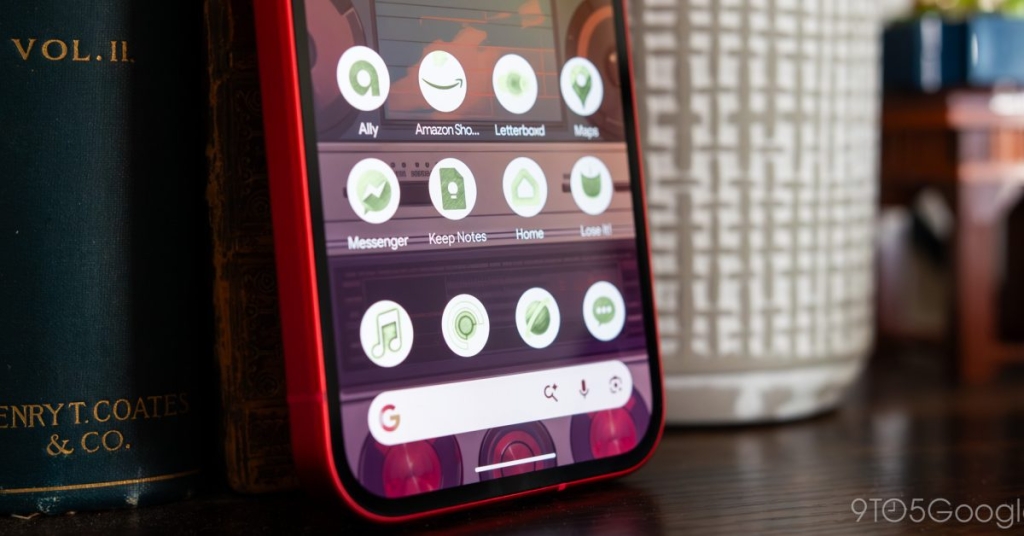
For years, Pixel users have clamored for more control over their home screens. The March 2026 update delivers five AI-generated icon styles: Scribbles, Cookies, Easel, Treasure, and Stardust. Each offers a distinct aesthetic, from whimsical doodles to elegant artistic interpretations.
The integration is seamless—you’ll find these options nestled in the Wallpaper & Style menu alongside your other customization tools. For users who’ve never ventured beyond the default Pixel launcher, this is an accessible entry point to visual customization.
Where It Falls Short
The excitement quickly fades once you start using the feature. Here’s why:
Limited Color Control: Unlike traditional icon packs where you can fine-tune every hue, Google’s AI system offers minimal color customization. Worse, Cookies and Stardust styles are completely locked to their pre-built color schemes, leaving no room for personalization.
Inconsistent Quality: During testing, first-party Google apps generally looked polished, but third-party applications often suffered. Apps with circular logos—like Letterboxd and Pocket Casts—frequently lost recognizable elements. The AI seems to struggle with geometric simplicity, turning clean, identifiable icons into abstract messes.
Regeneration Roulette: When an icon doesn’t meet your standards, you can regenerate it—but there’s no way to specify what needs fixing. The AI might produce three variations that all miss the mark in different ways. Without prompt-based refinement, you’re essentially hoping for a lucky roll of the dice.
Hidden Limitations: Perhaps most frustratingly, you can’t see all your home screen icons until after you’ve applied the changes. This means you might commit to a style only to discover later that several crucial apps look terrible. There’s no way to preview the complete transformation beforehand.
No Dynamic Updates: When apps update their official icons, Google’s system doesn’t automatically adapt. If you’ve AI-generated an icon based on an older design, it stays stuck in time, creating inconsistency across your home screen.
The Bigger Picture
This feature feels emblematic of Google’s current AI strategy: impressive in concept but underwhelming in execution. While competitors offer robust icon pack ecosystems with thousands of options and granular control, Google’s solution feels like a half-measure.
Third-party launchers like Nova and Action Launcher have supported custom icon packs for years, offering everything from minimalist monochrome sets to vibrant illustrated collections. These solutions work across all Android devices and don’t require you to sacrifice other features.
Is This the Future?
Google likely views this as laying groundwork for more sophisticated AI-driven customization. The technology could eventually understand your aesthetic preferences and automatically generate cohesive icon families. But today, it’s more of a proof of concept than a practical tool.
For users who’ve never customized their Android experience, these AI-generated icons might feel revolutionary. For everyone else, they’re a reminder that sometimes traditional solutions—like downloading a well-designed icon pack—still outperform flashy new technology.
The feature’s biggest sin isn’t that it’s bad—it’s that it’s mediocre in a way that prevents you from accessing better alternatives without switching launchers entirely.
The Verdict
Google’s AI-generated icons represent an interesting experiment in automated design, but they’re not ready to replace traditional customization methods. The limited control, inconsistent quality, and workflow friction make them more of a curiosity than a compelling reason to stick with the Pixel launcher.
If you’re deeply invested in the Pixel ecosystem and want something different from the default look, give them a try. But if you’re seeking true visual cohesion and control over your home screen, you’re still better off with a third-party launcher and the vast ecosystem of human-designed icon packs.
Sometimes, the old ways are still the best ways—especially when they’ve been refined over a decade by passionate developers who understand that personalization isn’t about automation, but about giving users the tools to express themselves.
tags
GooglePixel #AndroidCustomization #AICustomization #PixelDrop #HomeScreen #IconPacks #Android16 #TechNews #PixelLauncher #AI #Personalization #MobileTech #TechReview #AndroidUpdates #GoogleAI
viral
“AI-generated icons are here, but are they really an upgrade?” “Google’s customization finally arrives—with major caveats” “The future of Android theming? Not quite yet.” “Pixel users get AI icons, but third-party solutions still reign supreme” “Google’s AI customization: More novelty than necessity” “When automation meets design: Sometimes it just doesn’t click” “The customization feature we’ve waited for—sort of” “AI-generated icons: Revolutionary concept, flawed execution” “Pixel’s new feature feels like a beta test we didn’t sign up for” “Sometimes the old ways really are better”
,
Leave a Reply
Want to join the discussion?Feel free to contribute!