
Google quietly fixed a big annoyance with Android’s Driving Mode
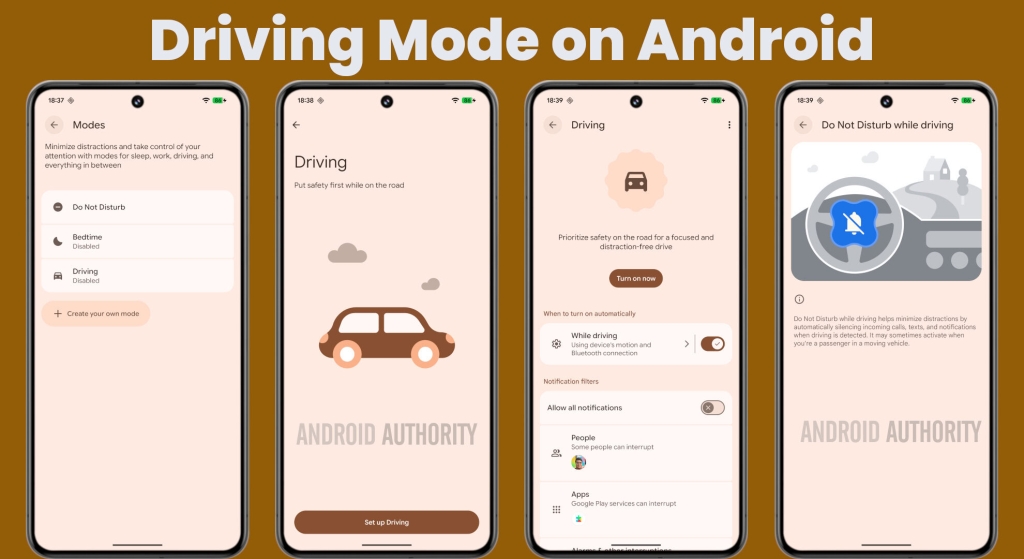
Google Revives Bluetooth-Only Driving Mode on Android, Solving Passenger Notification Woes
In a welcome move for Android users everywhere, Google has quietly rolled out a significant fix to the platform’s Driving Mode feature, addressing a long-standing frustration that left passengers bombarded with unnecessary Do Not Disturb (DND) notifications. The tech giant has reintroduced the ability to trigger Driving Mode exclusively when your phone connects to your vehicle’s head unit via Bluetooth, effectively solving the problem of phones mistakenly activating DND for non-drivers.
The Problem That Plagued Android Users
For years, Android’s Driving Mode has been a valuable tool for minimizing distractions behind the wheel. The feature automatically suppresses notifications when it detects driving activity, helping users stay focused on the road. However, a critical flaw emerged when Google removed the Bluetooth-only activation option sometime in recent years.
Without this option, Driving Mode relied heavily on motion detection to determine when to activate. While this seemed logical, it created a cascade of problems for passengers. Whether you were riding in a car, bus, or train, your Android device would often misinterpret the motion as driving activity and automatically enable DND mode. The result? Missed calls from family members, delayed messages from colleagues, and a general disruption to your mobile experience—all while you were simply along for the ride.
Google’s Stealthy Solution
According to recent reports and user observations, Google has quietly reintroduced the Bluetooth-only activation method for Driving Mode. This means the feature will now only activate when your phone establishes a Bluetooth connection with your vehicle’s audio system, rather than relying solely on motion sensors.
The change appears to be rolling out gradually across various Android devices, though the implementation details vary slightly between manufacturers. On Google Pixel devices, users will find the updated interface featuring Material 3 Expressive design language, while other manufacturers like OnePlus are implementing the feature with their own UI treatments.
How to Enable the Fixed Driving Mode
For users eager to take advantage of this improvement, the process is straightforward:
- Open your device’s Settings menu
- Navigate to “Modes” (the exact path may vary by device manufacturer)
- Select “Driving” from the available modes
- Toggle on the “While driving” option
- Tap the option again to choose between activation methods:
- Motion detection only
- Bluetooth connection only
- Both methods combined
The Bluetooth-only option provides the most precise control, ensuring Driving Mode activates only when you’re actually operating a vehicle with a connected head unit.
Why This Matters for Android Users
This seemingly small change represents a significant improvement in user experience for millions of Android owners. The previous motion-detection-only approach often felt like Android was making incorrect assumptions about user behavior, leading to frustration and missed communications.
By restoring Bluetooth as a primary trigger, Google has created a more intelligent system that respects the distinction between drivers and passengers. This is particularly important in shared vehicles, public transportation, and family cars where multiple people might be using their phones simultaneously.
Technical Implementation Details
The feature is being delivered through Google Play Services version 26.05.32, meaning it can be updated independently of major Android OS releases. This approach allows Google to deploy fixes and improvements more rapidly across the Android ecosystem.
Users can check for the latest version and manually update Google Play Services through the Google Play Store app page. The gradual rollout suggests Google is carefully monitoring the feature’s performance across different device configurations and Bluetooth implementations.
Potential Limitations and Considerations
While the return of Bluetooth-only activation is welcome news, some questions remain about compatibility with older or aftermarket head units. The feature description mentions “vehicle Bluetooth,” but it’s unclear whether this will cause issues with generic or third-party audio systems that may not fully comply with standard Bluetooth profiles.
Additionally, Samsung devices already offer a more granular option that specifically activates Driving Mode only when connected via Android Auto, providing an extra layer of precision. This suggests there’s still room for Google to further refine the feature in future updates.
The Bigger Picture: Android’s Focus on User Experience
This update reflects Google’s ongoing commitment to improving Android’s usability through thoughtful feature refinements. By listening to user feedback and addressing pain points, the company demonstrates its dedication to creating a mobile operating system that adapts to real-world usage patterns rather than forcing users to adapt to technological limitations.
The Driving Mode fix is part of a broader trend in Android development that emphasizes context-aware computing. Just as Focus Mode helps users maintain productivity by limiting distractions, and Wind Down mode promotes better sleep habits, the improved Driving Mode shows how Android can intelligently respond to different life scenarios.
Looking Ahead
As this feature continues its rollout, users can expect to see more intelligent context detection across the Android ecosystem. The success of this Bluetooth-only implementation may influence how Google approaches other location and motion-based features in the future.
For now, Android users can breathe a sigh of relief knowing that their phones will no longer mistakenly assume they’re driving every time they’re a passenger in a moving vehicle. It’s a small but meaningful victory in the ongoing quest to make technology work for us, rather than against us.
Tags & Viral Phrases:
Google Driving Mode fix, Android Bluetooth-only activation, Do Not Disturb while driving, Android passenger notification problem solved, Google Play Services update, Material 3 Expressive UI, OnePlus 13R Driving Mode, Android Auto integration, motion detection vs Bluetooth, Google listens to users, Android ecosystem improvement, context-aware computing, Focus Mode Android, Wind Down mode, mobile operating system refinement, user experience optimization, technological limitation solutions, smart device behavior, passenger vs driver distinction, aftermarket head unit compatibility, gradual feature rollout, Android Authority exclusive, tech news viral, software update breakthrough, mobile productivity tools, digital wellness features, intelligent notification management, Android customization options, Google Pixel exclusive features, cross-device synchronization, automotive technology integration, Bluetooth connectivity solutions, motion sensor accuracy, user feedback implementation, software development best practices, mobile device intelligence, driving safety technology, notification suppression features, Android ecosystem consistency, manufacturer UI differences, software version tracking, user interface evolution, context detection technology, mobile productivity enhancement, digital communication management, smart device adaptation, user-centric design philosophy, technological problem-solving, mobile operating system evolution.
,

Leave a Reply
Want to join the discussion?Feel free to contribute!