
Here’s What’s New in Google’s March Pixel Drop
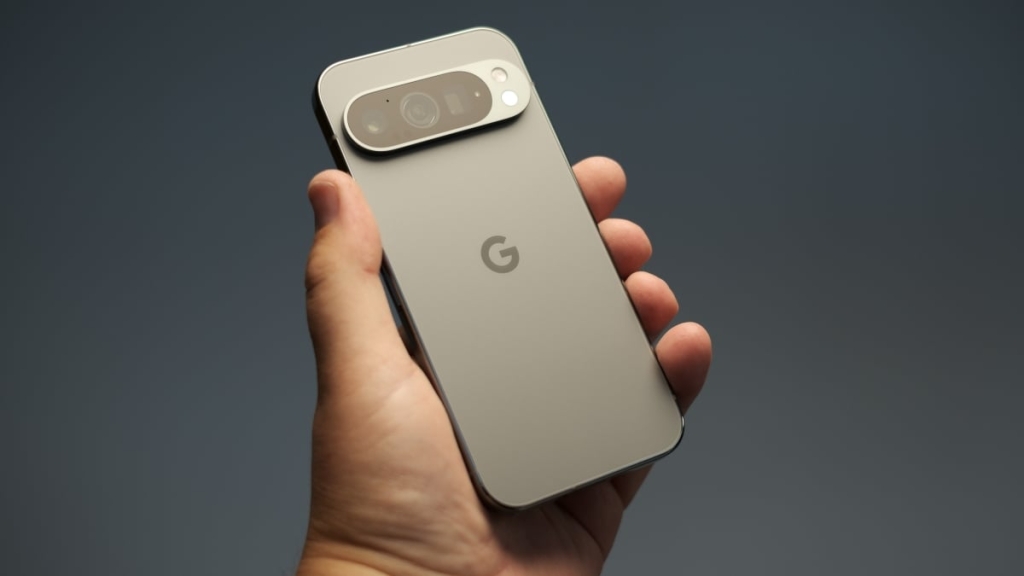
Google’s March 2025 Pixel Drop: A Feature-Packed Update for Pixel Phones and Watches
March has been an exceptionally busy month for Google, with the tech giant rolling out a slew of updates and new features across its ecosystem. From the launch of the Pixel 10a to the introduction of live location sharing in Google Messages, the company has been on a roll. Now, Google is back with its latest Pixel Drop, bringing a host of new features and improvements to Pixel phones and watches. Here’s everything you need to know about this exciting update.
Google Now Lets You Customize Your Calling Card on Android
Android has finally caught up with iOS in terms of personalizing your calling experience. While iOS has allowed users to customize their “Contact Posters” for a while, Android has now introduced the ability to customize your own “Calling Card.” This means you can now control how your contact information appears when you call others, making your calls more personal and visually appealing.
Airlines Can Soon Help You Find Your Lost Luggage
Google is taking a page out of Apple’s book by introducing a feature that allows users to share their Find Hub tracker’s location with airlines. This can be a game-changer for travelers who often misplace their luggage. While the feature is currently limited to 10 airlines, it’s a step in the right direction and could expand to more carriers in the future.
The Pixel Now Playing Widget Finally Has a Dedicated App
The Now Playing widget, a fan-favorite feature on Pixel devices, has now been upgraded with its own dedicated app. This app seamlessly transfers your widget’s history, allowing you to keep track of all the songs it has identified. Whether you’re a music enthusiast or just curious about the tunes playing around you, this feature is sure to enhance your experience.
Gemini Can Handle Tasks on Your Behalf
Google is pushing the boundaries of AI with Gemini, its latest assistant. The company is introducing a beta feature that allows Gemini to perform tasks on your behalf. By long-pressing the power button, you can ask Gemini to plan your grocery list, book an Uber, or even order your favorite takeout. This feature is currently available on the Pixel 10 series, but it’s expected to roll out to other devices soon.
Circle to Search Now Identifies Whole Outfits
Circle to Search, a feature that allows users to search for items by drawing a circle around them, has received a significant upgrade. Now, you can circle entire outfits to find every piece of the look. Whether you’re watching a movie or scrolling through social media, this feature makes it easier than ever to shop for the styles you love. Google has also integrated this with its “Try It On” feature, allowing you to virtually try on outfits before making a purchase.
Magic Cue Can Recommend Restaurants with Gemini
Magic Cue, Google’s contextual AI feature, is getting smarter with the latest Pixel Drop. It can now recommend restaurants based on conversations with friends. For example, if a contact suggests finding a vegan restaurant downtown, Magic Cue can offer a “Find restaurants” pop-up, which will then use Gemini to provide tailored suggestions. While this feature is impressive, it’s worth noting that generative AI can sometimes make mistakes or even create fictional restaurants.
At a Glance Gets Some New Updates
The At a Glance feature on Pixel devices is becoming even more useful with the addition of new data points. Now, it can provide information about your best route home, taking into account transit delays, as well as updates on sports scores and your financial portfolio. These updates appear passively on your home screen, so you don’t need to unlock your phone to stay informed.
Google Is Bringing AI Art Styles to the Home Screen
Android has always been known for its customization options, and the latest Pixel Drop takes it a step further with AI-generated art styles for your home screen. Google is introducing five new styles that allow you to create custom icons, making your home screen truly unique. However, it’s worth noting that not everyone is a fan of AI art, so this feature may not appeal to everyone.
Your Pixel Watch Can Now Warn If You Walk Away from Your Phone
If you have both a Pixel phone and a Pixel Watch, you’ll appreciate this new feature. Your watch can now send you an instant alert if you walk away from your phone, and your phone will automatically lock when you’re out of range. This feature is available on Pixel 8 and newer devices, as well as Pixel Watch 2 and newer, providing an extra layer of security for your data.
Pixel Gets a Desktop Mode
Google is introducing a desktop mode for Pixel devices, allowing you to connect your phone to an external monitor and use it like a traditional computer. This feature, similar to Samsung’s DeX, lets you run multiple apps side-by-side, making it easier to multitask. Additionally, if you have a Pixel tablet, you can now run multiple apps in free-form windows, similar to how Apple handles window management in iPadOS.
Connect Your Camera to Your Pixel Phone
Pixel devices are known for their excellent cameras, and the latest Pixel Drop takes it a step further by allowing you to connect an external camera to your phone. This is particularly useful for live streaming, as it enables you to get different angles and perspectives. Whether you’re a content creator or just looking to enhance your video calls, this feature is sure to come in handy.
These Are the Smaller Changes in the Latest Pixel Drop
In addition to the major updates, Google has also included several smaller changes in the latest Pixel Drop. These include a new display color filtering mode that softens high-intensity hues and saturated colors, making your screen more comfortable to look at. Guided Frame, Android’s feature that helps users take photos, now supports more languages, making it more accessible to a global audience. The Journal app also has new AI features to make it easier to jot down your thoughts and experiences. Finally, Pixel Watch 3 will get the Pixel Watch 4’s one-handed gestures, allowing you to perform actions like answering calls and pausing music with simple wrist movements.
Tags: Google, Pixel, Pixel Drop, Android, AI, Gemini, Now Playing, Circle to Search, Magic Cue, At a Glance, Pixel Watch, Desktop Mode, External Camera, Customization, Security, Accessibility
Viral Sentences:
- “Google’s March 2025 Pixel Drop is here, and it’s packed with game-changing features!”
- “Customize your Calling Card on Android and make your calls more personal than ever.”
- “Lost your luggage? Google’s new feature can help airlines find it for you!”
- “Gemini can now handle tasks on your behalf—just long-press the power button!”
- “Circle to Search now identifies whole outfits—shop the look with ease!”
- “Magic Cue recommends restaurants based on your conversations—AI just got smarter!”
- “At a Glance now shows your best route home, sports scores, and financial updates.”
- “AI art styles are coming to your Pixel home screen—make it uniquely yours!”
- “Your Pixel Watch can now warn you if you walk away from your phone—security just got smarter!”
- “Pixel gets a desktop mode—turn your phone into a computer with one connection!”
- “Connect an external camera to your Pixel for better live streaming angles!”
- “Smaller changes in the Pixel Drop include color filtering, more Guided Frame languages, and new Journal AI features!”
,
Leave a Reply
Want to join the discussion?Feel free to contribute!