
How to bring back macOS Launchpad with this neat command-line tool
Apple Power Users Push Back: How macOS Tahoe’s Liquid Glass Is Being Undone
Apple’s latest macOS update, Tahoe, promised a bold new era for Mac users with its revolutionary Liquid Glass interface. Marketed as a sleek, modern design that brought depth, motion, and translucency to the forefront, it was meant to redefine how users interact with their Macs. But as the dust settles, a surprising trend is emerging: power users are actively rolling back parts of this overhaul, restoring older, more familiar elements of the operating system.
The culprit? Liquid Glass—Apple’s ambitious attempt to modernize macOS with layered blur effects, reflections, and a translucent aesthetic. While these features look stunning in marketing materials and promotional videos, the reality of daily use has left many users cold. On large displays or with intricate wallpapers, the heavy translucency can feel overwhelming, distracting, and even intrusive. For those who rely on their Macs for productivity, the visual noise introduced by Liquid Glass has become a point of contention.
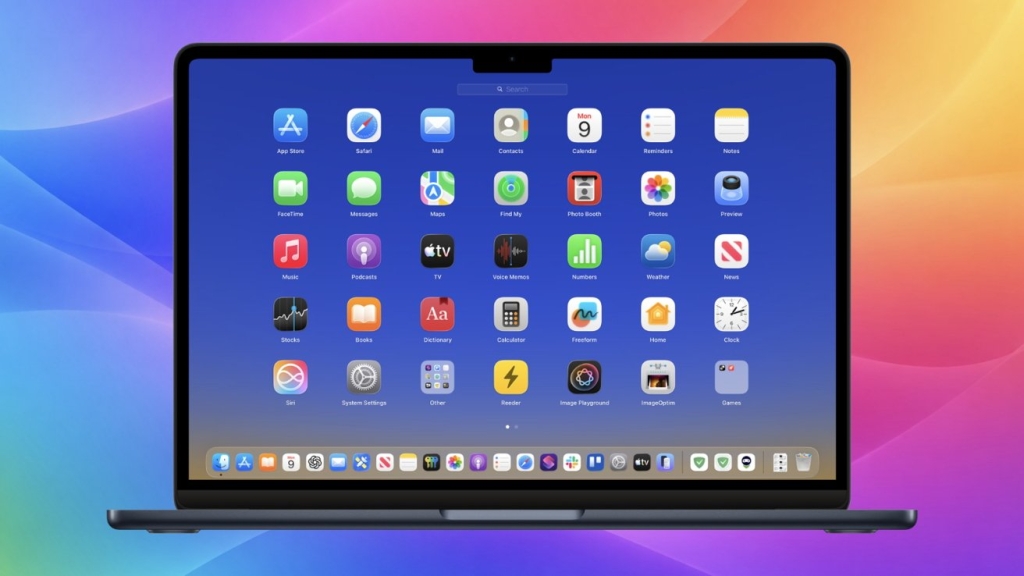
Enter the workaround: an unofficial but increasingly popular tool that allows users to bring back the classic Launchpad app grid while dialing back the intensity of Liquid Glass. This solution has struck a chord with power users who want to enjoy macOS Tahoe’s performance improvements and new features without fully committing to its visual overhaul. The tool effectively restores a sense of familiarity and simplicity, offering a middle ground for those who appreciate innovation but crave usability.
The resurgence of the classic Launchpad is particularly noteworthy. Once a staple of macOS, the grid-style app launcher was replaced in Tahoe with a more fluid, translucent version that aligns with the Liquid Glass aesthetic. While the new design is undeniably polished, many users have found it less intuitive and harder to navigate. The workaround not only brings back the grid but also reduces the translucency that defines Liquid Glass, creating a cleaner, more focused interface.
This pushback against Liquid Glass highlights a broader tension in the tech world: the balance between innovation and usability. Apple has long been a pioneer in design, often pushing the boundaries of what’s possible. But as macOS Tahoe demonstrates, not every leap forward resonates with its most dedicated users. For power users, who often rely on their Macs for complex workflows and multitasking, the visual changes introduced by Liquid Glass can feel like a step backward.
The workaround itself is a testament to the ingenuity of the macOS community. While Apple has yet to officially address the concerns surrounding Liquid Glass, third-party developers have stepped in to fill the gap. The tool, which operates via command line, is a reminder of the flexibility and customization that macOS has historically offered—a feature that some fear is being eroded by Apple’s increasingly closed ecosystem.
But the debate over Liquid Glass isn’t just about aesthetics. It also raises questions about performance. Translucent effects and layered blur require significant graphical processing power, which can impact system performance, particularly on older Macs. For users with high-resolution displays or those running resource-intensive applications, the trade-off between visual flair and efficiency is a critical consideration.
As macOS Tahoe continues to roll out, it’s clear that Apple’s vision for the future of its operating system is not universally embraced. The pushback from power users underscores the importance of listening to the community and finding a balance between innovation and practicality. Whether Apple will respond to this feedback remains to be seen, but one thing is certain: the macOS community is not afraid to take matters into its own hands.
For now, the workaround offers a lifeline to those who want to enjoy the benefits of macOS Tahoe without sacrificing the usability they’ve come to expect from their Macs. It’s a reminder that, in the world of technology, progress is not always linear—and sometimes, the best way forward is to take a step back.
Tags & Viral Phrases:
- macOS Tahoe
- Liquid Glass
- Apple power users
- Classic Launchpad
- Translucency backlash
- Mac customization
- Third-party workarounds
- Apple design controversy
- macOS performance
- Tech innovation vs. usability
- Command-line tools
- AppleInsider
- Mac forums
- Visual overhaul
- User experience
- Graphical processing
- High-resolution displays
- Resource-intensive apps
- macOS community
- Apple ecosystem
- Tech pushback
- Design trends
- Productivity tools
- Mac workflows
- Multitasking
- Apple feedback
- Visual noise
- Sleek design
- Modern interface
- Tech ingenuity
- macOS flexibility
,

Leave a Reply
Want to join the discussion?Feel free to contribute!