
How to get MacBook Neo wallpapers early
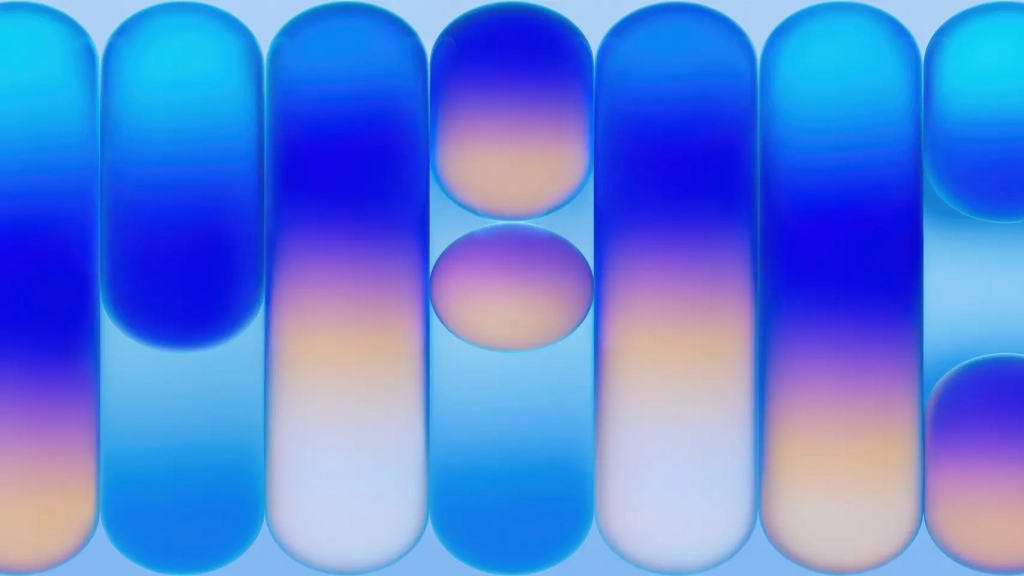
Get MacBook Neo Wallpapers Early for iPhone and Mac: The Ultimate Guide
Apple’s latest innovation, the MacBook Neo, has taken the tech world by storm, and enthusiasts are already clamoring for ways to personalize their devices with the new aesthetic. The good news? You don’t need to wait for the official release or even purchase the laptop to enjoy its vibrant, stylish wallpapers. Thanks to the creative genius of Basic Apple Guy, you can now download and set MacBook Neo wallpapers on your iPhone and Mac today.
The MacBook Neo: A Game-Changer in Affordable Computing
Apple’s unveiling of the MacBook Neo marks a significant milestone in the company’s history. This 13-inch laptop, powered by the A18 Pro chip, offers a budget-friendly option for users who want the Apple experience without breaking the bank. Starting at a price point well below the MacBook Air, the MacBook Neo is poised to become a favorite among students, professionals, and casual users alike.
But it’s not just the hardware that’s making waves—it’s the entire package, including the fresh, colorful wallpapers that come with the device. And thanks to Basic Apple Guy, you can get your hands on these wallpapers right now.
How to Get MacBook Neo Wallpapers Early
Basic Apple Guy, a trusted name in the Apple community, has once again delivered by extracting and upscaling the official MacBook Neo wallpapers. These wallpapers are now available for free download, allowing you to bring the MacBook Neo’s aesthetic to your iPhone and Mac before the device even hits the shelves.
What’s Included
The MacBook Neo launches in four stunning colors: indigo, silver, blush, and citrus. Basic Apple Guy has created a matching wallpaper for each color, ensuring that you can find the perfect fit for your style. Each wallpaper is available in both Mac and iPhone versions, so you can coordinate your desktop and Lock Screen for a cohesive look.
It’s worth noting that these wallpapers were extracted from the product’s USDZ file, meaning they’ve been upscaled from their original 2048 × 1024 resolution. While they look fantastic on most displays, sharper official versions may be released once Apple ships the device or updates its software next week. For now, though, these wallpapers are a fantastic early preview.
How to Download the Wallpapers
Getting the MacBook Neo wallpapers onto your devices is a breeze. Here’s how:
-
Visit the Basic Apple Guy Website: Head to the MacBook Neo wallpapers page and click on the color you want under the Mac or iPhone download row—Indigo, Silver, Blush, or Citrus. The image will open in a new browser tab.
-
Save the Image: Right-click the image and select Save Image As, then save it to a location you can easily find, like your Downloads folder. Repeat this step for any other colors you’d like to keep.
How to Set Your New Wallpaper
Once you’ve downloaded the wallpapers, setting them up on your devices is simple:
For Mac:
- Open System Settings and navigate to Wallpaper.
- Click the + button to add a new wallpaper, then choose the image you just downloaded. You can set it for your desktop, your screen saver, or both.
For iPhone:
- Save the wallpapers to your Photos app.
- Go to Settings > Wallpaper > Add New Wallpaper, then choose Photos to find and set them.
A Note on Basic Apple Guy
Basic Apple Guy is a beloved figure in the Apple community, known for his dedication to creating and sharing high-quality wallpapers tied to new Apple product launches. His work is always available for free, but if you appreciate his efforts, you can support him through his Tip Jar. It’s a small way to say thanks for the consistent effort he puts into these releases.
Final Thoughts
With the MacBook Neo wallpapers, you can give your devices a fresh, stylish look without spending a dime. Whether you’re an Apple enthusiast or just someone who loves a good aesthetic, these wallpapers are a perfect way to stay ahead of the curve. So why wait? Head over to Basic Apple Guy’s website, download your favorite colors, and transform your devices today.
Now go give your desktop a little MacBook Neo energy—no $599 required.
Tags & Viral Phrases:
- MacBook Neo wallpapers
- Free MacBook Neo wallpapers
- Basic Apple Guy wallpapers
- iPhone and Mac wallpapers
- Apple community wallpapers
- MacBook Neo aesthetic
- Budget-friendly MacBook
- A18 Pro chip
- Indigo, Silver, Blush, Citrus wallpapers
- Upgraded wallpapers
- Tech enthusiasts
- Apple product launches
- Device personalization
- Stylish wallpapers
- Early access wallpapers
- Coordinated desktop and Lock Screen
- USDZ file wallpapers
- Upscaled wallpapers
- Free wallpaper downloads
- Apple community designer
- Tip Jar for Basic Apple Guy
- Fresh MacBook Neo energy
- No $599 required
- Get the look without the cost
- Transform your devices
- Stay ahead of the curve
- Apple aesthetic
- Tech trends
- Wallpaper coordination
- Device customization
- Apple ecosystem
- Budget-friendly tech
- Stylish device setup
- Early tech access
- Apple community resources
- Free tech downloads
- Device personalization tips
- Apple product leaks
- Tech wallpaper trends
- iPhone and Mac coordination
- Apple design inspiration
- Tech community support
- Free design resources
- Apple ecosystem integration
- Device aesthetic upgrades
- Tech enthusiast must-haves
- Apple product anticipation
- Budget-friendly Apple options
- Device customization ideas
- Apple community favorites
- Tech wallpaper downloads
- iPhone Lock Screen ideas
- Mac desktop inspiration
- Apple product leaks and rumors
- Tech community resources
- Free Apple wallpapers
- Device personalization hacks
- Apple aesthetic inspiration
- Tech trends 2023
- Budget-friendly tech upgrades
- Apple product launches
- Device customization tips
- Tech enthusiast resources
- Apple community favorites
- Free tech downloads
- Device aesthetic upgrades
- Apple ecosystem tips
- Tech wallpaper trends
- iPhone and Mac coordination
- Apple design inspiration
- Tech community support
- Free design resources
- Apple ecosystem integration
- Device customization ideas
- Apple product leaks
- Tech enthusiast must-haves
- Apple product anticipation
- Budget-friendly Apple options
- Device customization ideas
- Apple community favorites
- Tech wallpaper downloads
- iPhone Lock Screen ideas
- Mac desktop inspiration
- Apple product leaks and rumors
- Tech community resources
- Free Apple wallpapers
- Device personalization hacks
- Apple aesthetic inspiration
- Tech trends 2023
- Budget-friendly tech upgrades
- Apple product launches
- Device customization tips
- Tech enthusiast resources
,


Leave a Reply
Want to join the discussion?Feel free to contribute!