
HP OmniBook 7 14-inch review: a phenomenal all-rounder with a steep asking price
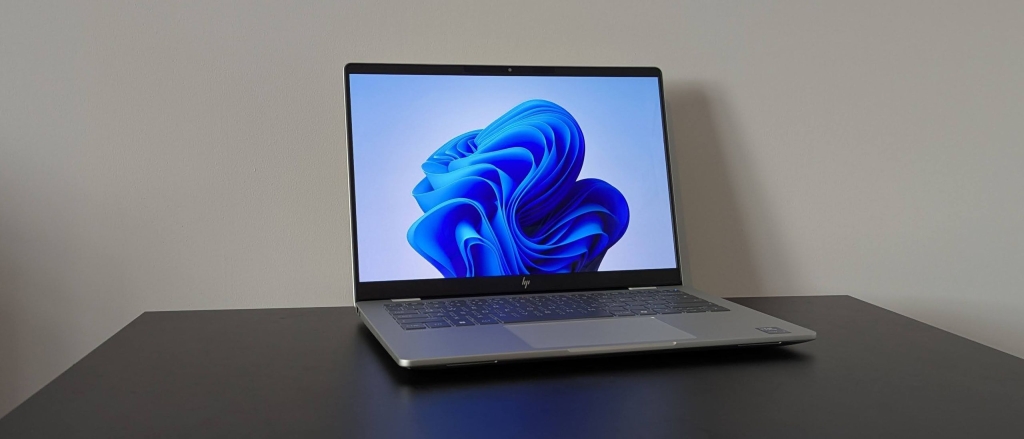
HP OmniBook 7 14-inch: Two-minute review
The HP OmniBook 7 14-inch AI Laptop is a stunning everyday workhorse that combines elegant design with impressive performance, setting a new standard in the mid-range laptop category.
Design That Turns Heads
Right out of the box, the OmniBook 7 makes a statement. Its minimalist aesthetic is both fetching and sophisticated, with a light gray chassis that provides the perfect canvas for the darker keycaps. This color contrast isn’t just visually appealing—it’s downright elegant.
What really sets this laptop apart is how it feels. The silky-smooth finish extends across the entire unit, from the lid to the keyboard, creating a premium tactile experience that rivals some of the best laptops on the market. The build quality is exceptional—both the base and lid feel remarkably sturdy despite the laptop’s incredibly thin and lightweight profile. It’s worth noting that while the sides are impressively slim, the underside is slightly thicker, though this doesn’t detract from the overall sleek appearance.
Port Selection: A Mixed Bag
The OmniBook 7 comes equipped with essential ports including two USB-A and two USB-C connections. The USB-C ports serve dual purposes, handling both charging and external monitor connections, with one supporting Thunderbolt 4 for maximum versatility. An HDMI port is also included—a welcome sight on modern laptops that’s becoming increasingly rare.
However, the port placement leaves something to be desired. The USB-C ports are positioned too close to the center of the unit, making cable management awkward, especially for the power adapter. The HDMI port’s location ahead of one USB-A port could also lead to crossed cables when both are in use simultaneously.
Performance That Surprises
The OmniBook 7 delivers impressive general performance that handles light productivity and multi-tab browsing with ease. Streaming ultra-HD content is seamless, with minimal buffering or stuttering. While I did notice some minor slowdowns during certain media tasks, these were negligible and didn’t impact the overall user experience.
Where this laptop truly shines is in gaming performance. For a device without a dedicated GPU, the OmniBook 7 is surprisingly capable. I was able to run Cyberpunk 2077 in a passable state, achieving frame rates suitable for casual gameplay—something many laptops with similar integrated graphics struggle to accomplish. This gaming capability, combined with the laptop’s cool and quiet operation even under load, makes it a versatile choice for entertainment.
The WUXGA display is another standout feature. While it may not match the sharpness of higher-resolution panels, the 1920 x 1200 resolution is perfectly suited to the 14-inch canvas, delivering crystal-clear text and sharp interface elements. Colors are vibrantly rendered with excellent contrast, creating an immersive viewing experience. Some minor reflections were noticeable, but they never significantly impacted visibility.
The keyboard offers a satisfying typing experience with generous key spacing and light actuation, though it lacks the premium dampening found in higher-end models. The touchpad is excellent—precisely responsive with ideal dimensions that balance navigation ease with typing comfort.
Battery Life That Defies Belief
The battery performance of the OmniBook 7 is nothing short of remarkable. In our continuous movie playback test, it lasted an incredible 26 hours—ranking among the very best in the industry. Even more impressive is the charging speed: just over two hours to go from empty to full capacity.
Pricing and Availability
The HP OmniBook 7 14-inch starts at $949 / £699 / AU$2,499 and is available now. While this represents a significant investment, we’ve observed substantial discounts in UK and Australian markets that dramatically improve the value proposition.
Configuration options vary by region, with the US market receiving a single model featuring an Intel Core Ultra 5 processor, 16GB of RAM, and 512GB of storage. This positions the OmniBook 7 as more expensive than the HP OmniBook 5, though the performance gap between the two models is substantial.
When compared to alternatives like the Dell 16 Plus, the OmniBook 7 holds its own. The Dell offers a larger form factor with a full-size keyboard that may appeal to productivity-focused users, but both laptops share similar integrated graphics limitations for gaming and creative workloads.
Should You Buy It?
Buy the HP OmniBook 7 14-inch if:
- You want a laptop that excels at everyday tasks
- You value premium design and build quality
- You need exceptional battery life
- You want surprising gaming capability without a dedicated GPU
- You appreciate a high-quality display
Don’t buy it if:
- You need a dedicated GPU for serious gaming or creative work
- You require extensive port options like an SD card reader
- You prefer a larger display or full-size keyboard
- You’re on a tight budget and can’t wait for sales
The HP OmniBook 7 14-inch represents one of the best values in the mid-range laptop market, especially when purchased during promotional periods. It delivers on all fronts—design, performance, display quality, and battery life—making it a compelling choice for users seeking a versatile, premium-feeling laptop without the flagship price tag.
Tags: #HPOmniBook7 #LaptopReview #TechReview #WindowsLaptop #BatteryLife #GamingLaptop #PortableComputing #TechDeals #HP2025 #Ultrabook
Viral Phrases: “battery life that defies belief,” “gaming performance that surprises,” “premium design at mid-range price,” “26 hours of continuous use,” “sleek and sophisticated,” “built to impress,” “everyday powerhouse,” “value that can’t be beaten,” “performance beyond expectations,” “the complete package”
,

Leave a Reply
Want to join the discussion?Feel free to contribute!