
I created the ultimate Wi-Fi password key with the most unexpected gadget – how it works
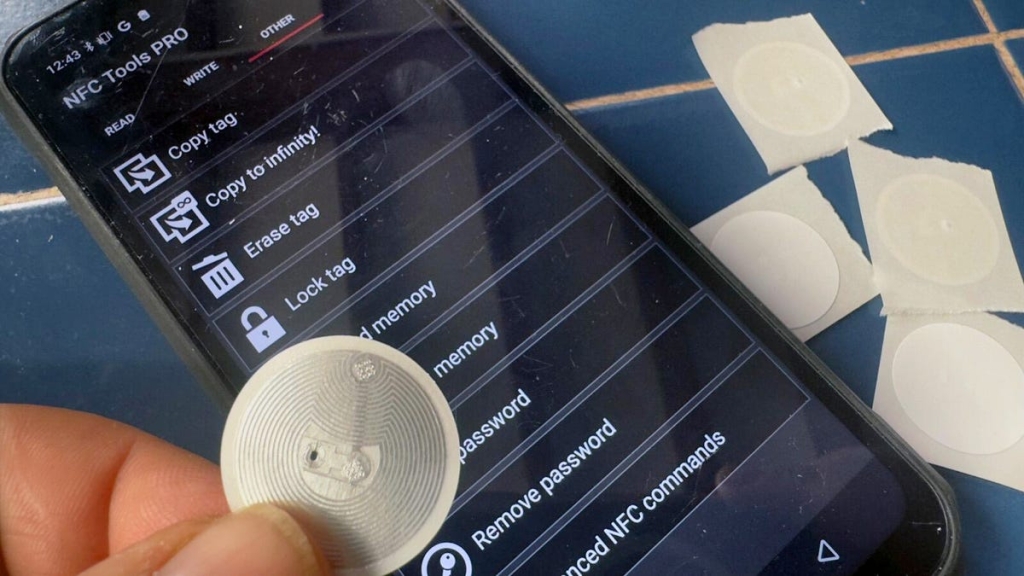
Writing NFC Tags with a Smartphone: The Complete Guide
Near Field Communication (NFC) technology continues to amaze me with its simplicity and versatility. The ability to encode data onto a tiny chip and instantly access it with a smartphone or tablet opens up countless possibilities for both personal and professional applications.
I’ve integrated NFC tags into various objects—from important documents and business cards to custom 3D-printed creations—and the process couldn’t be simpler. Whether you’re a tech enthusiast looking to explore new capabilities or a business owner seeking innovative solutions, NFC technology offers an accessible entry point into the Internet of Things.
Essential Equipment
Getting started requires just two components:
NFC Tags – Available in numerous formats including adhesive stickers, keychain disks, and durable plastic cards. I recommend NTAG215-compatible tags for most applications because they offer an optimal balance of affordability, storage capacity (504 bytes), and longevity with a data retention lifespan of at least 10 years or 100,000 write cycles. While NTAG213 tags are less expensive at only 137 bytes of storage, many modern URLs exceed this limit, making them impractical for web-based applications.
NFC Reader/Writer Application – I personally use NFC Tools, which provides comprehensive functionality across both iOS and Android platforms. The app’s intuitive interface makes the writing process straightforward while offering advanced features for power users.
Step-by-Step NFC Tag Creation
The process varies depending on your volume needs. Writing a few dozen tags manually works fine, but for larger-scale operations, industrial solutions like the Sato CT4-LX become necessary.
Here’s how to create your first web-browsing NFC tag:
- Open your NFC app and select the “Write” function
- Choose “Add a record” and select “URL/URI”
- Enter the complete web address you want the tag to open
- Confirm your entry
To write the data to your tag, simply tap “Write” and bring the tag to the back of your smartphone. The device will detect the tag and complete the writing process automatically—it’s genuinely that straightforward.
Testing and Security Considerations
After writing, test your tag by exiting the app and tapping the tag against your phone’s NFC sensor. It should prompt you to visit the designated webpage.
However, you’re not finished yet. Since NFC tags are inherently rewritable, you must implement security measures to prevent unauthorized modifications. This is particularly crucial for tags placed in public spaces or on valuable items.
The NFC Tools app offers two protection methods:
Password Protection – Allows future rewriting while preventing unauthorized access. You’ll need to create and remember a password, but this method provides flexibility for tags you might need to update later.
Locking – Permanently secures the tag’s contents, making it read-only. This quicker option works well for disposable applications like stickers.
I typically lock sticker-based tags for convenience but use password protection for reusable cards and frequently updated information.
Professional Tip: Wi-Fi Sharing Made Easy
One of my favorite practical applications is creating NFC tags that share Wi-Fi credentials. Within NFC Tools, simply add a “Wi-Fi Network” record and input your network details. This proves invaluable for guest networks, eliminating the hassle of verbally sharing complex passwords or writing them down.
The app contains numerous other features worth exploring—from contact sharing and location tagging to automation triggers and device pairing. Experiment with different record types to discover how NFC can streamline your daily routines.
Tags & Viral Phrases:
NFC technology, smartphone hacks, DIY tech, smart home automation, wireless connectivity, digital business cards, IoT projects, tech tutorials, NFC tags, contactless solutions, wireless sharing, modern convenience, tech innovation, smartphone capabilities, digital transformation, everyday tech, productivity hacks, connected devices, future technology, tech tips, wireless communication, smart solutions, digital efficiency, tech lifestyle, modern tools, wireless innovation, smartphone tricks, tech mastery, digital convenience, connected living, smart technology, wireless future, tech empowerment, digital integration, smart workflows, wireless productivity, tech accessibility, digital connectivity, smart automation, wireless possibilities, tech simplicity, digital solutions, smart efficiency, wireless advancement, tech evolution, digital accessibility, smart integration, wireless revolution, tech adoption, digital transformation, smart connectivity, wireless empowerment, tech exploration, digital innovation, smart technology, wireless connectivity, tech discovery, digital progress, smart solutions, wireless development, tech growth, digital advancement, smart future, wireless potential, tech possibilities, digital opportunities, smart implementation, wireless implementation, tech implementation, digital implementation, smart execution, wireless execution, tech execution, digital execution, smart deployment, wireless deployment, tech deployment, digital deployment, smart application, wireless application, tech application, digital application
,

Leave a Reply
Want to join the discussion?Feel free to contribute!