
I thought my Galaxy XR was broken, but then I realized I was wearing it wrong
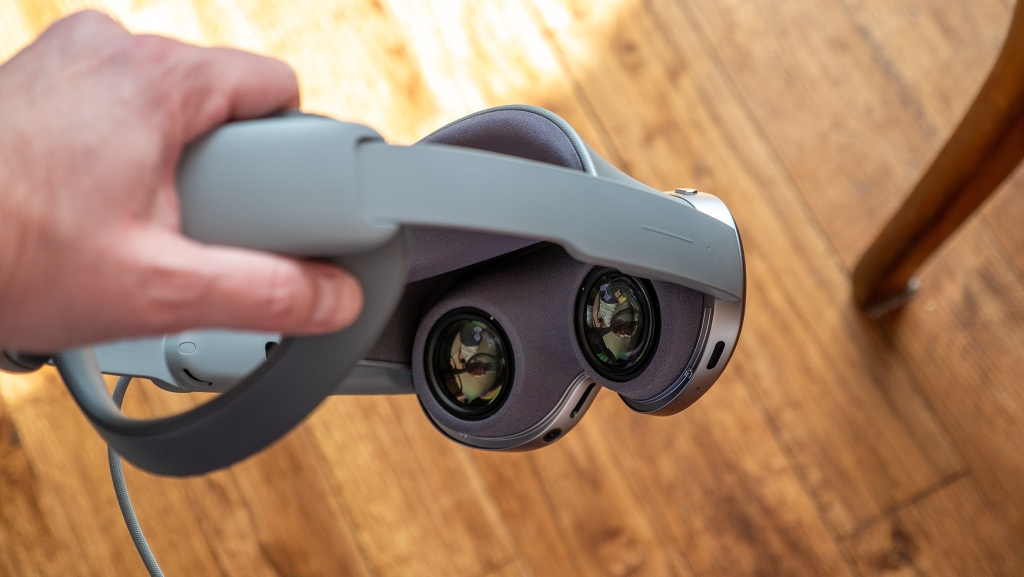
Samsung Galaxy XR: The Perfect Fit You Didn’t Know You Needed
My first impressions of Samsung’s Galaxy XR hardware were overwhelmingly positive. The headset is absolutely gorgeous—lightweight, crafted from premium materials, and clearly designed by borrowing the best elements from every top-tier VR headset on the market. But something felt slightly off during those initial wears.
While the Galaxy XR certainly shares design DNA with the Meta Quest Pro, I quickly discovered it demands a completely different approach to wearing it. General discomfort, a frustratingly narrow field of view, and persistent warning messages from the Android XR operating system about eye-tracking calibration issues all signaled that something wasn’t right. This couldn’t possibly be the intended experience, could it?
Getting the Right Angle
The left side of the image below shows exactly how I initially put the headset on—the wrong way. I started by positioning the forehead pad at the very top of my forehead, then tightened the rear wheel to ensure the headset wouldn’t slip. While this seemed geometrically logical, the side arms ended up perfectly horizontal, which turned out to be a critical mistake.
When worn this way, the rear padding completely fails to align with my skull’s natural curvature, and the displays don’t properly line up with my eyes. Android XR kept nagging me to move the headset downward—impossible since the forehead pad was already at maximum extension on my forehead.
The solution was elegantly simple: I completely changed my approach by placing the front of the headset against my cheeks first, then pulling the back down onto my skull. This created a subtle downward angle for the front of the headset. The side-by-side comparison in the image above demonstrates this crucial difference.
That’s when everything clicked—literally and figuratively. Suddenly, my view of those gorgeous micro-OLED displays felt complete and immersive. They filled a significant portion of my vision rather than creating that frustrating telescope effect I experienced when wearing it incorrectly.
Not only did the visual experience transform, but the pressure distribution completely changed. The uncomfortable forehead pressure vanished, replaced by even weight distribution across the back of my head. The Android XR eye-tracking warnings disappeared instantly, and that brilliant eye-tracking navigation system finally worked as intended.
It’s remarkable how such a small adjustment fixed so many issues simultaneously, but I’m thrilled I discovered this technique and can now properly enjoy the Galaxy XR experience!
Tags & Viral Phrases:
- game-changing headset design
- the one trick that fixes everything
- eye-tracking that actually works
- premium mixed reality experience
- Samsung’s secret sauce revealed
- best VR headset of the year contender
- comfort level: maximum
- field of view problem solved
- Android XR operating system
- micro-OLED display technology
- mixed reality headset revolution
- how to wear it right
- the comfort you’ve been waiting for
- premium materials, premium experience
- Meta Quest Pro competitor
- Samsung Galaxy XR hands-on
- first impressions that matter
- eye-tracking navigation system
- weight distribution perfected
- the angle makes all the difference
,

Leave a Reply
Want to join the discussion?Feel free to contribute!