
I tried Firefox’s new AI ‘Smart Window’ in a beta build
Firefox’s New AI-Powered ‘Smart Window’ Feature: A Hands-On Look at the Future of Browsing
Firefox is betting big on AI with its new Smart Window feature, but is this the future of browsing or just another tech gimmick? I spent some quality time with the latest beta to find out.
The AI Revolution Comes to Firefox
Mozilla is going all-in on artificial intelligence, making it a cornerstone of what they call their “double-bottom line” strategy—a fancy way of saying they’re using AI to both improve their product and generate revenue. The new Smart Window feature is central to this vision, transforming the browsing experience by making AI the primary interface.
But here’s the thing: Firefox’s AI push isn’t exactly subtle. After adding an AI switch in version 148, they’re now embedding AI so deeply that it becomes the default way you interact with the web. Bold move, Mozilla.
First Impressions: It’s AI, But Make It Browser
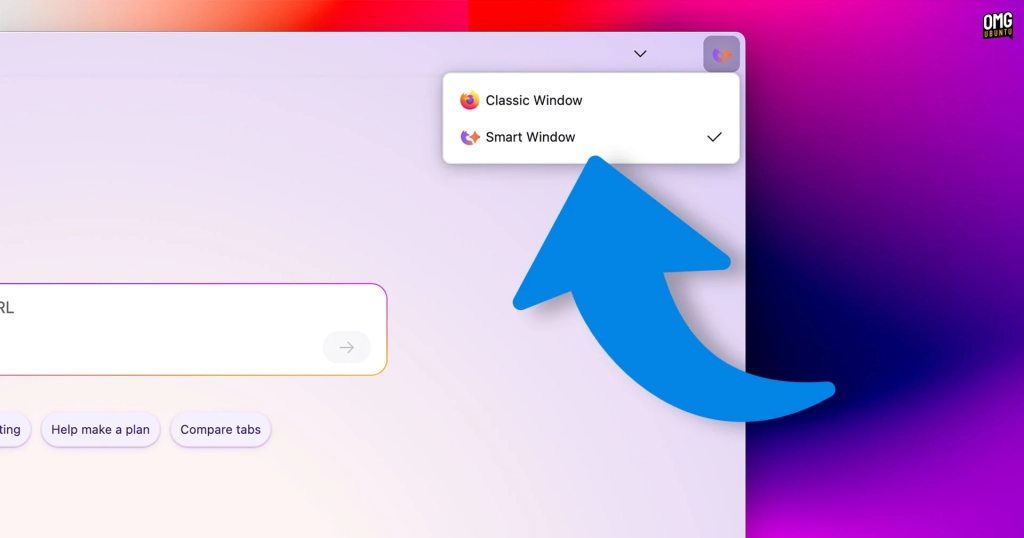
When I fired up Firefox 149.0b7 beta on macOS (sadly, it wouldn’t work on Linux for me), I was greeted with something that felt both familiar and alien. Activating Smart Window changes the browser’s entire color scheme—think pastel gradients and rounded corners that give off major Firefox Nova redesign vibes.
Here’s the kicker though: despite being marketed as an entirely new browsing mode, Smart Window still keeps the toolbar, address bar, extension menu, and other familiar elements. It’s like putting a fancy new coat of paint on your house but keeping all the furniture in the same spots.
Choosing Your AI Companion
The first time you enter Smart Window mode, Firefox asks you to pick your poison—err, I mean, your AI model. The beta doesn’t show model names on the selection screen, but digging into Preferences reveals your options:
- Fast – Google’s Gemini Flash Lite
- Flexible – Alibaba Cloud’s Qwen3-235B-A22B
- Personal – OpenAI’s GPT-OSS 120B
There’s also a “bring your own model” option where you can enter your own endpoint and API token, though the setup warns that local models might not work correctly. Classic beta disclaimer.
The New Tab Page: AI Takes Center Stage
Say goodbye to the traditional search bar and those “recommended stories” feeds nobody actually reads. In their place sits a prompt box inviting you to “ask, search, or type a URL,” complete with suggested action chips beneath.
It’s like having ChatGPT built directly into your browser, but with Firefox’s own twist. You can ask it to help plan meals, proofread text, or generate that homework assignment you’ve been putting off—complete with all the classic LLM writing tics that make everything sound like it was written by an AI that’s read too many self-help books.
How It Actually Works
Most questions you type will trigger a Google search, which loads a regular search results page. But here’s where it gets interesting: Firefox’s AI chatbot shifts to a sidebar on the right, reads the top results (including any AI overviews), and produces a response based on them.
You can click through to actual web pages, ask questions about them, and if the model decides it needs more information, it’ll run its own follow-up search using its own terms in the same tab. It’s like having a research assistant that’s always one step ahead of you.
The “Smart” in Smart Window
The real magic (or gimmick, depending on your perspective) is in how it handles information gathering. It’s essentially an unsubtle version of the AI chatbot sidebar Firefox has been nagging users about for months, but now it’s front and center.
When using the prompt box, the action button transforms into a menu with additional actions depending on what you want to do. The primary action is “Ask,” not “Go to site”—a subtle but significant shift in how Firefox wants you to think about browsing.
The Creepy Part: Memories
Here’s where things get a bit… uncomfortable. Smart Window uses something Mozilla calls “memories”—essentially learning from your activity to inform its responses. You can delete memories individually and set chat sessions to not use or store them.
Fine so far, right? Wrong.
When I checked my memory list, I discovered it wasn’t populated with things Smart Window had learned since I enabled it. No, it had activity going back months—searches and website interactions from long before I even enabled this feature.
Firefox had just handed over my entire browsing history to the AI models without telling me upfront. Yikes.
Mozilla claims this was a flub and promises to refine the onboarding to limit memory formation to post-opt-in activity only. That’s obviously the right fix, but the fact that it happened at all raises some serious privacy questions.
Who’s Actually Hosting These Models?
After discovering my entire search history had been handed over to AI models, I started wondering: who exactly are these models, and where are they running?
I asked each model where it thinks it’s hosted:
Gemini (Fast) couldn’t be coaxed and just deflected with corporate speak about being “trained by Google.”
Qwen (Flexible) was more forthcoming: “While I am integrated into Firefox as Smart Window by Mozilla, the underlying Qwen model that powers me runs on infrastructure provided by Alibaba Cloud.”
GPT-OSS (Personal) was also upfront: “This model runs on OpenAI’s cloud infrastructure. Mozilla integrates the service into Firefox, but the inference happens on OpenAI’s servers.”
The obvious takeaway? Mozilla can’t afford to run major LLMs on its own infrastructure at scale, so they’re mediating access to Alibaba, OpenAI, etc. This has implications for where your questions (and potentially your browsing history) end up, and which governments or agencies might have access to that data.
The Bottom Line
Smart Window is still very much in development and not enabled by default in beta builds. I couldn’t get it to run on Linux, so if you’re on Linux and curious, it’s one to watch.
Do I think this feature will reverse Firefox’s years-long decline in market share? No. It’s essentially copying what others are doing and putting a Firefox spin on it—much like generative AI in general.
Would I use this feature personally? Again, no. AI-as-default-browsing-interface isn’t something I want or have use for. If I wanted someone else to read the web on my behalf, parse what it says on topics I care about, and then confidently BS to me about what’s happening, I’d just watch YouTube.
But at least now you have a better idea of what’s coming. Whether that’s exciting or terrifying probably depends on your perspective.
Tags: Firefox, AI, Smart Window, Mozilla, browsing, technology, beta, Gemini, Qwen, OpenAI, privacy, memories, browser features, tech news
Viral Phrases: “AI takes center stage,” “the creepy part,” “who’s actually hosting these models,” “the bottom line,” “whether that’s exciting or terrifying,” “bets big on AI,” “double-bottom line strategy,” “hands-on look,” “future of browsing,” “tech gimmick,” “bold move,” “quality time,” “putting a fancy new coat of paint,” “pick your poison,” “ChatGPT built directly into your browser,” “research assistant,” “corporate speak,” “yikes,” “serious privacy questions,” “obvious takeaway,” “essentially copying,” “Firefox spin,” “depends on your perspective”
,


Leave a Reply
Want to join the discussion?Feel free to contribute!