
I’m thankful for Google TV’s update that puts ‘Free’ tab, ‘Shop’ on the main screen
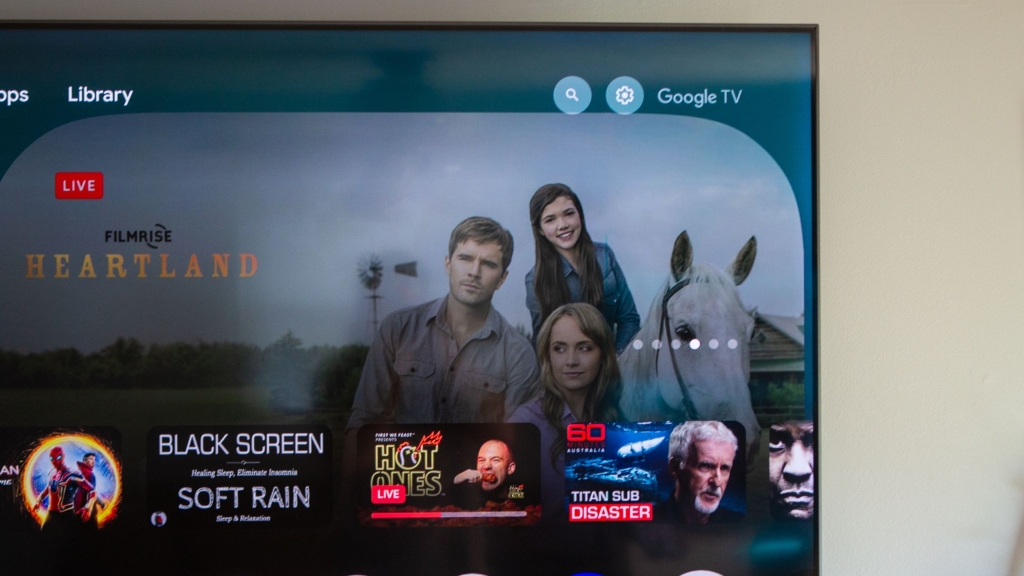
Google TV Unveils New “Free” and “Shop” Tabs – A Game-Changer for Streaming
In a surprising yet strategic move, Google TV is rolling out a subtle yet impactful update to its home screen, introducing two new tabs: “Free” and “Shop”. This change, first spotted by a user with the latest Google TV Streamer, is already generating buzz among tech enthusiasts and streaming aficionados alike.
What’s New?
The addition of these tabs is a small but meaningful enhancement to Google TV’s user interface. Positioned between the existing “Live” and “Apps” options, the new tabs aim to streamline the streaming experience. The “Free” tab curates a selection of free streaming content, such as Tubi, while the “Shop” tab allows users to purchase or rent movies and shows, complete with Rotten Tomatoes ratings and pricing details.
Interestingly, this update appears to be rolling out selectively. While some users with newer devices like the Google TV Streamer or TCL TVs with built-in Google TV have already spotted the changes, others with older Chromecast devices are still waiting. This staggered rollout suggests Google is testing the feature before a wider release.
A Week of Updates for Google TV
This isn’t the first time Google TV has made headlines this week. Earlier, the platform rolled out a series of quality-of-life tweaks, including a new “Report history” section for users to track their feedback and a fix for a YouTube thumbnail aspect ratio bug. These updates, combined with the new tabs, highlight Google’s commitment to refining the user experience.
Why This Matters
The introduction of the “Free” and “Shop” tabs is more than just a cosmetic change. It reflects Google’s understanding of user behavior and the evolving streaming landscape. With the proliferation of free ad-supported streaming services, having a dedicated tab for free content makes it easier for users to discover and enjoy entertainment without breaking the bank. Meanwhile, the “Shop” tab simplifies the process of finding and purchasing premium content, making Google TV a one-stop shop for all streaming needs.
User Reactions
The response from the community has been overwhelmingly positive. Many users have praised the update for its simplicity and practicality. One Reddit user noted, “It’s about time Google made free content more accessible. This is a game-changer!” Others have highlighted how the new tabs make navigating the platform more intuitive, especially for those who frequently switch between free and paid content.
The Bigger Picture
This update is part of Google’s broader strategy to enhance its streaming ecosystem. Last September, the company introduced a redesigned home screen with an updated navigation bar, including a Search function and reorganized options like “Library” and “Watchlist”. These incremental changes demonstrate Google’s focus on creating a seamless and user-friendly experience.
Final Thoughts
Google TV’s latest update is a testament to the power of small, thoughtful changes. By adding the “Free” and “Shop” tabs, Google is not only improving usability but also catering to the diverse needs of its user base. Whether you’re a budget-conscious streamer or a movie buff looking for the latest releases, these new tabs make Google TV more versatile than ever.
As the rollout continues, it will be interesting to see how users adapt to these changes and whether Google introduces further enhancements in the future. For now, one thing is clear: Google TV is stepping up its game, and the streaming world is taking notice.
Tags: #GoogleTV #Streaming #TechNews #FreeContent #ShopTab #StreamingUpdate #GoogleEcosystem #TechInnovation #UserExperience #StreamingTips
Viral Phrases: “Game-changer for streaming,” “Free content made easy,” “Shop and stream in one place,” “Google TV levels up,” “Small updates, big impact,” “The future of streaming is here,” “Discover free entertainment effortlessly,” “Your one-stop streaming shop,” “Tech updates that matter,” “Stream smarter with Google TV.”
,

Leave a Reply
Want to join the discussion?Feel free to contribute!