
Indie App Spotlight: ‘Itsyhome’ adds smart home controls to your Mac’s menu bar
Revolutionizing Mac Smart Home Control: Introducing Itsyhome – The Ultimate Menu Bar Hub
In a world where smart homes are becoming the norm, managing your connected devices can often feel like a juggling act. Enter Itsyhome, a groundbreaking macOS application that’s about to change how you interact with your smart home ecosystem. This isn’t just another HomeKit controller – it’s a comprehensive smart home command center that lives right in your menu bar.
Breaking Free from Ecosystem Lock-in
The smart home market has long been plagued by platform exclusivity. If you’re invested in Apple’s HomeKit, you’re golden. But what if you’ve embraced Home Assistant? Or perhaps you’re using a mix of both? This is where Itsyhome truly shines – it’s platform-agnostic, supporting both HomeKit and Home Assistant ecosystems. No more being locked into a single vendor’s walled garden.
Your Smart Home, Always at Your Fingertips
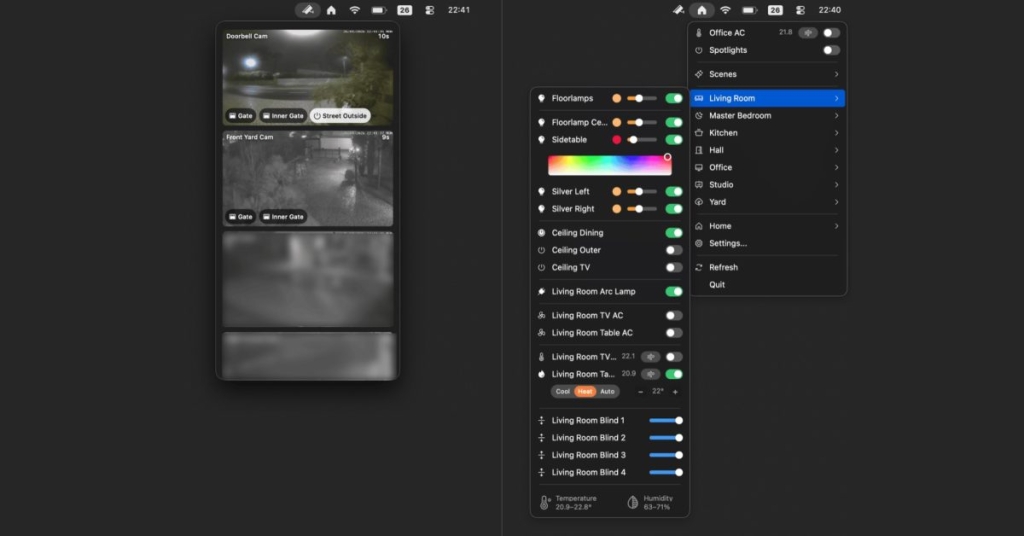
Imagine this: You’re deep in work on your Mac, and you suddenly need to adjust the thermostat or check your front door camera. Instead of fumbling through your phone or asking Siri, Itsyhome puts instant control at your fingertips. Every smart device – lights, thermostats, fans, air conditioners, door locks, and cameras – is just a click away in your menu bar.
The interface is thoughtfully designed with room-based organization, allowing you to group devices logically. But Itsyhome doesn’t stop there. You can customize your experience by rearranging rooms, creating custom device groups for batch control, and even pinning your most-used devices to the top of the list for immediate access.
Power Features That Set It Apart
What makes Itsyhome truly special is the depth of functionality hidden beneath its simple exterior:
- Selective visibility: Hide devices you don’t want cluttering your interface
- Keyboard shortcuts: Control your smart home without even touching your mouse
- Stream Deck integration: Perfect for power users who want physical buttons for smart home control
- Companion Apple TV remote: This innovative feature lets you control your Apple TV directly from your Mac, complete with a built-in app launcher that eliminates the need to navigate the home screen
The Open Source Advantage
In an era where privacy concerns are paramount, Itsyhome’s open-source nature is a breath of fresh air. Available on GitHub, the community can inspect, contribute to, and verify the security of the code. This transparency builds trust and ensures the app evolves based on real user needs rather than corporate agendas.
Pricing That Makes Sense
Itsyhome follows a freemium model that respects both casual users and power users. The core functionality is free, allowing you to test the waters without commitment. For those who want the full experience – including camera access, iCloud sync, and webhook integration – a one-time payment of $12.99 unlocks everything. No subscriptions, no hidden fees, no nickel-and-diming.
Technical Requirements and Availability
The app requires macOS 14.0 Sonoma or later, ensuring it takes advantage of the latest macOS features and security improvements. Available exclusively on the Mac App Store, Itsyhome benefits from Apple’s rigorous app review process and automatic updates.
The Future of Smart Home Control
Itsyhome represents a paradigm shift in how we interact with our smart homes. By bringing control to the platform where we spend most of our time – our computers – it eliminates the friction that often comes with smart home management. Whether you’re a tech enthusiast with dozens of devices or someone with just a few smart bulbs, Itsyhome scales to meet your needs.
The app’s menu bar integration is particularly clever. It leverages a space we’re already familiar with, making the learning curve virtually nonexistent. For Mac users, this feels like a natural extension of the operating system rather than a third-party add-on.
Why Itsyhome Matters
In a market saturated with smart home apps that often feel like afterthoughts, Itsyhome stands out by putting the user experience first. It recognizes that smart home control isn’t just about turning lights on and off – it’s about creating a seamless, intuitive interface that integrates with your daily workflow.
The platform-agnostic approach is particularly noteworthy. As the smart home market continues to fragment, with new protocols and ecosystems emerging regularly, Itsyhome’s flexibility ensures it will remain relevant regardless of how your smart home evolves.
The Bottom Line
Itsyhome isn’t just an app – it’s a statement about what smart home control should be: accessible, powerful, transparent, and user-centric. Whether you’re a HomeKit loyalist, a Home Assistant enthusiast, or somewhere in between, Itsyhome offers a compelling solution that might just make you wonder how you ever managed your smart home without it.
For Mac users looking to take their smart home experience to the next level, Itsyhome represents not just an app worth downloading, but a fundamental improvement in how we interact with our connected environments.
Tags & Viral Phrases
- Game-changer for Mac users
- Must-have utility for smart home enthusiasts
- Open-source transparency in smart home apps
- Platform-agnostic solution for mixed ecosystems
- One-time payment model (no subscriptions!)
- Menu bar integration that feels native
- Power user features without complexity
- Companion Apple TV remote – innovative twist
- Custom device groups and batch control
- Keyboard shortcuts and Stream Deck support
- Room-based organization made simple
- Free to try with premium features unlocked
- macOS 14.0+ requirement ensures modern compatibility
- GitHub available for community contribution
- $12.99 one-time fee for full functionality
- Smart home command center in your menu bar
- No more ecosystem lock-in
- Instant control without phone dependency
- Privacy-focused open-source approach
- Workflow integration that makes sense
- Future-proof platform flexibility
- User-centric design philosophy
- Seamless experience for mixed-device households
- Revolutionary approach to smart home management
- Hidden gem in the Mac App Store
- Essential utility for productivity-focused users
- Smart home evolution for the modern era
- Cross-platform compatibility that actually works
- Feature-rich without being overwhelming
- Community-driven development ensures longevity
,


Leave a Reply
Want to join the discussion?Feel free to contribute!