
Indie App Spotlight: ‘Weather mini’ packs trip forecasts and more in a beautiful design
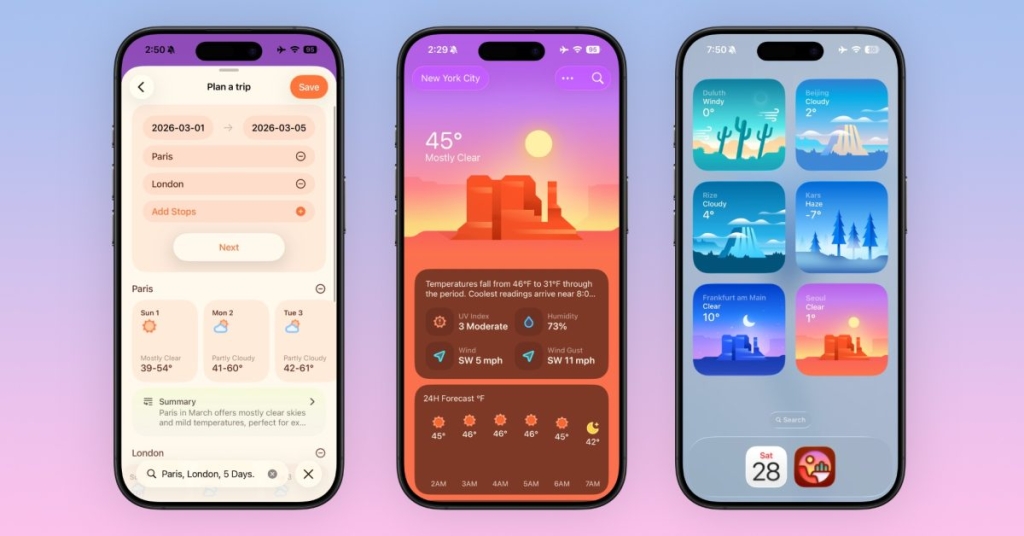
Weather Mini: The Privacy-First Weather App Revolutionizing Apple’s Ecosystem
In an increasingly crowded weather app market, Weather Mini has emerged as a standout contender, offering Apple users a beautifully designed, privacy-focused alternative to Apple’s native Weather app. This comprehensive review explores why Weather Mini is generating buzz across the Apple ecosystem and how it’s setting new standards for weather applications.
A Native Apple Experience Like No Other
Weather Mini isn’t just another weather app—it’s a meticulously crafted experience designed exclusively for Apple devices. From the moment you launch the app, you’ll notice the attention to detail that Apple enthusiasts crave. The interface feels instantly familiar yet refreshingly modern, with smooth animations and intuitive gestures that make checking the weather a pleasure rather than a chore.
What sets Weather Mini apart is its deep integration across Apple’s entire product lineup. Whether you’re checking conditions on your iPhone, monitoring forecasts on your Apple Watch, or keeping an eye on the weather from your Mac’s dock, Weather Mini provides a consistent and elegant experience across all devices.
The Watch App That Redefines Wearable Weather
Weather Mini’s Apple Watch application is arguably the crown jewel of the suite. Featuring complications that display real-time weather information at a glance, the Watch app goes beyond simple temperature readings. Users can swipe through detailed forecasts, view radar animations, and even receive severe weather alerts directly on their wrist.
The complications are thoughtfully designed to work with various watch face styles, from minimalist digital faces to information-rich complications layouts. This level of customization ensures that whether you’re checking the weather during your morning run or glancing at conditions before heading out for the evening, the information you need is always accessible.
Trip Planning: The Feature Apple Weather Forgot
One of Weather Mini’s most compelling features is its trip planning functionality. Unlike Apple Weather, which provides static forecasts, Weather Mini allows users to input travel dates and destinations, then tracks weather conditions for those specific locations and timeframes. This feature alone justifies the app’s existence for frequent travelers.
The trip planning interface is intuitive and powerful. Users can save multiple trips, receive notifications about significant weather changes, and even share forecasts with travel companions. As your departure date approaches, Weather Mini refines its predictions, giving you increasingly accurate information to help you pack appropriately or adjust your plans if necessary.
Natural Language Forecasting with On-Device AI
Weather Mini leverages Apple’s on-device intelligence to provide a unique forecasting experience. Users can ask natural language questions like “Will it rain during my afternoon meeting?” or “What should I wear tomorrow?” and receive contextually relevant answers. This feature transforms weather checking from a passive activity into an interactive conversation.
The AI-powered responses are generated entirely on-device, ensuring that your location data and personal information never leave your device. This commitment to privacy is central to Weather Mini’s philosophy and represents a significant advantage over competitors that rely on cloud-based processing.
Privacy-First Philosophy
In an era where data privacy concerns dominate headlines, Weather Mini takes a refreshingly transparent approach. The app uses Apple’s WeatherKit for data sourcing, but unlike many competitors, it doesn’t track user behavior, sell data to third parties, or even collect anonymous usage statistics.
All processing, including the AI-powered natural language features, occurs on-device. This means your location history, search queries, and personal preferences remain private. For privacy-conscious users who have grown wary of weather apps that seem more interested in data collection than accurate forecasts, Weather Mini represents a welcome alternative.
Cross-Platform Excellence
Weather Mini’s support for the entire Apple ecosystem is comprehensive. On iPhone and iPad, the app features a clean, card-based interface that makes navigating between current conditions, hourly forecasts, and extended outlooks effortless. The iPad version takes advantage of the larger screen real estate with split-view functionality and detailed weather maps.
On Mac, Weather Mini integrates seamlessly with the operating system. The live dock icon provides constant weather updates without requiring the app to be open, and the menu bar integration allows for quick weather checks without interrupting your workflow. The Vision Pro version offers an immersive 3D weather experience that’s perfect for the spatial computing environment.
Pricing and Subscription Model
Weather Mini follows a freemium model that respects users’ choices. The basic version is completely free and includes core features like current conditions, basic forecasts, and the Apple Watch app. For users who want the full experience, Weather Mini Plus offers additional features including unlimited saved locations, advanced radar maps, and the live dock icon on Mac.
The subscription pricing is competitive: $1.49 per month, $12.99 annually, or a $34.99 lifetime purchase. This flexible pricing structure allows users to choose the option that best fits their needs and budget.
Community and Support
Weather Mini has cultivated an active community of users who share tips, request features, and provide feedback. The development team maintains an active presence on social media platforms like X (formerly Twitter) and Threads, where they announce updates, respond to user questions, and showcase new features.
The app’s support system is responsive and helpful, with comprehensive documentation and a straightforward process for submitting feature requests or reporting issues. This level of engagement between developers and users creates a sense of community that’s increasingly rare in the app world.
Why Weather Mini Matters
Weather Mini represents more than just another weather app—it’s a statement about what’s possible when developers prioritize user experience, privacy, and ecosystem integration. In a market where many weather apps rely on aggressive data collection and intrusive advertising, Weather Mini proves that it’s possible to create a successful app while respecting user privacy.
The app’s success also highlights the growing demand for alternatives to Apple’s default applications. While Apple Weather is competent, many users are willing to pay for apps that offer additional features, better design, or stronger privacy protections. Weather Mini capitalizes on this demand while maintaining the aesthetic and functional standards that Apple users expect.
Final Thoughts
Weather Mini has quickly established itself as a must-have app for Apple users who want more from their weather experience. With its beautiful design, comprehensive feature set, and unwavering commitment to privacy, it sets a new standard for what weather apps can and should be.
Whether you’re a casual user who just wants to know if you need an umbrella, a frequent traveler who needs detailed trip planning, or a privacy advocate who wants to keep your data secure, Weather Mini offers something valuable. At its price points, it’s an investment in both functionality and peace of mind.
For Apple users looking to upgrade their weather experience while maintaining their privacy, Weather Mini is an easy recommendation. It’s available now on the App Store for all Apple devices, with a free trial of Weather Mini Plus available for those who want to test the premium features before committing to a subscription.
#WeatherMini #AppleWeather #WeatherApp #iOS #iPadOS #macOS #AppleWatch #PrivacyFirst #WeatherForecasting #AppStore #IndieApp #AppleEcosystem #WeatherTechnology #OnDeviceAI #TripPlanning #WeatherNotifications #WeatherWidgets #WeatherRadar #WeatherMaps #AppleIntelligence #WeatherPrivacy #WeatherDesign #WeatherExperience #WeatherInnovation #WeatherFeatures #WeatherIntegration #WeatherCommunity #WeatherSupport #WeatherUpdates #WeatherTrends,

Leave a Reply
Want to join the discussion?Feel free to contribute!