
Kindle Scribe’s latest update turns scribbles into action
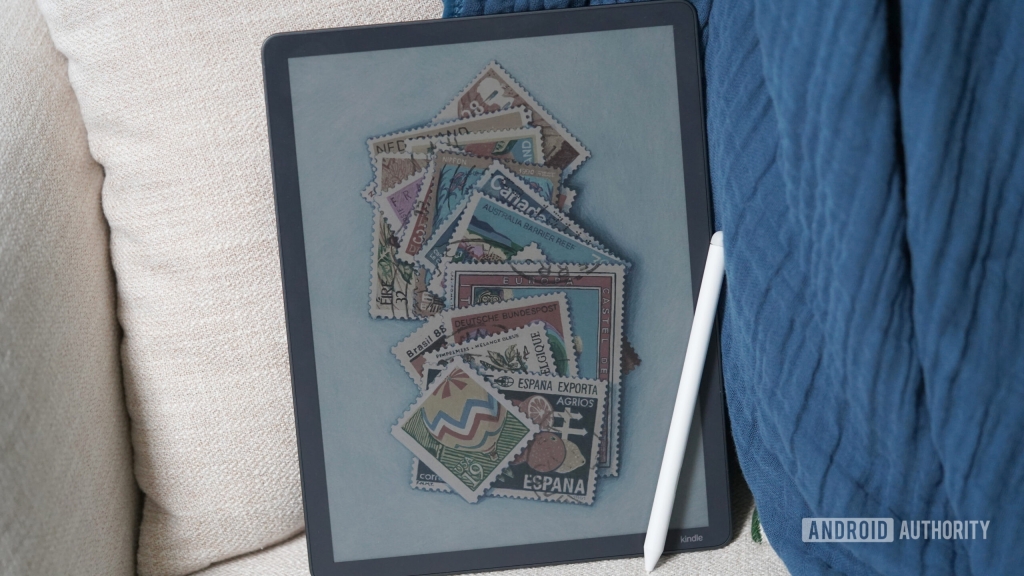
Amazon’s Kindle Scribe Gets a Major AI Overhaul—Here’s What You Need to Know
Amazon is doubling down on generative AI, and this time, it’s bringing the future straight to your Kindle Scribe. The e-reader giant has just unveiled a suite of AI-powered features designed to transform the way users interact with handwritten notes, making them smarter, cleaner, and more actionable than ever before. If you’ve ever wished your messy scribbles could magically turn into organized, searchable, and even voice-activated reminders, Amazon just made that a reality.
AI-Powered Notebook Features: Smarter Than Ever
The Kindle Scribe, already a favorite among digital note-takers and avid readers, is now getting a serious intelligence boost. Amazon has integrated generative AI tools that can summarize lengthy notes into concise bullet points, refine messy handwriting into polished text, and even search for notes using natural language descriptions instead of exact keywords. Imagine jotting down a brainstorming session and having the AI instantly distill it into key takeaways—no more sifting through pages of scribbles.
But that’s not all. The update also introduces deeper integration with Alexa+, Amazon’s next-generation conversational assistant. With Alexa+ onboard, users can now send their handwritten notes to the cloud and interact with them in entirely new ways. Need to turn a to-do list into a reminder? Done. Want to extract specific details from a meeting note? Alexa+ has you covered. The assistant can even offer guidance or context based on your notes, effectively turning your Scribe into a dynamic productivity hub.
The Alexa+ Connection: Power at a Price
Here’s the catch: Alexa+ is a subscription-based service, meaning the most advanced features won’t be available to everyone. While the core AI tools (like note summarization and handwriting refinement) will work offline, the full potential of Alexa+ integration—like voice-activated reminders and cloud-based note analysis—will require a paid subscription. It’s a strategic move by Amazon to layer premium features onto its hardware while keeping users tethered to its ecosystem.
Kindle Scribe: Still the Same, But Smarter
Under the hood, the Kindle Scribe remains the same beloved device it’s always been. It still boasts a 10.2-inch glare-free E Ink display, a pressure-sensitive stylus with a built-in eraser, and battery life that lasts for weeks. Storage options start at 16GB and go up from there, ensuring you’ve got plenty of space for notes, books, and documents. The update doesn’t change the core experience—it enhances it.
For those who primarily use the Scribe as a distraction-free e-reader, these new AI tools might feel like overkill. But for productivity enthusiasts who rely on the device as a digital notebook, the ability to automatically clean up handwriting, summarize notes, and integrate with Alexa+ could be a game-changer.
Rollout Details: When Can You Get It?
Amazon has confirmed that the AI features are rolling out today, February 12, with wider availability expected over the coming weeks. As with most Kindle updates, the rollout may vary by device, so don’t panic if you don’t see the update immediately. Keep an eye on your Scribe’s settings for the latest software version.
The Bigger Picture: Amazon’s Vision for the Scribe
This update signals a clear shift in how Amazon views the Kindle Scribe. No longer just an oversized Kindle with stylus support, the device is now being positioned as a smart notebook—a tool that’s not only for reading and writing but for thinking, organizing, and acting on ideas. By layering in AI and tying it to Alexa+, Amazon is creating a seamless ecosystem where your notes aren’t just stored—they’re alive, interactive, and ready to help you get things done.
Whether you’re a student, a professional, or just someone who loves the tactile feel of writing on E Ink, the Kindle Scribe’s new AI features are designed to make your life easier. And with Amazon’s track record of continuous improvement, this is likely just the beginning of what’s to come for the Scribe.
Tags: Kindle Scribe, Amazon, AI, Generative AI, Alexa+, E Ink, Digital Notebook, Productivity, Tech News, Handwritten Notes, Smart Assistant, Subscription Service, Cloud Integration, Note Summarization, Handwriting Refinement, Natural Language Search, Tech Updates, Digital Reading, Stylus Support, Battery Life, Storage Options, Glare-Free Display, Tech Ecosystem, Amazon Ecosystem, Voice-Activated Reminders, To-Do Lists, Calendar Events, Meeting Notes, Brainstorming, Tech Innovation, Future of Note-Taking, Smart Devices, Digital Transformation, AI-Powered Tools, Conversational Assistant, Cloud-Based Features, Offline AI, Tech Rollout, Software Update, Device Integration, Interactive Notes, Productivity Hub, Distraction-Free Reading, Digital Writing, Tech Trends, AI in Education, AI in Business, AI in Daily Life, Tech Advancements, Smart Technology, Amazon News, Kindle Updates, Digital Productivity, Note Organization, AI Assistance, Tech Community, Comment Policy.
Viral Sentences:
- “Amazon’s Kindle Scribe just got a brain upgrade—AI is here to clean up your messy notes!”
- “Turn your scribbles into smart reminders with Alexa+—but is it worth the subscription?”
- “The Kindle Scribe isn’t just a reader anymore—it’s your new AI-powered productivity sidekick.”
- “Handwriting refinement, note summarization, and Alexa+ integration—Kindle Scribe is leveling up!”
- “Amazon’s latest update makes the Kindle Scribe smarter than ever—are you ready to upgrade your notes?”
- “AI-powered notebooks are here, and Kindle Scribe is leading the charge—don’t get left behind!”
- “From messy scribbles to polished text—Kindle Scribe’s AI tools are a game-changer for note-takers.”
- “Alexa+ meets Kindle Scribe: Your handwritten notes just got a whole lot more interactive.”
- “Amazon’s vision for the Scribe? A smart notebook that’s always one step ahead of your thoughts.”
- “The future of note-taking is here—and it’s powered by AI, Alexa+, and the Kindle Scribe.”
,
Leave a Reply
Want to join the discussion?Feel free to contribute!