
Libinput 1.31 Released With Configurable Timeouts, Fast 3-Finger Swipes
Libinput 1.31: Red Hat’s Input Wizard Delivers Fast Three-Finger Swipes and Configurable Touchpad Magic
In a move that’s sending ripples through the Linux desktop community, Red Hat’s input handling virtuoso Peter Hutterer has just unveiled libinput 1.31—the latest evolution of the critical library that powers how we interact with Linux desktops on both X.Org and Wayland. This isn’t just another incremental update; it’s a thoughtful refinement that solves real-world usability headaches while adding genuinely useful new capabilities.
The Three-Finger Dilemma Finally Solved
For years, Linux users with multi-touch capable devices have faced a frustrating compromise: you could either enable three-finger drag gestures for precise control, or three-finger swipes for navigation—but not both. The physical movements were simply too similar for the system to distinguish reliably, forcing users into an either/or scenario that felt like a step backward compared to proprietary operating systems.
Libinput 1.31 elegantly resolves this longstanding limitation with what Hutterer calls “fast three-finger swipes.” The genius lies in the timing. When three-finger drag is enabled, the system now recognizes the subtle but crucial difference between deliberate dragging motions and quick, intentional swipes.
As Hutterer explains in the release announcement, “We now support fast 3fg swipes when 3fg drag is enabled. Previously, enabling 3fg drag meant 3fg swipe was no longer available since the finger movement for both is physically identical.” The solution? A carefully calibrated timeout mechanism that distinguishes between the two gestures based on speed and immediacy of execution.
This isn’t just technical cleverness—it’s UX design thinking at its finest. The implementation recognizes that in the real world, users don’t always move their fingers at perfectly consistent speeds, but they do have clear intentions. A rapid, decisive three-finger movement almost always signals a swipe gesture, while slower, more deliberate motions indicate dragging. By making the timeout “intentionally quite short,” the developers ensure that swiping remains responsive while preserving the primary functionality of three-finger drag.
The four-finger variant receives identical treatment, ensuring that power users with high-precision input needs aren’t left behind.
Laptop Users Rejoice: Configurable Touchpad Intelligence
If you’ve ever been typing furiously on a laptop only to have your cursor jump across the screen because your palm brushed the touchpad, you’ll appreciate the second major enhancement in libinput 1.31. The library now allows configurable timeouts for both the disable-while-typing and disable-while-trackpointing features.
This seemingly simple addition represents a significant quality-of-life improvement. Different users type at different speeds, use different typing styles, and have varying sensitivity preferences. What constitutes a “palm touch” versus intentional cursor movement varies from person to person. By making these timeouts configurable, libinput 1.31 puts control back in the hands of users rather than forcing everyone into a one-size-fits-all approach.
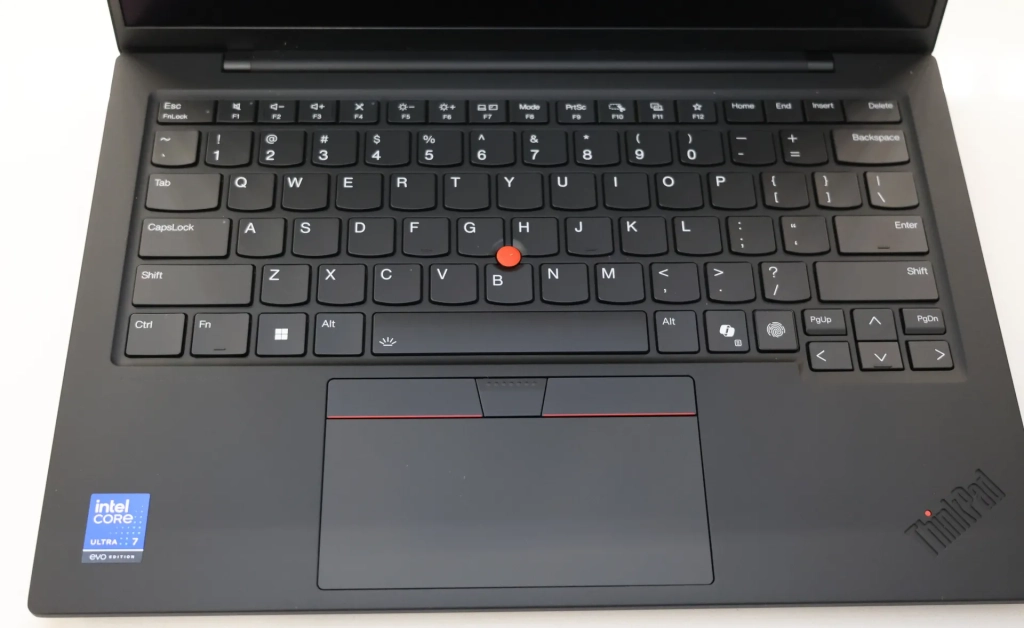
For ThinkPad enthusiasts and other trackpoint users, the disable-while-trackpointing feature has been particularly welcome. When using the classic red nub for precise cursor control, accidental touchpad interference can be maddening. Now, users can fine-tune exactly how long the touchpad remains disabled after trackpoint activity, creating a seamless experience that respects their workflow preferences.
Under the Hood: New APIs and Polish
Beyond these headline features, libinput 1.31 brings a suite of new APIs and refinements that developers will appreciate. While the technical details are best explored in the official release documentation, the improvements speak to Red Hat’s commitment to maintaining libinput as a robust, forward-looking foundation for Linux input handling.
The library’s role in the Linux ecosystem cannot be overstated. As the abstraction layer between hardware input devices and desktop environments, libinput ensures consistency across different hardware configurations and display server technologies. Whether you’re running a bleeding-edge Wayland compositor or a traditional X.Org setup, libinput provides the reliable input handling that makes modern Linux desktop experiences possible.
What This Means for the Linux Desktop
The release of libinput 1.31 represents more than just bug fixes and feature additions—it demonstrates the maturity and sophistication of the Linux input stack. Features that users of other operating systems have taken for granted for years are now available on Linux, implemented with the flexibility and configurability that Linux users expect.
For distribution maintainers, this update will likely filter through to users over the coming weeks as packages are updated and tested. Desktop environments will need to ensure their gesture handling integrates properly with the new fast swipe functionality, but the groundwork laid by Hutterer and the libinput team makes this a straightforward process.
The attention to detail—from the carefully tuned timing thresholds to the configurable timeouts—reflects a development philosophy that prioritizes user experience without sacrificing the technical excellence that has made libinput the de facto standard for Linux input handling.
Looking Forward
As Linux continues its steady march toward broader desktop adoption, the importance of polished, intuitive input handling cannot be overstated. Libinput 1.31 takes another step in that direction, proving that the Linux desktop can not only match but exceed the input capabilities of competing platforms when developers have the freedom to innovate and refine based on actual user needs.
Peter Hutterer’s work on libinput has been instrumental in elevating the Linux desktop experience, and this release continues that tradition of excellence. For users, it means fewer compromises and more fluid interaction with their systems. For developers, it provides a more capable foundation to build upon. And for the Linux ecosystem as a whole, it represents another piece of the puzzle falling into place as the platform becomes increasingly competitive in the desktop space.
The release of libinput 1.31 isn’t just a technical milestone—it’s a statement that the Linux desktop is maturing in all the right ways, with input handling that’s finally as sophisticated and user-friendly as the operating system’s renowned stability and security.
Tags & Viral Phrases: Linux desktop revolution, input handling breakthrough, three-finger swipe magic, touchpad configuration freedom, Red Hat innovation, Wayland compatibility, X.Org enhancement, Peter Hutterer genius, laptop user delight, gesture recognition perfected, Linux UX evolution, open source excellence, desktop environment harmony, multi-touch mastery, configurable timeout brilliance, trackpoint synergy, palm rejection perfected, Linux catching up, input library upgrade, developer API improvements, user experience focus, Linux desktop maturity, hardware abstraction layer, gesture timing precision, swipe vs drag solution, laptop productivity boost, Linux input stack, Wayland gesture support, X.Org gesture support, open source input handling, Linux desktop competitiveness, user-centric design, technical excellence, Linux ecosystem growth, desktop adoption catalyst, input device intelligence, Linux user empowerment, gesture configuration options, touchpad disable intelligence, three-finger gesture harmony, Linux innovation leadership, desktop interaction refinement, input handling sophistication, Linux desktop polish, user workflow optimization, gesture recognition accuracy, Linux input future, desktop environment integration, hardware compatibility expansion, Linux user satisfaction, input library reliability, desktop experience elevation, Linux platform maturity
,

Leave a Reply
Want to join the discussion?Feel free to contribute!