
Love to customize your Linux desktop? This lightweight distro is great fun for newbies and experts
BunsenLabs Carbon: The Underdog Linux Distro That Will Make You Rethink Your Desktop
In the ever-evolving world of Linux distributions, some fly under the radar despite offering incredible experiences. BunsenLabs Carbon is one of those hidden gems that’s about to change how you think about lightweight, customizable operating systems.
The Unexpected Contender
When I first booted BunsenLabs Carbon, I wasn’t expecting much. After all, how many Debian-based distros can truly stand out in 2025? Boy, was I wrong. This distribution surprised me with its minimalistic yet highly functional operating system that feels like a love child between Bodhi Linux and Ubuntu—but with its own unique personality.
What Makes Carbon Special?
BunsenLabs Carbon is built on Debian’s rock-solid foundation, ensuring stability and access to thousands of packages through standard repositories. But what truly sets it apart is the OpenBox window manager combined with a carefully curated selection of lightweight applications.
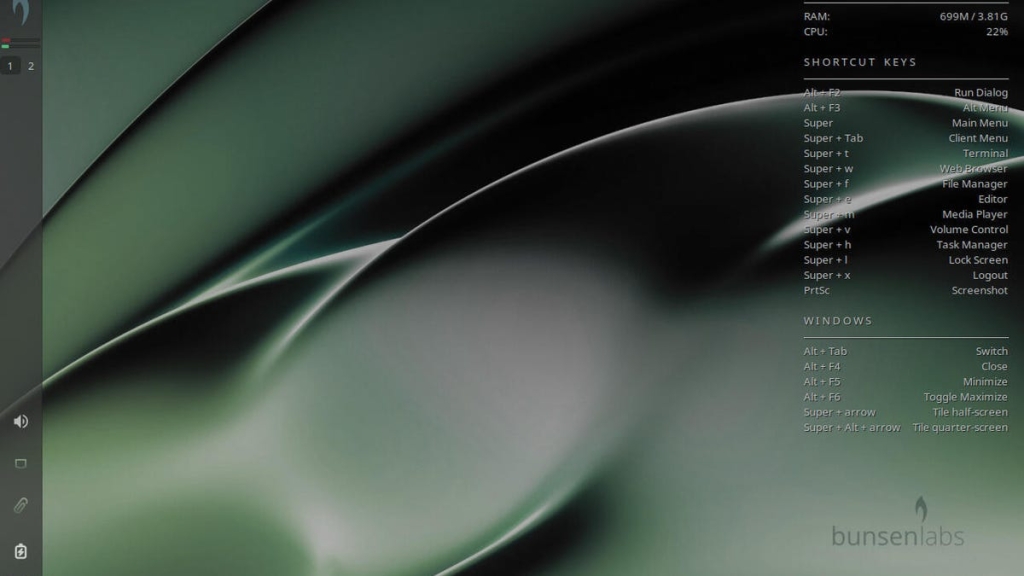
The vertical panel design immediately catches your eye, offering a desktop menu reminiscent of Ubuntu’s approach. Add in the distinctive green theme, right-click desktop functionality à la Bodhi Linux, and Conky for system monitoring, and you’ve got a desktop that’s both familiar and refreshingly different.
Customization: Where Carbon Truly Shines
Here’s where things get interesting. BunsenLabs Carbon isn’t just another pretty face—it’s a playground for customization enthusiasts. The nwg-look app gives you control over desktop appearance, but here’s the catch: changing the theme doesn’t automatically update everything.
Want to modify your panel? You’ll need the Xfce Panel Preferences app. Changed your desktop menu theme? You might need to navigate to User Settings > jgmenu > “Sync theme with OpenBox.” It sounds complicated, but once you understand the workflow, it becomes second nature.
The Flexibility Factor
Don’t like the default “Deskbar” position? No problem. You can easily move it to a traditional horizontal layout or even give it a floating appearance similar to KDE Plasma. This level of flexibility is rare in lightweight distributions and shows the developers’ commitment to user choice.
Out-of-the-Box Applications
BunsenLabs Carbon comes pre-loaded with a thoughtful selection of applications:
- Firefox ESR for web browsing
- LibreOffice for productivity
- VLC Media Player and BL Media Player for entertainment
- FileZilla for FTP transfers
- Transmission for torrenting
- X Web Browser as an alternative
- Plus numerous system tools and utilities
Who Should Use BunsenLabs Carbon?
While BunsenLabs aims to be friendly for all users, it’s particularly well-suited for those who love to customize their desktop experience. Whether you’re a Linux newbie or a seasoned veteran, if you enjoy tweaking settings and making your system truly yours, Carbon will keep you engaged for hours.
However, if you prefer a completely out-of-the-box experience without any configuration, you might not appreciate Carbon’s full potential. That said, even with default settings, it’s a simple, point-and-click affair that anyone can use.
The Debian Advantage
Being Debian-based means you get the best of both worlds: the amazing stability that comes with the “mother of all distributions” and access to a vast software repository. This combination makes Carbon not just lightweight and fast, but also incredibly practical for everyday use.
Getting Started
Ready to give BunsenLabs Carbon a try? Download the ISO image from the official website, burn it to a USB drive, and boot it up on a spare machine. When you boot the ISO image, remember to select the Installer option from the menu—it’s not as obvious as you might think.
The Verdict
BunsenLabs Carbon proves that you don’t need flashy graphics or cutting-edge features to create an exceptional Linux experience. It’s lightweight, highly customizable, and built on a foundation of reliability. For users who appreciate minimalism without sacrificing functionality, Carbon is a breath of fresh air in the crowded Linux landscape.
Whether you’re looking to revive an old machine or simply want a different desktop experience, BunsenLabs Carbon deserves your attention. It might just become your new favorite Linux distribution.
Tags: #Linux #BunsenLabs #Carbon #OpenBox #Debian #Lightweight #DesktopCustomization #LinuxDistro #TechNews #OperatingSystems
Viral Phrases: “The Underdog Distro That Surprised Everyone,” “Lightweight Powerhouse,” “Customization Paradise,” “Debian’s Best Kept Secret,” “The Desktop That Adapts to You,” “Minimalism Meets Functionality,” “Linux for Tweakers,” “Revive Your Old PC,” “The Perfect Balance,” “Hidden Gem Alert”
,


Leave a Reply
Want to join the discussion?Feel free to contribute!