
M5 MacBook Air vs. M4, M3, M2, M1: Should You Upgrade?
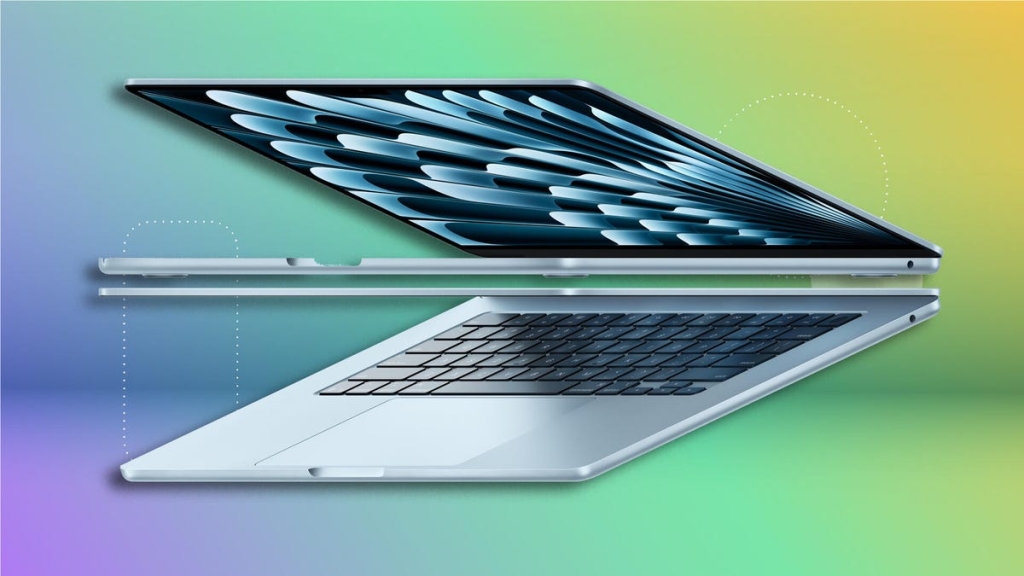
Is It Time to Upgrade Your MacBook? A Comprehensive Guide to the New M5 Models
Spring has officially arrived, and with it comes Apple’s annual MacBook refresh. The tech giant recently unveiled its latest lineup featuring the M5 processor across its MacBook Air, MacBook Pro, and the newly introduced MacBook Neo. If you’re sitting there wondering whether it’s finally time to ditch your current MacBook for one of these shiny new machines, you’re not alone.
We’ve put the new MacBook Neo, M5 MacBook Air, and MacBook Pro with M5 Pro and M5 Max chips through their paces to help you make an informed decision. Let’s dive into what’s new and whether you should pull the trigger on an upgrade.
What’s New with the M5 MacBook Air?
Apple’s M5 MacBook Air maintains the familiar design we’ve come to know, with the same color options and display sizes (13.6-inch and 15.3-inch). The magic happens inside, where Apple’s M5 processor brings significant improvements.
The M5 features 10 CPU cores (4 performance cores and 6 efficiency cores) and either 8 or 10 GPU cores. While the core count matches last year’s M4, the M5 introduces a revolutionary new GPU architecture with a neural accelerator on each core, dramatically boosting AI and ray-tracing performance.
Storage has also been upgraded across the board, with all M5 MacBook Air models now starting with 512GB SSD (up from 256GB). The pricing reflects this change: $1,099 for the 13-inch model and $1,299 for the 15-inch version—a $100 increase for each, but actually a better value considering the doubled storage.
Other improvements include faster unified memory (153GBps vs 120GBps on M4) and significantly improved SSD read/write speeds. The M5 Air also incorporates Apple’s N1 wireless chip for Wi-Fi 7 and Bluetooth 6 connectivity.
Should You Upgrade? It Depends on Your Current Model
The answer to whether you should upgrade varies dramatically based on which MacBook you currently own. Let’s break it down by generation:
M5 vs. M4: Evolutionary, Not Revolutionary
If you own an M4 MacBook Air, the M5 offers only incremental improvements. Our tests showed the M5 to be roughly 9-13% faster on Geekbench 6 and 12-18% faster on Cinebench 2024. Battery life remains excellent across both generations, with both easily lasting 15+ hours in our tests.
The only compelling reason to upgrade from M4 to M5 is if you want to switch from the 13-inch to the 15-inch model. If you’re happy with your current M4 Air’s size and performance, there’s no urgent need to upgrade.
M5 vs. M3: A Noticeable Gap
The performance difference between M3 and M5 is more substantial. The M5 was 33% faster on single-core Geekbench 6 and 40% faster on multi-core tests compared to the M3. On Cinebench 2024, the M5 showed 41% better single-core performance and an impressive 57-71% improvement in multi-core performance.
However, the M3 was Apple’s first 3nm chip, and the M5 uses the same manufacturing process. With Apple potentially moving to a new process with the M6 later this year, you might want to wait for even more dramatic improvements.
M5 vs. M2: Time to Consider an Upgrade
The M2 MacBook Air, released in 2022, was the last to use a 5nm process before Apple moved to 3nm. The performance gap between M2 and M5 is significant: 59% faster on single-core Geekbench 6 and 71% faster on multi-core tests.
If you bought the 13-inch M2 Air in 2022 and have been wanting a larger display, the M5 15-inch model is an excellent upgrade. However, if you purchased the 15-inch M2 Air in 2023, you might want to wait another year for potentially bigger design changes with the M6.
M5 vs. M1: An Easy Decision
If you’re still rocking an M1 MacBook Air from 2020, it’s definitely time for an upgrade. You can get better performance from even the budget-friendly MacBook Neo, and the M5 Air will feel dramatically faster. You’ll also enjoy a sleeker design, larger display options, and all the latest features.
Performance Comparison: How Do They Stack Up?
Our benchmark tests reveal the performance progression across MacBook Air generations:
Geekbench 6 Multi-Core Performance:
- M5 MacBook Air: 16,890
- M4 MacBook Air: 15,049
- M3 MacBook Air: 12,063
- M2 MacBook Air: 9,859
- M1 MacBook Air: 8,710
Cinebench 2024 Multi-Core Performance:
- M5 MacBook Air: 926
- M4 MacBook Air: 830
- M3 MacBook Air: 591
- M1 MacBook Air: 449
Battery Life (Online Streaming Test):
- M3 MacBook Air: 18 hours, 17 minutes
- M5 MacBook Air: 17 hours, 2 minutes
- M4 MacBook Air: 16 hours, 41 minutes
- M2 MacBook Air: 16 hours, 31 minutes
- M1 MacBook Air: 15 hours, 33 minutes
The Bottom Line
Don’t upgrade if you have an M4 or M3 MacBook Air unless you specifically want a larger display or are experiencing performance issues.
Probably upgrade if you have an M2 MacBook Air and want better performance or a larger display.
Definitely upgrade if you have an M1 MacBook Air or any Intel-based MacBook.
The M5 MacBook Air is an excellent machine, but for most current MacBook Air owners, it represents a refinement rather than a revolution. If your current MacBook is meeting your needs, there’s no need to rush into an upgrade. However, if you’re coming from an older model or specifically want the latest features and performance, the M5 Air is a worthy investment.
Tags: #MacBook #M5 #Apple #Upgrade #TechNews #Laptop #Performance #BatteryLife #AI #RayTracing #Wi-Fi7 #Bluetooth6
Viral Phrases:
“Spring MacBook refresh”
“evolutionary vs revolutionary upgrades”
“3nm process technology”
“AI and ray-tracing performance boost”
“512GB SSD minimum standard”
“Wi-Fi 7 and Bluetooth 6 connectivity”
“performance gap analysis”
“should I upgrade my MacBook”
“MacBook Air generations compared”
“tech upgrade season”
,

Leave a Reply
Want to join the discussion?Feel free to contribute!