
macOS 26.4 brings battery Charge Limit to the Mac and Shortcuts
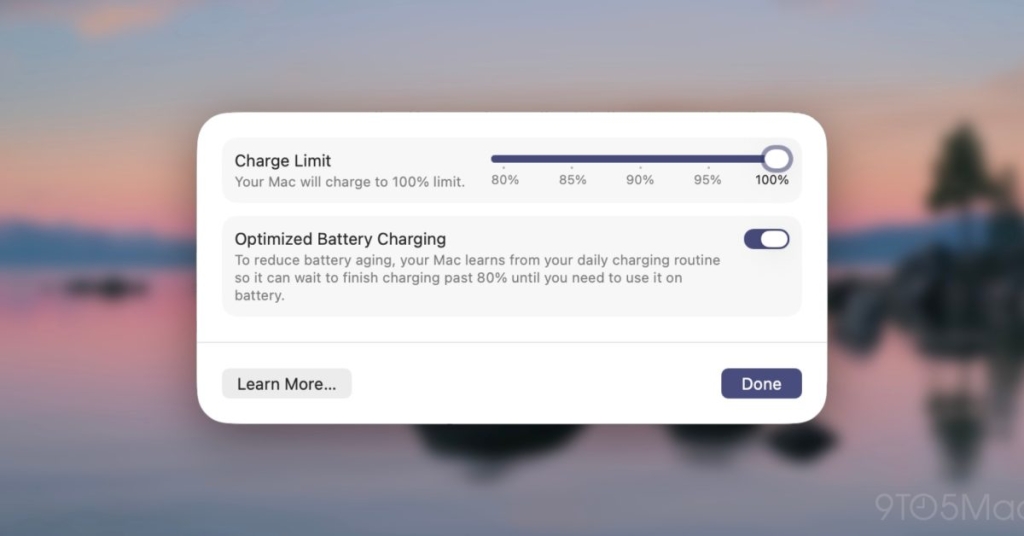
Apple Finally Brings Battery Charge Limit to Mac: Here’s What You Need to Know
In a move that’s got tech enthusiasts buzzing, Apple has finally extended its Battery Charge Limit feature to Mac computers with the release of macOS 26.4 beta. This highly anticipated addition, previously exclusive to iPhone and iPad, marks a significant step forward in Apple’s commitment to battery longevity and user customization.
The Evolution of Charge Limit
The Charge Limit feature first made its debut on iOS devices, allowing users to cap their battery charging at 80% to extend overall battery health. With iOS 18, Apple expanded this functionality, offering users the flexibility to set their charge limit anywhere between 80% and 100%. Now, Mac users can finally join in on the battery-saving action.
How It Works on Mac
Enabling Charge Limit on your Mac is a straightforward process. Simply navigate to Settings, select the Battery section, and click the “info” symbol next to “Charging.” From there, you’ll be able to set your desired charge limit within the 80-100% range.
It’s worth noting that when Charge Limit is active, your Mac will stop charging within a few percentage points of your set limit. This feature is designed to reduce the strain on your battery caused by constant charging to 100%, thereby extending its overall lifespan.
However, Apple has clarified that your device may occasionally still charge to full capacity. This is to “maintain accurate battery state-of-charge estimates,” ensuring that your battery percentage readings remain reliable over time.
The Power of Automation with Shortcuts
In an exciting development, Apple has also integrated Charge Limit functionality into the Shortcuts app with iOS 26.4 and macOS 26.4 betas. This means you can now automate the process of setting your Charge Limit, opening up a world of possibilities for power users and those who love to tinker with their device settings.
Imagine setting up a Shortcut that automatically adjusts your Charge Limit based on your calendar events or location. Heading to the office for a long day? Your Mac could automatically set the limit to 100%. Staying home for the weekend? It could drop down to 80% to maximize battery health during periods of lighter use.
Why This Matters
The introduction of Charge Limit to Mac is more than just a nice-to-have feature. It represents Apple’s ongoing commitment to addressing one of the most significant pain points for mobile device users: battery degradation.
For MacBook users, this feature is particularly valuable. Many of us use our MacBooks primarily at desk setups where power is readily available. By capping the charge at 80%, we can significantly extend the overall lifespan of our batteries, potentially saving money on costly replacements and reducing electronic waste.
Moreover, as our devices become increasingly integral to our daily lives and work, maximizing their longevity is more important than ever. This feature gives users more control over their device’s health, potentially extending the useful life of their MacBooks by months or even years.
The Bigger Picture
Apple’s decision to bring Charge Limit to Mac also aligns with broader industry trends towards more sustainable and user-centric technology. As consumers become more environmentally conscious and cost-aware, features that extend device lifespan are likely to become increasingly important selling points.
Furthermore, this move demonstrates Apple’s willingness to iterate on and expand features across its ecosystem. By bringing a popular iOS feature to macOS, Apple is creating a more cohesive user experience across its devices.
Looking Ahead
As with any beta feature, it’s important to approach Charge Limit on Mac with cautious optimism. While the initial reports are promising, real-world usage will ultimately determine its effectiveness and reliability.
That said, the tech community is already abuzz with speculation about potential future developments. Could we see even more granular control over charging in future updates? Might Apple introduce machine learning algorithms to automatically optimize Charge Limit based on usage patterns?
Only time will tell, but one thing is certain: Apple’s expansion of the Charge Limit feature to Mac is a significant step forward in battery management technology, and it’s got the tech world excited about what’s next.
Your Turn
Are you excited about the new Charge Limit feature on Mac? Do you think you’ll use it regularly? Share your thoughts in the comments below – we’d love to hear your perspective on this game-changing addition to macOS.
Tags: #Apple #Mac #BatteryHealth #macOS264 #TechNews #BatteryLife #ChargeLimit #iOS264 #Shortcuts #Sustainability #TechInnovation #AppleEcosystem #DeviceLongevity #BatteryManagement #BetaSoftware
ViralPhrases: “Game-changing battery feature”, “Apple listens to users”, “MacBook battery just got smarter”, “The future of device longevity”, “Tech enthusiasts rejoice”, “Apple ecosystem gets even better”, “Sustainable tech for the win”, “Battery life revolution”, “Charge smarter, not harder”, “The feature Mac users have been waiting for”
,


Leave a Reply
Want to join the discussion?Feel free to contribute!