
Malicious npm Package Posing as OpenClaw Installer Deploys RAT, Steals macOS Credentials
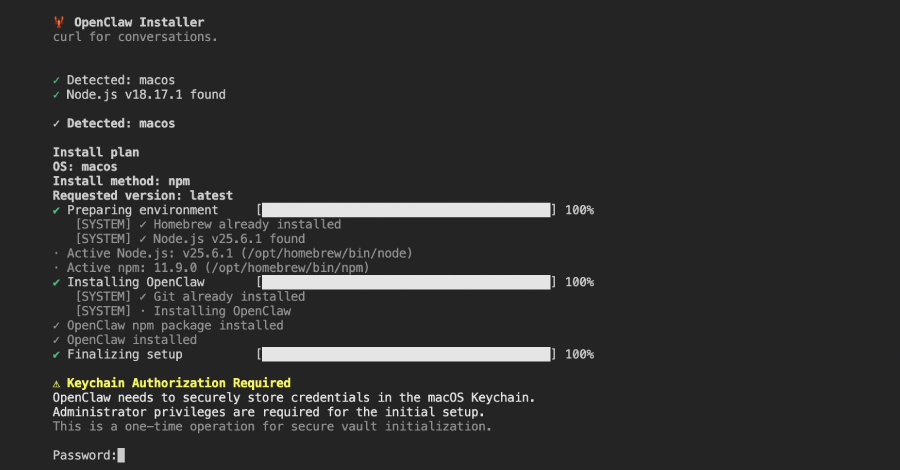
Cybersecurity researchers have uncovered a dangerous npm package that masquerades as an OpenClaw installer but is actually a sophisticated remote access trojan (RAT) designed to steal sensitive data from compromised systems. The malicious package, named “@openclaw-ai/openclawai,” was uploaded to the npm registry on March 3, 2026, by a user named “openclaw-ai” and has been downloaded 178 times to date. Despite its malicious nature, the package remains available for download as of writing.
JFrog, the cybersecurity firm that discovered the package, revealed that it is designed to steal system credentials, browser data, cryptocurrency wallets, SSH keys, Apple Keychain databases, and iMessage history. Additionally, it installs a persistent RAT with remote access capabilities, SOCKS5 proxy, and live browser session cloning. “The attack is notable for its broad data collection, its use of social engineering to harvest the victim’s system password, and the sophistication of its persistence and C2 [command-and-control] infrastructure,” said Meitar Palas, a security researcher at JFrog. “Internally, the malware identifies itself as GhostLoader.”
The malicious logic is triggered by a postinstall hook, which re-installs the package globally using the command: “npm i -g @openclaw-ai/openclawai.” Once the installation is complete, the OpenClaw binary points to “scripts/setup.js” through the “bin” property in the “package.json” file. This field is used to define executable files that should be added to the user’s PATH during package installation, effectively turning the package into a globally accessible command-line tool.
The “setup.js” file serves as the first-stage dropper. Upon execution, it displays a convincing fake command-line interface with animated progress bars, giving the impression that OpenClaw is being installed on the host. After the purported installation step is complete, the script shows a bogus iCloud Keychain authorization prompt, asking users to enter their system password. Simultaneously, the script retrieves an encrypted second-stage JavaScript payload from the C2 server (“trackpipe[.]dev”), which is then decoded, written to a temporary file, and spawned as a detached child process to continue running in the background. The temp file is deleted after 60 seconds to cover up traces of the activity.
“If the Safari directory is inaccessible (no Full Disk Access), the script displays an AppleScript dialog urging the user to grant FDA to Terminal, complete with step-by-step instructions and a button that opens System Preferences directly,” JFrog explained. “This enables the second-stage payload to steal Apple Notes, iMessage, Safari history, and Mail data.”
The JavaScript second-stage, featuring about 11,700 lines, is a full-fledged information stealer and RAT framework capable of persistence, data collection, browser decryption, C2 communication, a SOCKS5 proxy, and live browser cloning. It is also equipped to steal a wide range of data, including:
- macOS Keychain, including both the local login.keychain-db and all iCloud Keychain databases
- Credentials, cookies, credit cards, and autofill data from all Chromium-based browsers, such as Google Chrome, Microsoft Edge, Brave, Vivaldi, Opera, Yandex, and Comet
- Data from desktop wallet applications and browser extensions
- Cryptocurrency wallet seed phrases
- SSH keys
- Developer and cloud credentials for AWS, Microsoft Azure, Google Cloud, Kubernetes, Docker, and GitHub
- Artificial intelligence (AI) agent configurations
- Data protected by the FDA, including Apple Notes, iMessage history, Safari browsing history, Mail account configurations, and Apple account information
In the final stage, the collected data is compressed into a tar.gz archive and exfiltrated through multiple channels, including directly to the C2 server, Telegram Bot API, and GoFile.io. The malware also enters a persistent daemon mode that allows it to monitor clipboard content every three seconds and transmit any data that matches one of the nine pre-defined patterns corresponding to private keys, WIF key, SOL private key, RSA private key, BTC address, Ethereum address, AWS key, OpenAI key, and Strike key.
Other features include keeping tabs on running processes, scanning incoming iMessage chats in real-time, and executing commands sent from the C2 server to run arbitrary shell commands, open a URL on the victim’s default browser, download additional payloads, upload files, start/stop a SOCKS5 proxy, list available browsers, clone a browser profile and launch it in headless mode, stop the browser clone, self-destruct, and update itself.
The browser cloning function is particularly dangerous as it launches a headless Chromium instance with the existing browser profile that contains cookies, login, and history data. This gives the attacker a fully authenticated browser session without the need for accessing credentials.
“The @openclaw-ai/openclawai package combines social engineering, encrypted payload delivery, broad data collection, and a persistent RAT into a single npm package,” JFrog said. “The polished fake CLI installer and Keychain prompt are convincing enough to extract system passwords from cautious developers, and once captured, those credentials unlock macOS Keychain decryption and browser credential extraction that would otherwise be blocked by OS-level protections.”
Tags: npm package, OpenClaw, malware, remote access trojan, RAT, cybersecurity, data theft, JFrog, GhostLoader, command-and-control, C2, social engineering, browser cloning, SOCKS5 proxy, cryptocurrency wallets, SSH keys, Apple Keychain, iMessage, macOS, Chromium browsers, AWS, Microsoft Azure, Google Cloud, Kubernetes, Docker, GitHub, AI agent configurations, Full Disk Access, clipboard monitoring, browser session, headless mode, self-destruct, update.
Viral Sentences:
- “This malicious npm package is a ticking time bomb for developers!”
- “Hackers are using fake installers to steal your most sensitive data!”
- “Your browser history, passwords, and crypto wallets are at risk!”
- “This RAT can clone your browser and steal your identity!”
- “Don’t fall for the fake iCloud Keychain prompt—it’s a trap!”
- “The malware is still available for download—act now to protect yourself!”
- “This is the most sophisticated npm attack we’ve seen this year!”
- “Your system password is the key to unlocking this malware’s full potential!”
- “Hackers are targeting developers with this fake OpenClaw installer!”
- “This RAT can monitor your clipboard and steal your crypto keys in seconds!”
,
Leave a Reply
Want to join the discussion?Feel free to contribute!