
My 6 favorite DNS services – and why they’re a must for security
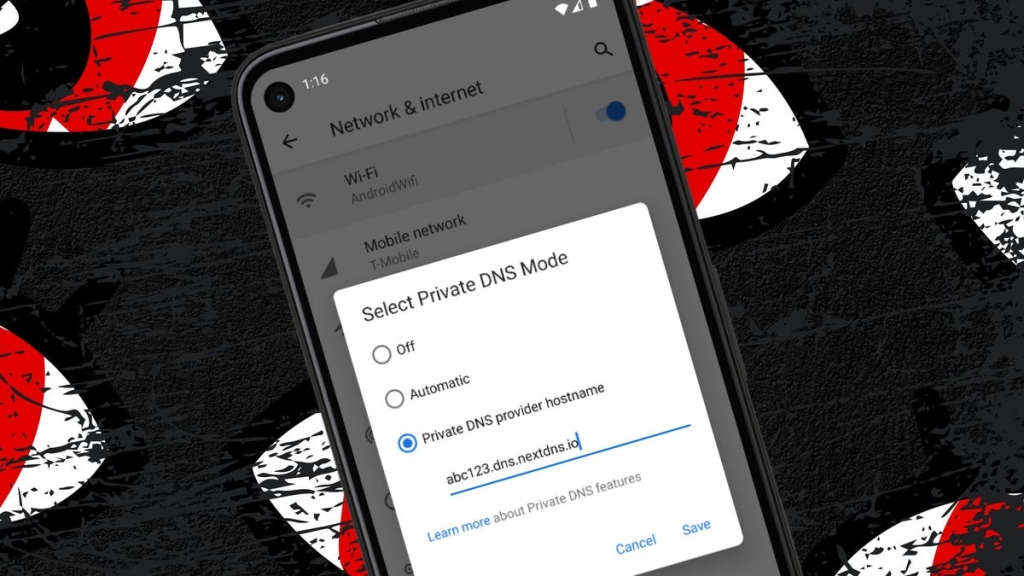
Top 6 Secure DNS Services to Protect Your Privacy in 2025
In today’s digital landscape, securing your online presence goes far beyond installing antivirus software. One critical yet often overlooked component of your digital security stack is DNS—the Domain Name System that translates human-readable website names into machine-readable IP addresses. Without secure DNS, your internet traffic remains vulnerable to snooping, tampering, and tracking by ISPs, hackers, and other malicious actors.
Here are the six best secure DNS services that will encrypt your internet traffic and keep your browsing private.
1. Google Public DNS
It’s no surprise that Google offers a robust secure DNS solution. Google Public DNS has been a reliable choice for years, featuring automatic mode integration in Chrome, DNSSEC validation for authenticity, TLS 1.3 support, cache poisoning protection through query name case randomization, and performance optimization.
Google’s DNS prevents tampering, eavesdropping, and spoofing while maintaining a strict privacy policy that ensures no data is logged. Your encrypted traffic remains private, and you don’t have to worry about Google retaining your browsing information.
IP addresses: 8.8.8.8 and 8.8.4.4
Cost: Free
Best for: Users who want a proven, reliable service with excellent performance
2. Cloudflare DNS
Cloudflare stands out with its DNS over HTTPS (DoH) and DNS over TLS (DoT) encryption protocols that secure all your queries. The service boasts a 310+ city Anycast network with guaranteed 100% uptime, built-in DDoS mitigation, DNSSEC security, and CNAME flattening for apex domain optimization.
Cloudflare’s privacy promise is particularly strong—they don’t log your IP addresses and delete all associated logs within 24 hours.
IP addresses: 1.1.1.1 and 1.0.0.1
Mobile: Requires the 1.1.1.1 + Warp app (Android/iOS)
Cost: Free
Best for: Privacy-conscious users who want fast, secure DNS with a strong privacy commitment
3. Quad9
Quad9 takes security a step further by blocking lookups of malicious hostnames using an up-to-the-minute threat intelligence list. This service is 97% effective against malicious and phishing domains, protecting your devices from malware, phishing, spyware, and botnets.
Run by a Swiss company, Quad9 operates in over 200 locations across 90+ nations and offers DNSSEC validation, real-time intelligence, and no personal data logging or user profiling.
IP addresses:
- 9.9.9.9 – Secure service with malware and phishing blocking
- 9.9.9.10 – Unsecure service for testing and debugging
- 9.9.9.11 – Secure + ECS with EDNS Client Subnet support
Cost: Free
Best for: Users who want maximum protection against malicious websites and phishing attempts
4. OpenDNS
OpenDNS protects virtually any device connected to your network—from PCs and laptops to phones, tablets, and even smart TVs. The service includes built-in protection against malicious phishing, parental controls, customizable content filtering, ad blocking, and tracking protection.
OpenDNS is particularly user-friendly and offers comprehensive network-wide protection with minimal setup required.
IP addresses: 208.67.222.222 and 208.67.220.220
Cost: Free
Best for: Families and users who want content filtering and parental controls along with security
5. NextDNS
NextDNS provides a comprehensive secure DNS solution with content filtering, ad blocking, wide-spectrum tracker blocking, user-configurable log retention (including a no-logs option), native support for all platforms, unlimited configurations, custom deny and allow lists, a customizable block page, rewrites, DNSSEC, and peer-to-peer naming sessions.
The free tier offers 300,000 queries per month, unlimited devices, and access to all features, making it an excellent choice for most users.
IP addresses: 45.90.28.232 and 45.90.30.232
Cost: Free (300K queries/month) or paid plans starting at $19/year for 10M requests
Best for: Power users who want granular control over filtering and extensive customization options
6. AdGuard DNS
AdGuard DNS uses an app-based approach to configure your device to its secure DNS servers, eliminating the need to remember IP addresses. The service includes extensive security features like blocking and tracking protection, user-customizable log retention (even a no-logs option), and anonymized logging for filtering based on user preferences.
The Starter plan is free and includes 300,000 DNS requests and 20 devices, with paid options available for heavier usage.
IP addresses: 94.140.14.14 and 94.140.15.15
Cost: Free (Starter plan) or $19/year for premium features
Best for: Users who want an easy app-based setup with strong ad-blocking capabilities
Why Secure DNS Matters More Than Ever
In an era where data privacy is constantly under threat, secure DNS has become a fundamental component of online security. Without it, your ISP can monitor your browsing habits, advertisers can track your online activity, and malicious actors can intercept your internet traffic.
The services listed above provide varying levels of protection, from basic encryption to comprehensive threat blocking and content filtering. Most offer free tiers that are more than sufficient for average users, while paid options provide additional features for power users and businesses.
Making the switch to secure DNS is one of the simplest yet most effective steps you can take to protect your online privacy and security. Whether you choose Google’s reliable performance, Cloudflare’s privacy commitment, Quad9’s threat protection, OpenDNS’s family-friendly features, NextDNS’s customization, or AdGuard’s ad-blocking prowess, you’ll be taking a significant step toward a more secure digital life.
Tags: secure DNS, DNS security, online privacy, internet security, DNS encryption, Cloudflare DNS, Google Public DNS, Quad9, OpenDNS, NextDNS, AdGuard DNS, protect your privacy, cybersecurity, data protection, encrypted DNS, DNS over HTTPS, DNS over TLS, threat protection, ad blocking, content filtering, parental controls
Viral phrases: “Your ISP is watching you—here’s how to stop it,” “The free security upgrade everyone needs,” “97% effective against phishing—this DNS service is a game-changer,” “Stop advertisers from tracking your every move,” “The one security setting you’re probably not using,” “Protect your entire network with this simple change,” “Free privacy protection that takes 2 minutes to set up,” “The Swiss company that’s making the internet safer,” “Block malicious websites before they load,” “Take back control of your online privacy today”
Viral sentences: “Most people think antivirus is enough—they’re dangerously wrong,” “This free service blocks 97% of malicious websites automatically,” “Your ISP can see everything you do online—unless you use this,” “The easiest security upgrade you can make right now,” “Stop being tracked by advertisers with this one simple change,” “Why your current DNS setup is putting you at risk,” “The hidden security feature built into your phone that you’re not using,” “Protect your kids online with these DNS settings,” “This DNS service is so fast, you won’t even notice it’s working,” “The privacy tool that even tech experts use”
Viral questions: “Is your ISP spying on your internet traffic?” “Could your DNS be putting your security at risk?” “Are you really as private online as you think?” “What if you could block malicious websites automatically?” “Why are most people still using insecure DNS?” “Could this free tool be the key to better online privacy?” “What’s the one security setting everyone should change?” “Are you being tracked online without even knowing it?” “How can you protect your entire network with one simple change?” “What do tech experts use for secure DNS?”
,

Leave a Reply
Want to join the discussion?Feel free to contribute!